


Introduction
Games: we all love them, and we all hate them sometimes. Today, I will show you how easy it is to make a Reversi game in Visual Basic.
Reversi
Reversi is a strategy game usually played on an 8 x 8 checkered board. The game pieces are sixty-four identical disks, which are light on one side and dark on the other. Players take turns placing disks on the board with their assigned color facing up.
Reversi’s object is to have the most disks turned to display your color when the last playable empty square is filled. Go to Wikipedia for more information about Reversi.
Our Project
Create a new Visual Basic Windows Forms project. Add some pictures as Resources: one for the game board, one for the dark disk, and one for the light disk, as shown in Figure 1. Okay, I do not have much imagination.…
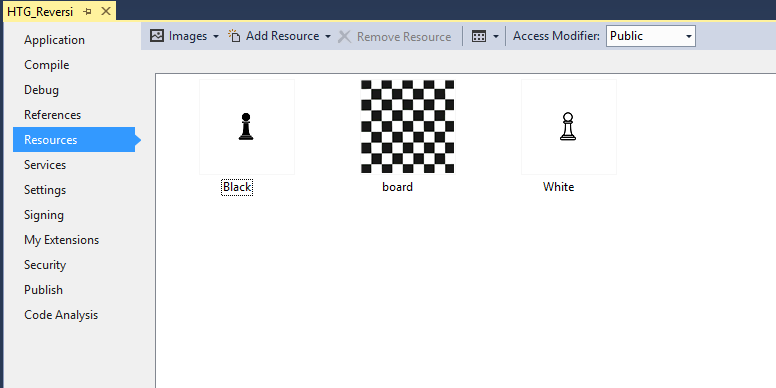
Figure 1: Our design
Add a class that will be used as the game’s engine that will provide all the capabilities to play the game. You can name the class anything you like, but keep in mind that I may have named mine differently.
Add the necessary Namespaces:
Imports System.Net
Imports System.Math
Add the following member variables:
   Private arrGameMoves(sBoardMoves, sBoardMoves) _
      As MoveType
   Private bmpBoard As Bitmap
   Private grpBoard As Graphics
   Private Const sBoardMoves As Short = 11
   Public Const sGameSize As Short = 32
   Public Const sMargin As Short = 3
   Private sFreeSpace As Short
   Private blnTurn As Boolean = False
   Private blnPlay As Boolean = False
   Private chrSeparator As Char = (",")
   Private sWhite As Short
   Private sBlack As Short
These objects will control the game’s progress as well as where each associated piece is. Add the following Enum to keep track of what move has taken place:
   Public Enum MoveType As Short
      Know = 0
      White = 1
      Black = 2
      Player = 3
      Opponent = 4
      Both = 5
   End Enum
   Public Event UpdateBoard(ByVal bmp As Bitmap)
Add the following Properties:
   Public ReadOnly Property Pieces()
      Get
         Return sFreeSpace
      End Get
   End Property
   Public ReadOnly Property MovesTotal()
      Get
         Return ((sBoardMoves + 1) ^ 2)
      End Get
   End Property
   Public ReadOnly Property GameMoves()
      Get
         Return (sBoardMoves + 1)
      End Get
   End Property
   Public ReadOnly Property Turn() As Boolean
      Get
         Return blnTurn
      End Get
   End Property
   Public ReadOnly Property Playable() As Boolean
      Get
         Return blnPlay
      End Get
   End Property
   Public ReadOnly Property sPlayerPawn() As Short
      Get
         Return sWhite
      End Get
   End Property
   Public ReadOnly Property sOpponentPawn()
      Get
         Return sBlack
      End Get
   End Property
Initialize the game and set everything up:
   Public Sub Initialize()
      Randomize()
      sFreeSpace = (sBoardMoves + 1) * _
         (sBoardMoves + 1)
      bmpBoard = Nothing
      grpBoard = Nothing
      bmpBoard = New Bitmap(My.Resources.Board)
      grpBoard = Graphics.FromImage(bmpBoard)
      sWhite = 0
      sBlack = 0
      For x As Integer = 0 To sBoardMoves
         For y As Integer = 0 To sBoardMoves
            arrGameMoves(x, y) = MoveType.Know
         Next y
      Next x
      arrGameMoves(Floor(sBoardMoves / 2), _
         Floor(sBoardMoves / 2)) = MoveType.White
      arrGameMoves(Ceiling(sBoardMoves / 2), _
         Ceiling(sBoardMoves / 2)) = MoveType.White
      arrGameMoves(Floor(sBoardMoves / 2), _
         Ceiling(sBoardMoves / 2)) = MoveType.Black
      arrGameMoves(Ceiling(sBoardMoves / 2), _
         Floor(sBoardMoves / 2)) = MoveType.Black
      AvailableMoves(True)
   End Sub
This sub re-creates the drawing board as well as position all pieces where they need to be. Add the AvailableMoves sub that gets referenced inside the Initialize sub:
Private Sub AvailableMoves(Optional blnFirtsRun As Boolean = False)
If (Playable Or blnFirtsRun) = True Then
Dim sX As Short, sY As Short
For i As Integer = 0 To sBoardMoves
For j As Integer = 0 To sBoardMoves
If arrGameMoves(i, j) = MoveType.Opponent Or
arrGameMoves(i, j) = MoveType.Both Or
arrGameMoves(i, j) = MoveType.Player Then
arrGameMoves(i, j) = MoveType.Know
End If
Next
Next
sX = -1
sY = -1
For x As Integer = 0 To sBoardMoves
For y As Integer = 0 To sBoardMoves
If x < sBoardMoves Then
If arrGameMoves(x + 1, y) = MoveType.Black And
arrGameMoves(x, y) = MoveType.White Then
sX = x + 1
While arrGameMoves(sX, y) = MoveType.Black
If (sX + 1) <= sBoardMoves Then
sX += 1
Else
Exit While
End If
End While
If arrGameMoves(sX, y) = MoveType.White Or
arrGameMoves(sX, y) = MoveType.Black Then
sX = -1
Else
If arrGameMoves(sX, y) = MoveType.Opponent Or
arrGameMoves(sX, y) = MoveType.Both Then
arrGameMoves(sX, y) = MoveType.Both
Else
arrGameMoves(sX, y) = MoveType.Player
End If
End If
ElseIf arrGameMoves(x + 1, y) = MoveType.White And
arrGameMoves(x, y) = MoveType.Black Then
sX = x + 1
While arrGameMoves(sX, y) = MoveType.White
If (sX + 1) <= sBoardMoves Then
sX += 1
Else
Exit While
End If
End While
If arrGameMoves(sX, y) = MoveType.White Or
arrGameMoves(sX, y) = MoveType.Black Then
sX = -1
Else
If arrGameMoves(sX, y) = MoveType.Player Or
arrGameMoves(sX, y) = MoveType.Both Then
arrGameMoves(sX, y) = MoveType.Both
Else
arrGameMoves(sX, y) = MoveType.Opponent
End If
End If
End If
End If
If y < sBoardMoves Then
If arrGameMoves(x, y + 1) = MoveType.Black And
arrGameMoves(x, y) = MoveType.White Then
sY = y + 1
While arrGameMoves(x, sY) = MoveType.Black
If (sY + 1) <= sBoardMoves Then
sY += 1
Else
Exit While
End If
End While
If arrGameMoves(x, sY) = MoveType.White Or
arrGameMoves(x, sY) = MoveType.Black Then
sY = -1
Else
If arrGameMoves(x, sY) = MoveType.Opponent Or
arrGameMoves(x, sY) = MoveType.Both Then
arrGameMoves(x, sY) = MoveType.Both
Else
arrGameMoves(x, sY) = MoveType.Player
End If
End If
ElseIf arrGameMoves(x, y + 1) = MoveType.White And
arrGameMoves(x, y) = MoveType.Black Then
sY = y + 1
While arrGameMoves(x, sY) = MoveType.White
If (sY + 1) <= sBoardMoves Then
sY += 1
Else
Exit While
End If
End While
If arrGameMoves(x, sY) = MoveType.White Or
arrGameMoves(x, sY) = MoveType.Black Then
sY = -1
Else
If arrGameMoves(x, sY) = MoveType.Player Or
arrGameMoves(x, sY) = MoveType.Both Then
arrGameMoves(x, sY) = MoveType.Both
Else
arrGameMoves(x, sY) = MoveType.Opponent
End If
End If
End If
End If
If (x < sBoardMoves) And (y < sBoardMoves) Then
If arrGameMoves(x + 1, y + 1) = MoveType.Black And
arrGameMoves(x, y) = MoveType.White Then
sX = x + 1
sY = y + 1
While arrGameMoves(sX, sY) = MoveType.Black
If (sY + 1) <= sBoardMoves And
(sX + 1) <= sBoardMoves Then
sY += 1
sX += 1
Else
Exit While
End If
End While
If arrGameMoves(sX, sY) = MoveType.White Or
arrGameMoves(sX, sY) = MoveType.Black Then
sY = -1
sX = -1
Else
If arrGameMoves(sX, sY) = MoveType.Opponent Or
arrGameMoves(sX, sY) = MoveType.Both Then
arrGameMoves(sX, sY) = MoveType.Both
Else
arrGameMoves(sX, sY) = MoveType.Player
End If
End If
ElseIf arrGameMoves(x + 1, y + 1) = MoveType.White And
arrGameMoves(x, y) = MoveType.Black Then
sX = x + 1
sY = y + 1
While arrGameMoves(sX, sY) = MoveType.White
If (sY + 1) <= sBoardMoves And (sX + 1) _
<= sBoardMoves Then
sY += 1
sX += 1
Else
Exit While
End If
End While
If arrGameMoves(sX, sY) = MoveType.White Or
arrGameMoves(sX, sY) = MoveType.Black Then
sY = -1
sX = -1
Else
If arrGameMoves(sX, sY) = MoveType.Player Or
arrGameMoves(sX, sY) = MoveType.Both Then
arrGameMoves(sX, sY) = MoveType.Both
Else
arrGameMoves(sX, sY) = MoveType.Opponent
End If
End If
End If
End If
If x > 0 Then
If arrGameMoves(x - 1, y) = MoveType.Black And
arrGameMoves(x, y) = MoveType.White Then
sX = x - 1
While arrGameMoves(sX, y) = MoveType.Black
If (sX - 1) >= 0 Then
sX -= 1
Else
Exit While
End If
End While
If arrGameMoves(sX, y) = MoveType.White Or
arrGameMoves(sX, y) = MoveType.Black Then
sX = -1
Else
If arrGameMoves(sX, y) = MoveType.Opponent Or
arrGameMoves(sX, y) = MoveType.Both Then
arrGameMoves(sX, y) = MoveType.Both
Else
arrGameMoves(sX, y) = MoveType.Player
End If
End If
ElseIf arrGameMoves(x - 1, y) = MoveType.White And
arrGameMoves(x, y) = MoveType.Black Then
sX = x - 1
While arrGameMoves(sX, y) = MoveType.White
If (sX - 1) >= 0 Then
sX -= 1
Else
Exit While
End If
End While
If arrGameMoves(sX, y) = MoveType.White Or
arrGameMoves(sX, y) = MoveType.Black Then
sX = -1
Else
If arrGameMoves(sX, y) = MoveType.Player Or
arrGameMoves(sX, y) = MoveType.Both Then
arrGameMoves(sX, y) = MoveType.Both
Else
arrGameMoves(sX, y) = MoveType.Opponent
End If
End If
End If
End If
If y > 0 Then
If arrGameMoves(x, y - 1) = MoveType.Black And
arrGameMoves(x, y) = MoveType.White Then
sY = y - 1
While arrGameMoves(x, sY) = MoveType.Black
If (sY - 1) >= 0 Then
sY -= 1
Else
Exit While
End If
End While
If arrGameMoves(x, sY) = MoveType.White Or
arrGameMoves(x, sY) = MoveType.Black Then
sY = -1
Else
If arrGameMoves(x, sY) = MoveType.Opponent Or
arrGameMoves(x, sY) = MoveType.Both Then
arrGameMoves(x, sY) = MoveType.Both
Else
arrGameMoves(x, sY) = MoveType.Player
End If
End If
ElseIf arrGameMoves(x, y - 1) = MoveType.White And
arrGameMoves(x, y) = MoveType.Black Then
sY = y - 1
While arrGameMoves(x, sY) = MoveType.White
If (sY - 1) >= 0 Then
sY -= 1
Else
Exit While
End If
End While
If arrGameMoves(x, sY) = MoveType.White Or
arrGameMoves(x, sY) = MoveType.Black Then
sY = -1
Else
If arrGameMoves(x, sY) = MoveType.Player Or
arrGameMoves(x, sY) = MoveType.Both Then
arrGameMoves(x, sY) = MoveType.Both
Else
arrGameMoves(x, sY) = MoveType.Opponent
End If
End If
End If
End If
If (x > 0) And (y > 0) Then
If arrGameMoves(x - 1, y - 1) = MoveType.Black And
arrGameMoves(x, y) = MoveType.White Then
sX = x - 1
sY = y - 1
While arrGameMoves(sX, sY) = MoveType.Black
If (sY - 1) >= 0 And (sX - 1) >= 0 Then
sY -= 1
sX -= 1
Else
Exit While
End If
End While
If arrGameMoves(sX, sY) = MoveType.White Or
arrGameMoves(sX, sY) = MoveType.Black Then
sY = -1
sX = -1
Else
If arrGameMoves(sX, sY) = MoveType.Opponent Or
arrGameMoves(sX, sY) = MoveType.Both Then
arrGameMoves(sX, sY) = MoveType.Both
Else
arrGameMoves(sX, sY) = MoveType.Player
End If
End If
ElseIf arrGameMoves(x - 1, y - 1) = MoveType.White And
arrGameMoves(x, y) = MoveType.Black Then
sX = x - 1
sY = y - 1
While arrGameMoves(sX, sY) = MoveType.White
If (sY - 1) >= 0 And (sX - 1) >= 0 Then
sY -= 1
sX -= 1
Else
Exit While
End If
End While
If arrGameMoves(sX, sY) = MoveType.White Or
arrGameMoves(sX, sY) = MoveType.Black Then
sY = -1
sX = -1
Else
If arrGameMoves(sX, sY) = MoveType.Player Or
arrGameMoves(sX, sY) = MoveType.Both Then
arrGameMoves(sX, sY) = MoveType.Both
Else
arrGameMoves(sX, sY) = MoveType.Opponent
End If
End If
End If
End If
If (x < sBoardMoves) And (y > 0) Then
If arrGameMoves(x + 1, y - 1) = MoveType.Black And
arrGameMoves(x, y) = MoveType.White Then
sX = x + 1
sY = y - 1
While arrGameMoves(sX, sY) = MoveType.Black
If (sY - 1) >= 0 And (sX + 1) <= sBoardMoves Then
sX += 1
sY -= 1
Else
Exit While
End If
End While
If arrGameMoves(sX, sY) = MoveType.White Or
arrGameMoves(sX, sY) = MoveType.Black Then
sY = -1
sX = -1
Else
If arrGameMoves(sX, sY) = MoveType.Opponent Or _
arrGameMoves(sX, sY) = MoveType.Both Then
arrGameMoves(sX, sY) = MoveType.Both
Else
arrGameMoves(sX, sY) = MoveType.Player
End If
End If
ElseIf arrGameMoves(x + 1, y - 1) = MoveType.White And
arrGameMoves(x, y) = MoveType.Black Then
sX = x + 1
sY = y - 1
While arrGameMoves(sX, sY) = MoveType.White
If (sY - 1) >= 0 And (sX + 1) <= sBoardMoves Then
sX += 1
sY -= 1
Else
Exit While
End If
End While
If arrGameMoves(sX, sY) = MoveType.White Or
arrGameMoves(sX, sY) = MoveType.Black Then
sY = -1
sX = -1
Else
If arrGameMoves(sX, sY) = MoveType.Player Or
arrGameMoves(sX, sY) = MoveType.Both Then
arrGameMoves(sX, sY) = MoveType.Both
Else
arrGameMoves(sX, sY) = MoveType.Opponent
End If
End If
End If
End If
If (x > 0) And (y < sBoardMoves) Then
If arrGameMoves(x - 1, y + 1) = MoveType.Black And
arrGameMoves(x, y) = MoveType.White Then
sX = x - 1
sY = y + 1
While arrGameMoves(sX, sY) = MoveType.Black
If (sY + 1) <= sBoardMoves And (sX - 1) >= 0 Then
sX -= 1
sY += 1
Else
Exit While
End If
End While
If arrGameMoves(sX, sY) = MoveType.White Or
arrGameMoves(sX, sY) = MoveType.Black Then
sY = -1
sX = -1
Else
If arrGameMoves(sX, sY) = MoveType.Opponent Or
arrGameMoves(sX, sY) = MoveType.Both Then
arrGameMoves(sX, sY) = MoveType.Both
Else
arrGameMoves(sX, sY) = MoveType.Player
End If
End If
ElseIf arrGameMoves(x - 1, y + 1) = MoveType.White And
arrGameMoves(x, y) = MoveType.Black Then
sX = x - 1
sY = y + 1
While arrGameMoves(sX, sY) = MoveType.White
If (sY + 1) <= sBoardMoves And (sX - 1) >= 0 Then
sX -= 1
sY += 1
Else
Exit While
End If
End While
If arrGameMoves(sX, sY) = MoveType.White Or
arrGameMoves(sX, sY) = MoveType.Black Then
sY = -1
sX = -1
Else
If arrGameMoves(sX, sY) = MoveType.Player Or
arrGameMoves(sX, sY) = MoveType.Both Then
arrGameMoves(sX, sY) = MoveType.Both
Else
arrGameMoves(sX, sY) = MoveType.Opponent
End If
End If
End If
End If
Next y
Next x
End If
End Sub
This sub determines the position of a certain piece when you want to place it on the board, depending on whether you are in any of the corners or if you are on the edge of the board or in an open area.
Add the Start procedure, which starts the game:
   Public Sub Start()
      blnTurn = CInt(Rnd() * 2)
      blnPlay = True
      drawGame()
      If blnTurn = False Then
         ComputerPlay()
      End If
   End Sub
Add the DrawGame function, which updates the screen with the new position of each disk on every move:
   Private Function DrawGame() As Bitmap
      grpBoard.DrawImage(My.Resources.board, _
         New Rectangle(0, 0, My.Resources.board.Width, _
                             My.Resources.board.Height))
      For x As Integer = 0 To sBoardMoves
         For y As Integer = 0 To sBoardMoves
            Select Case arrGameMoves(x, y)
               Case MoveType.White
                  grpBoard.DrawImage(My.Resources.White, _
                     New Rectangle(x * (sGameSize + sMargin), y * _
                     (sGameSize + sMargin), sGameSize, sGameSize))
              Case MoveType.Black
                 grpBoard.DrawImage(My.Resources.Black, _
                    New Rectangle(x * (sGameSize + sMargin), y * _
                    (sGameSize + sMargin), sGameSize, sGameSize))
            End Select
         Next y
      Next x
      RaiseEvent UpdateBoard(bmpBoard)
      Return bmpBoard
   End Function
Add the Play sub procedure, which does all the necessary calculations on where a disk can be placed:
   Public Sub Play(ByVal X As Short, ByVal Y As Short)
      If blnPlay = True Then
         If blnTurn = True Then
            'If (arrGameMoves(X, Y) = MoveType.Player) Or
            '   (arrGameMoves(X, Y) = MoveType.Both) Then
            sFreeSpace -= 1
            arrGameMoves(X, Y) = MoveType.White
            Dim i As Short
            Dim j As Short
            If X > 0 Then
               For i = (X - 1) To 0 Step -1
                  If arrGameMoves(i, Y) = MoveType.Black Then
                  ElseIf arrGameMoves(i, Y) = MoveType.White Then
                     For j = i To X
                        arrGameMoves(j, Y) = MoveType.White
                     Next
                     Exit For
                  Else
                     Exit For
                  End If
               Next
            End If
            If X < sBoardMoves Then
               For i = (X + 1) To sBoardMoves
                  If arrGameMoves(i, Y) = MoveType.Black Then
                  ElseIf arrGameMoves(i, Y) = MoveType.White Then
                     For j = X To i
                        arrGameMoves(j, Y) = MoveType.White
                     Next
                     Exit For
                  Else
                     Exit For
                  End If
               Next
            End If
            If Y > 0 Then
               For i = (Y - 1) To 0 Step -1
                  If arrGameMoves(X, i) = MoveType.Black Then
                  ElseIf arrGameMoves(X, i) = MoveType.White Then
                     For j = i To Y
                        arrGameMoves(X, j) = MoveType.White
                     Next
                     Exit For
                  Else
                     Exit For
                  End If
               Next
            End If
            If Y < sBoardMoves Then
               For i = (Y + 1) To sBoardMoves
                  If arrGameMoves(X, i) = MoveType.Black Then
                  ElseIf arrGameMoves(X, i) = MoveType.White Then
                     For j = Y To i
                        arrGameMoves(X, j) = MoveType.White
                     Next
                     Exit For
                  Else
                     Exit For
                  End If
               Next
            End If
            i = X - 1
            j = Y - 1
            While (i >= 0 And j >= 0)
               If arrGameMoves(i, j) = MoveType.Black Then
               ElseIf arrGameMoves(i, j) = MoveType.White Then
                  While (i <= X) And (j <= Y)
                     arrGameMoves(i, j) = MoveType.White
                     i += 1
                     j += 1
                  End While
                  Exit While
               Else
                  Exit While
               End If
               i -= 1
               j -= 1
            End While
            i = X + 1
            j = Y + 1
            While (i <= sBoardMoves And j <= sBoardMoves)
               If arrGameMoves(i, j) = MoveType.Black Then
               ElseIf arrGameMoves(i, j) = MoveType.White Then
                  While (i >= X) And (j >= Y)
                     arrGameMoves(i, j) = MoveType.White
                     i -= 1
                     j -= 1
                  End While
                  Exit While
               Else
                  Exit While
               End If
               i += 1
               j += 1
            End While
            i = X - 1
            j = Y + 1
            While (i >= 0 And j <= sBoardMoves)
               If arrGameMoves(i, j) = MoveType.Black Then
               ElseIf arrGameMoves(i, j) = MoveType.White Then
                  While (i <= X) And (j >= Y)
                     arrGameMoves(i, j) = MoveType.White
                     i += 1
                     j -= 1
                  End While
                  Exit While
               Else
                  Exit While
               End If
               i -= 1
               j += 1
            End While
            i = X + 1
            j = Y - 1
            While (i <= sBoardMoves And j >= 0)
               If arrGameMoves(i, j) = MoveType.Black Then
               ElseIf arrGameMoves(i, j) = MoveType.White Then
                  While (X <= i) And (Y >= j)
                     arrGameMoves(i, j) = MoveType.White
                     i -= 1
                     j += 1
                  End While
                  Exit While
               Else
                  Exit While
               End If
               i += 1
               j -= 1
            End While
            AvailableMoves()
            GameEnd()
            drawGame()
            blnTurn = False
            ' End If
         End If
      End If
   End Sub
Add the next sub that will fire when the Computer has to make a move:
   Private Sub ComputerPlay()
      Randomize()
      Dim ptPoints() As Point = New Point() {}
      Dim sCount As Short = 0
      Dim rndPlay As Short
      For i As Integer = 0 To sBoardMoves
         For j As Integer = 0 To sBoardMoves
            If arrGameMoves(i, j) = MoveType.Opponent Or _
               arrGameMoves(i, j) = MoveType.Both Then
               ReDim Preserve ptPoints(sCount)
               ptPoints(sCount) = New Point(i, j)
               sCount += 1
            End If
         Next j
      Next i
      If sCount > 0 Then
         rndPlay = CInt(Rnd() * (sCount - 1))
         Play(ptPoints(rndPlay).X, ptPoints(rndPlay).Y)
      End If
   End Sub
Add the last remaining sub. This sub determines whether or not our game is finished:
   Private Sub GameEnd()
      Dim blnWhite As Boolean = False
      Dim blnBlack As Boolean = False
      Dim blnPlayer As Boolean = False
      Dim blnOpponent As Boolean = False
      sWhite = 0
      sBlack = 0
      For i As Integer = 0 To sBoardMoves
         For j As Integer = 0 To sBoardMoves
            Select Case arrGameMoves(i, j)
               Case MoveType.White
                  blnWhite = True
                  sWhite += 1
               Case MoveType.Black
                  blnBlack = True
                  sBlack += 1
               Case MoveType.Opponent
                  blnOpponent = True
               Case MoveType.Player
                  blnPlayer = True
               Case MoveType.Both
                  blnOpponent = True
                  blnPlayer = True
            End Select
         Next j
      Next i
      If Pieces <= 0 Or blnBlack = False Or blnWhite = False Or
         (blnOpponent = False And blnTurn = False) Or
         (blnPlayer = False And blnTurn = True) Then
         blnPlay = False
         If sWhite > sBlack Then
            MessageBox.Show("You win!  Final score:  " & _
               sWhite.ToString & " to " & sBlack.ToString, _
               "Game Over", MessageBoxButtons.OK)
         ElseIf sWhite < sBlack Then
            MessageBox.Show("You lose!  Final score:  " & _
               sWhite.ToString & " to " & sBlack.ToString, _
               "Game Over", MessageBoxButtons.OK)

         End If
      End If
   End Sub
Conclusion
Reversi is fun. Creating games with Visual Basic is fun; all you need is some logic.