


Introduction
Don’t you just love technology sometimes? We live in the digital age, and I for one am quite excited about it. It is amazing what apps are out there to improve our otherwise dull lives. I cannot imagine my life without TeamViewer. Giving technical support has never been easier, especially when you are working in a large company with various branches all over the country. It has never been easier. Today, I will introduce you to the TeamViewer API and the various platforms you can make use of to program a TeamViewer enabled app.
What Is TeamViewer?
If you haven’t figured it out yet, based on the introduction of this article, TeamViewer enables you to provide technical support to any PC that is not near you. But how? Well, once you have installed TeamViewer, you cannot simply open it and have a magical skeleton key that opens up all backdoors to all PCs. You are given an ID, just like the PC you are connecting to also has been given an ID. You have to supply the ID of the PC you are connected to, as well as that PC’s given password.
Once you have supplied the given ID and password to connect to the desired PC, you have control over that PC. Note, it is not full control; it’s just enough so that you can try to replicate the given problem or chat with the person on the PC. Let me tell you this: Make use of TeamViewer because not everyone is as tech savvy as you. People you have to give support to speak a different language, so try to understand the basics of their problem.
Getting Started with the TeamViewer API
Just like any other mainstream product, you cannot just jump in haphazardly. Similar to previous apps I have demonstrated (Facebook, Instagram), there is a simple method of making sure your intentions are valid with your app. Keep one thing in mind: Popular brands do not like the fact that their name could possibly be connected with malicious apps, hence destroying their brand’s reputation.
The following screenshots demonstrate all the steps you need to take to make use of the TeamViewer API.
Navigate to the following URL to start the process: https://integrate.teamviewer.com/en/develop/api/get-started/.
The previous link details each step that you have to follow, as seen in the following screenshots:
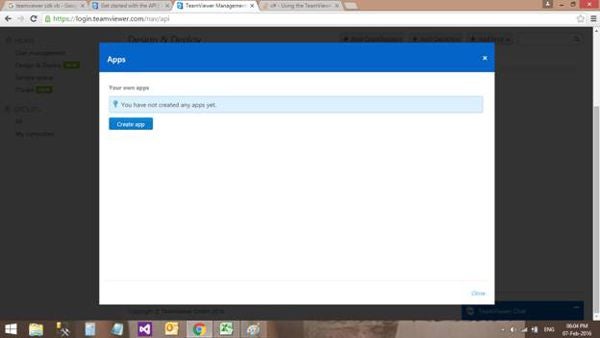
Figure 1: Create App
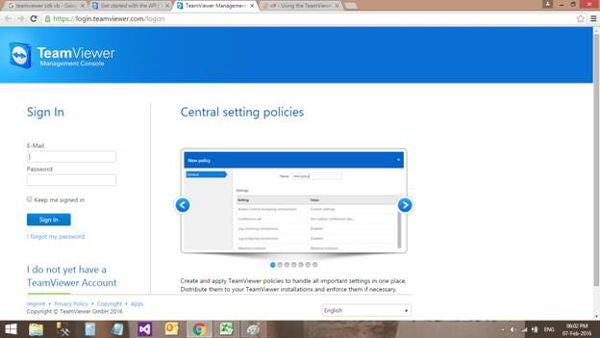
Figure 2: Create Account
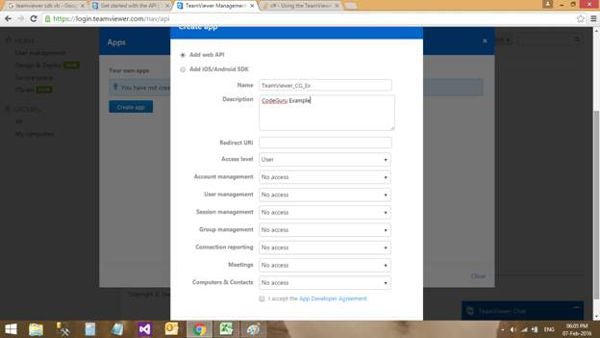
Figure 3: Create App Menu
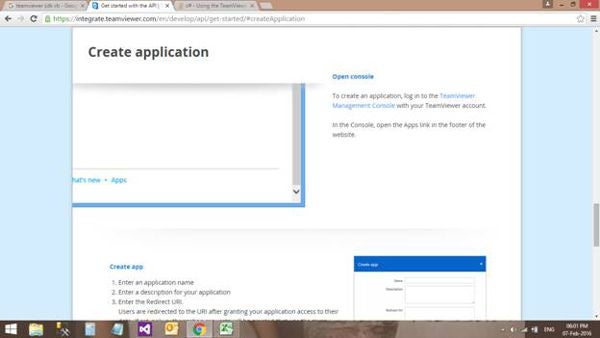
Figure 4: Create Application
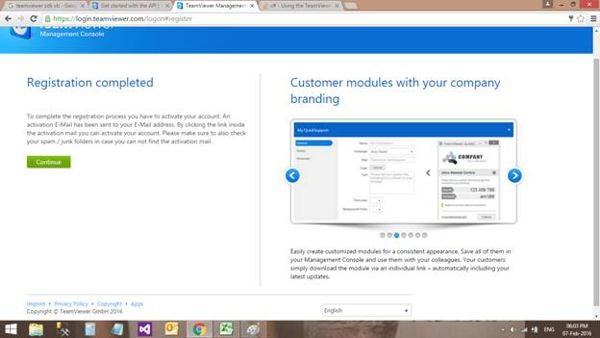
Figure 5: Registration Completed
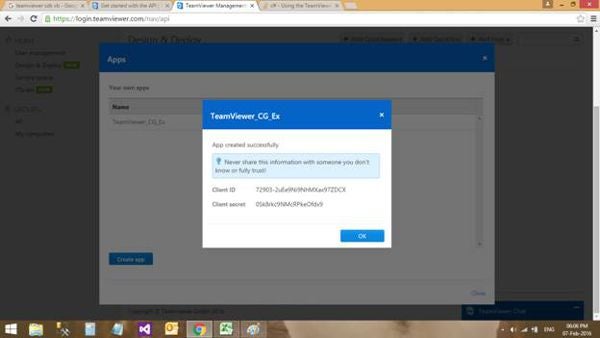
Figure 6: Token
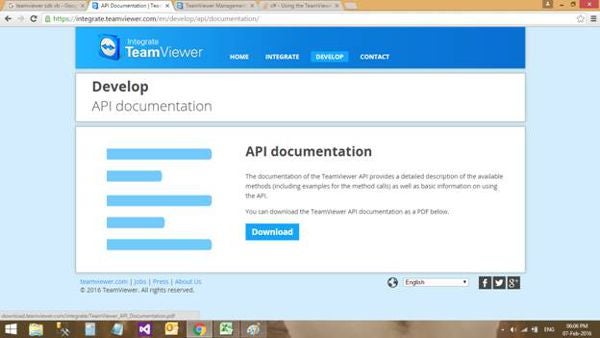
Figure 7: Documentation
Once you have been given a token, you are able to develop an app that integrates with TeamViewer. A word to the wise: Please make sure you download the documentation. It is a step-by-step guide in creating apps that makes use of the TeamViewer API. The documentation can be downloaded from here.
Examples
You can find a list of examples on how to create a basic TeamViewer app from here.
Using the TeamViewer API
First off, your app needs to be authenticated. This confirms (through your app) that you do in fact have the appropriate tokens to make use of the API. Here is a small example on how to get authenticated with the TeamViewer API:
Imports System
Imports System.Net
Imports System.Security.Cryptography
Imports System.Text
Imports CreateSession.CustomException
Imports CreateSession.DataType
Imports CreateSession.Ressources
Imports CreateSession.Views
Imports Newtonsoft.Json

Namespace CreateSession.Helper
   Friend Delegate Sub OauthProcessCompleteHandler()

   Friend Class OAuth
      #Region "internal fields"

   ' TODO: Insert your client id here:
      Friend Const ClientId As String = ""

   ' TODO: Insert your client secret here:
      Friend Const ClientSecret As String = ""

   ' TODO: Insert your redirect uri here:
      Friend Const RedirectUri As String = ""

      #End Region ' internal fields

      #Region "private fields"

      Private Shared s_currentinstance As OAuth
      Private ReadOnly _additionalEntropy() As Byte = _
         Encoding.ASCII.GetBytes("Just a sample")

      Private _webView4Oauth As Webview4Oauth

      #End Region ' private fields

      #Region "constructors"

      Private Sub New()
         Tokens = New Token With {.TokenType = TokenType.AppToken}
         ReadTokens()
      End Sub

      #End Region ' constructors

      #Region "events"

      Friend Event OauthProcessComplete As OauthProcessCompleteHandler

      #End Region ' events

      #Region "properties"

      Friend Shared ReadOnly Property CurrentCurrentinstance() As OAuth
         Get
            If s_currentinstance Is Nothing Then
               s_currentinstance = New OAuth()
            End If
            Return s_currentinstance
         End Get
      End Property

      Private privateTokens As Token
      Friend Property Tokens() As Token
         Get
            Return privateTokens
         End Get
         Private Set(ByVal value As Token)
            privateTokens = value
         End Set
      End Property

      Friend ReadOnly Property TokensAvailable() As Boolean
         Get
            Return (Tokens IsNot Nothing AndAlso Not _
               String.IsNullOrEmpty(Tokens.AccessToken) AndAlso Not _
               String.IsNullOrEmpty(Tokens.RefreshToken))
         End Get
      End Property

      #End Region ' properties

      #Region "internal methods"

      Friend Shared Function ValidateToken(ByVal tokenType As TokenType, _
            ByVal accessToken As String) As String
         If tokenType = CreateSession.Ressources.TokenType.SkriptToken AndAlso _
               Not String.IsNullOrEmpty(accessToken) Then
            Return accessToken
         End If
         If tokenType = CreateSession.Ressources.TokenType.AppToken AndAlso _
               CurrentCurrentinstance.TokensAvailable Then
            If CurrentCurrentinstance.AccessTokenIsExpired() Then
               CurrentCurrentinstance.RefreshAccesToken()
            End If
            Return CurrentCurrentinstance.Tokens.AccessToken
         End If
         Throw New AuthorizationException(Resources.Error_AccessTokenRequired)
      End Function

      ''' <summary>
      '''    Pings the API to validate the access tokens
      ''' </summary>
      ''' <returns></returns>
      Friend Function AccessTokenIsExpired() As Boolean
         Dim rp = New RestProperties With {.Url = TvApiUrls.UrlPing, .Method = _
            WebRequestMethods.Http.Get, .AccessToken = Tokens.AccessToken}

         Dim jsonResultString As String = (New RestConnection(rp)).SendToApi()
         If String.Empty <> jsonResultString Then
            Dim pingResult = New With {Key .token_valid = False}
            pingResult = JsonConvert.DeserializeAnonymousType _
               (jsonResultString, pingResult)
            Return Not pingResult.token_valid
         End If

         Return True
      End Function

      ''' <summary>
      '''    Sets the url and the postdata to get a new access tokens
      '''    from the api
      ''' </summary>
      ''' <param name="code">Authorisierungcode zur Erstellung
      '''    des neuen tokens</param>
      Friend Sub GetNewAccessToken(ByVal code As String)
         If code = String.Empty Then
            Return
         End If

         Dim postData = New StringBuilder()
         postData.Append("grant_type=authorization_code")
         postData.Append("&code=" & code)
         postData.Append("&redirect_uri=" & RedirectUri)
         postData.Append("&client_id=" & ClientId)
         postData.Append("&client_secret=" & ClientSecret)

         RetrieveAndSetTokensFromApi(postData.ToString())
      End Sub

      ''' <summary>
      '''    Opens the webview to authorize the app
      ''' </summary>
      Friend Sub OpenWebviewForNewAccessToken()
         _webView4Oauth = New Webview4Oauth()
         AddHandler _webView4Oauth.WebViewFinished, _
            AddressOf GetNewAccessToken
         _webView4Oauth.ShowDialog()
      End Sub

      ''' <summary>
      '''    Reads the tokens from the encrypted binary files
      '''    and decrypts them
      ''' </summary>
      Friend Sub ReadTokens()
         If My.Settings.Default.AccessToken IsNot Nothing Then
            Try
               Dim encryptedAccessToken() As Byte = _
                  My.Settings.Default.AccessToken
               Dim decryptedAccessToken() As Byte = _
                  ProtectedData.Unprotect(encryptedAccessToken, _
                  _additionalEntropy, DataProtectionScope.CurrentUser)

               Tokens.AccessToken = _
                  Encoding.Default.GetString(decryptedAccessToken)

               Dim encryptedRefreshToken() As Byte = _
                  My.Settings.Default.RefreshToken
               Dim decryptedRefreshToken() As Byte = _
                  ProtectedData.Unprotect(encryptedRefreshToken, _
                  _additionalEntropy, DataProtectionScope.CurrentUser)
               Tokens.RefreshToken = _
                  Encoding.Default.GetString(decryptedRefreshToken)
            Catch e1 As CryptographicException
               Tools.StandardErrorMessage("Error on decrypting
                  the tokens-files!" & ControlChars.Lf & _
                  "Files or tokens seem to be defective ..." _
                  & ControlChars.Lf & ControlChars.Lf & _
                  "New Authorization is acquired!", _
                  "Decryption error")
            End Try
         End If
      End Sub

      ''' <summary>
      '''    Sets the url and the postdata to get a new access tokens
      '''    from the api after the old one is expired
      ''' </summary>
      Friend Sub RefreshAccesToken()
         If Tokens.RefreshToken = String.Empty Then
            Return
         End If

         Dim postData = New StringBuilder()
         postData.Append("grant_type=refresh_token")
         postData.Append("&refresh_token=" & Tokens.RefreshToken)
         postData.Append("&client_id=" & ClientId)
         postData.Append("&client_secret=" & ClientSecret)

         RetrieveAndSetTokensFromApi(postData.ToString())
      End Sub

      ''' <summary>
      '''    Calling the API for the new tokens and save them
      ''' </summary>
      ''' <param name="postData"></param>
      Friend Sub RetrieveAndSetTokensFromApi(ByVal postData As String)
         Dim restProperties = New RestProperties With {.Url = TvApiUrls.UrlToken, _
            .Method = WebRequestMethods.Http.Post, .ContentType = _
            HttpContentTypes.ApplicationXWwwFormUrlEncoded, .PostData = postData}

         Dim jsonResultString As String = _
            (New RestConnection(restProperties)).SendToApi()
         If String.Empty <> jsonResultString Then
            Tokens = JsonConvert.DeserializeObject(Of Token)(jsonResultString)
            SaveTokens()
            ' Check if someone is listening to the OauthProcessComplete-Event
            ' Event to inform the main thread that the OAuth-Process is complete
            ' and that he can use the new tokens to create a new session via
            ' the API
            RaiseEvent OauthProcessComplete()
         End If
      End Sub

      ''' <summary>
      '''    Ecnrypts the tokens and saves them to binary files
      ''' </summary>
      Friend Sub SaveTokens()
         Try
            Dim encryptedAccessToken() As Byte = _
               ProtectedData.Protect(Tools.StringToByteArray(Tokens.AccessToken), _
               _additionalEntropy, DataProtectionScope.CurrentUser)
            My.Settings.Default.AccessToken = encryptedAccessToken

            Dim encryptedRefreshToken() As Byte = _
               ProtectedData.Protect(Tools.StringToByteArray(Tokens.RefreshToken), _
               _additionalEntropy, DataProtectionScope.CurrentUser)
            My.Settings.Default.RefreshToken = encryptedRefreshToken
            My.Settings.Default.Save()
         Catch e As Exception
            Tools.StandardErrorMessage(e.Message)
         End Try
      End Sub

      #End Region ' internal methods
   End Class
End Namespace
This Namespace handles the Authentication. It simply checks to see if you have a valid token, then tries to connect to the corresponding URL as specified through the Webview4Oauth class (it was referenced earlier when we connected to the Authorization page).
Everything Okay?
Namespace CreateSession.Views
   Friend Delegate Sub WebViewFinishedHandler(ByVal code As String)

   Partial Friend Class Webview4Oauth
      Inherits Form

      Friend Event WebViewFinished As WebViewFinishedHandler

      ''' <summary>
      '''    Constructor -> navigates to the defined url on startup
      ''' </summary>
      Friend Sub New()
         InitializeComponent()

         Dim url = New StringBuilder("https://webapi.teamviewer.com")
         url.Append("/api/v1/oauth2/authorize")
         url.Append("?")
         url.Append("response_type=code")
         url.Append("&client_id=" & OAuth.ClientId)
         url.Append("&redirect_uri=" & OAuth.RedirectUri)
         url.Append("&display=popup")

         oauthWebBrowser.Navigate(url.ToString())

         oauthWebBrowser.Select()
         oauthWebBrowser.Focus()
      End Sub

      ''' <summary>
      '''    Url of the webview has changed
      ''' </summary>
      ''' <param name="sender"></param>
      ''' <param name="e"></param>
      Private Sub oauthWebBrowser_Navigated(ByVal sender As Object, _
         ByVal e As WebBrowserNavigatedEventArgs) _
         Handles oauthWebBrowser.Navigated
         ' Checks the changed url corresponds to the final url with the code
         If oauthWebBrowser.Url.Query.Contains("code=") Then
            ' Extract the code from the link
            Dim urlParameters = _
               HttpUtility.ParseQueryString(oauthWebBrowser.Url.Query)
            Dim code As String = urlParameters("code")

            ' Inform asynchronous thread that the new code is available
            ' and deliver it
            If code <> String.Empty Then
               RaiseEvent WebViewFinished(code)
            Else
               MessageBox.Show("Code for the new access-token could not be _
                  retrieved!", "Error", MessageBoxButtons.OK, _
                  MessageBoxIcon.Error)
            End If

            Close()
         End If
      End Sub
   End Class
End Namespace
Namespace CreateSession.Ressources
   Friend Module TvApiUrls
      Public Const UrlCreateSession As String = _
         "https://webapi.teamviewer.com/api/v1/sessions"

      Public Const UrlGetGroupIds As String = _
         "https://webapi.teamviewer.com/api/v1/groups"

      Public Const UrlPing As String = _
         "https://webapi.teamviewer.com/api/v1/ping"

      Public Const UrlToken As String = _
         "https://webapi.teamviewer.com/api/v1/oauth2/token"
   End Module
End Namespace
This class ensures that we are indeed validated and that the resulting URL can be found and be accessed.
Getting the Application Info
Namespace CreateSession.Helper
   Friend Class ApplicationInfo
      ''' <summary>
      '''    get assembly title
      ''' </summary>
      Friend Shared ReadOnly Property AssemblyTitle() As String
         Get
            Dim attributes() As Object = _
               System.Reflection.Assembly.GetExecutingAssembly()._
               GetCustomAttributes(GetType(AssemblyTitleAttribute), False)

            If attributes.Length > 0 Then
               Dim titleAttribute As AssemblyTitleAttribute = _
                  DirectCast(attributes(0), AssemblyTitleAttribute)

                  If titleAttribute.Title <> String.Empty Then
                     Return titleAttribute.Title
                  End If
            End If

            Return Path.GetFileNameWithoutExtension(System.Reflection.Assembly _
               .GetExecutingAssembly().CodeBase)
         End Get
      End Property

      ''' <summary>
      '''    get assembly version
      ''' </summary>
      Friend Shared ReadOnly Property AssemblyVersion() As String
         Get
            Return System.Reflection.Assembly.GetExecutingAssembly() _
               .GetName().Version.ToString()
         End Get
      End Property

      ''' <summary>
      '''    get assembly description
      ''' </summary>
      Friend Shared ReadOnly Property AssemblyDescription() As String
         Get
            Dim attributes() As Object = _
               System.Reflection.Assembly.GetExecutingAssembly() _
               .GetCustomAttributes(GetType(AssemblyDescriptionAttribute), False)

            If attributes.Length = 0 Then
               Return String.Empty
            End If

            Return DirectCast(attributes(0), AssemblyDescriptionAttribute).Description
         End Get
      End Property

      ''' <summary>
      '''    get assembly product
      ''' </summary>
      Friend Shared ReadOnly Property AssemblyProduct() As String
         Get
            Dim attributes() As Object = _
               System.Reflection.Assembly.GetExecutingAssembly() _
               .GetCustomAttributes(GetType(AssemblyProductAttribute), False)

            If attributes.Length = 0 Then
               Return String.Empty
            End If

            Return DirectCast(attributes(0), AssemblyProductAttribute).Product
         End Get
      End Property

      ''' <summary>
      '''    get assembly copyright
      ''' </summary>
      Friend Shared ReadOnly Property AssemblyCopyright() As String
         Get
            Dim attributes() As Object = _
               System.Reflection.Assembly.GetExecutingAssembly() _
               .GetCustomAttributes(GetType(AssemblyCopyrightAttribute), False)

            If attributes.Length = 0 Then
               Return String.Empty
            End If

            Return DirectCast(attributes(0), AssemblyCopyrightAttribute).Copyright
         End Get
      End Property

      ''' <summary>
      '''    get assembly company
      ''' </summary>
      Friend Shared ReadOnly Property AssemblyCompany() As String
         Get
            Dim attributes() As Object = _
               System.Reflection.Assembly.GetExecutingAssembly() _
               .GetCustomAttributes(GetType(AssemblyCompanyAttribute), False)

            If attributes.Length = 0 Then
               Return String.Empty
            End If

            Return DirectCast(attributes(0), AssemblyCompanyAttribute).Company
         End Get
      End Property

      Friend Shared Function RetrieveLinkerTimestamp() As Date
         Dim filePath = System.Reflection.Assembly.GetCallingAssembly().Location
         Const cPeHeaderOffset As Integer = 6
         Const cLinkerTimestampOffset As Integer = 8
         Dim b = New Byte(2047){}
         Dim s As Stream = Nothing

         Try
            s = New FileStream(filePath, FileMode.Open, FileAccess.Read)
            s.Read(b, 0, 2048)
         Finally
            If s IsNot Nothing Then
               s.Close()
            End If
         End Try

         Dim i = BitConverter.ToInt32(b, cPeHeaderOffset)
         Dim secondsSince1970 = _
            BitConverter.ToInt32(b, i + cLinkerTimestampOffset)
         Dim dt = New Date(1970, 1, 1, 0, 0, 0)
         dt = dt.AddSeconds(secondsSince1970)
         dt = dt.AddHours(TimeZone.CurrentTimeZone.GetUtcOffset(dt).Hours)
         Return dt
      End Function
   End Class
End Namespace
API Functionalities
Namespace CreateSession.Helper
   Friend Class ApiFunctions
      Friend Shared Function GetGroupsOfAccount(ByVal tokenType As TokenType, _
            Optional ByVal accessToken As String = Nothing) As Group()
         ' First setting up a new RestProperties and define the attributes
         ' needed for "GET /api/v1/groups (list all available groups)"
         Dim rp4GroupIDs = New RestProperties With {.Url = _
            TvApiUrls.UrlGetGroupIds, .Method = WebRequestMethods.Http.Get, _
            .AccessToken = OAuth.ValidateToken(tokenType, accessToken)}

         ' Set up a new API-Connection
         Dim rc4GroupIDs = New RestConnection(rp4GroupIDs)
         ' Send the newly created RestProperties to the API and retrieve
         ' the JSON string
         Dim resultJsonString = rc4GroupIDs.SendToApi()
         If String.Empty <> resultJsonString Then
            ' Extracting the group names from the JSON-string we got
            ' from the API
            Dim groups = _
               JsonConvert.DeserializeObject(Of Groups)(resultJsonString)
            Return groups.GroupArray
         End If

         Return Nothing
      End Function

      Friend Shared Sub CreateInstantSupportSession(ByRef _
         instantSupportInfo As InstantSupportInfo, ByVal tokenType _
         As TokenType, Optional ByVal accessToken As String = Nothing)
         Dim restProperties = _
            New RestProperties With {.Url = TvApiUrls.UrlCreateSession, _
            .Method = WebRequestMethods.Http.Post, .PostData = _
            JsonConvert.SerializeObject(instantSupportInfo), _
            .AccessToken = OAuth.ValidateToken(tokenType, accessToken)}

         ' Create a new RestConnection with the completed RestProperties
         Dim rc = New RestConnection(restProperties)

         ' Send data to the API and retrieve the JSON data
         Dim resultJsonString = rc.SendToApi()

         ' Extract the session data from the JSON string
         If String.Empty <> resultJsonString Then
            instantSupportInfo = _
               JsonConvert.DeserializeObject(Of InstantSupportInfo)(resultJsonString)
            instantSupportInfo.UnformatedJsonString = resultJsonString
         Else
            instantSupportInfo = Nothing
         End If
      End Sub
   End Class
End Namespace
Conclusion
As you can see, once you know where to find the particular APIs and documentation needed, developing apps with third-party DLLs is quite easy. Until next time, happy coding!.