


Having a well thought-out design, coupled with visual appeal, is crucial for modern day apps. In some situations, there may be a need to make use of custom fonts for your applications. In cases like these, it is easy to embed the custom font in your application and make use of it. You have to keep in mind that some fonts may not exist on other people’s PC’s, and especially when your company has designed a custom font, you still need the same look and feel you have intended. If the desired system does not find the font in question, it defaults to a font that may look similar.
Let’s have a closer look.
Fonts
For the uninformed: A font is the style of text that you use to type with—basically your digital handwriting—but at least you have more options and aren’t stuck with your real handwriting—nobody would have understood any of my articles, because my handwriting is extremely atrocious and barely legible.… A font is comprised of a typeface, font style, and a font size.
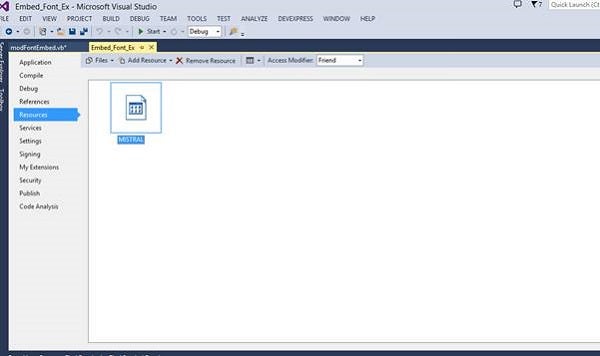
Add the following function:
   Private Function bRawFontData(aAssembly As Assembly, _
      strFontName As String) As Byte()

     Using stFont As Stream = _
         aAssembly.GetManifestResourceStream(strFontName)

         If (stFont Is Nothing) Then Throw _
            New Exception(String.Format("Cannot load _
            font '{0}'", strFontName))

         Dim bFontBuffer() As Byte = New _
            Byte(CInt(stFont.Length - 1)) {}

         stFont.Read(bFontBuffer, 0, CInt(stFont.Length))

         Return bFontBuffer

      End Using

   End Function
The preceding code reads the font via the use of a Stream object. As it reads each byte, it feeds the previous function named GetFont. Navigate to the Form and add the following code:
   Private Sub Form1_Load(sender As Object, e As EventArgs) _
      Handles MyBase.Load

      TextBox1.Font = modEmbedFont.GetFont(Me.GetType.Assembly, _
         "Embed_Font_Ex.MISTRAL.TTF", 12, FontStyle.Bold)

   End Sub
The Textbox’s font property gets set to the object that gets returned from the GetFont Function. Figure 3 shows the result in which the Textbox’s Font is changed to the embedded font.
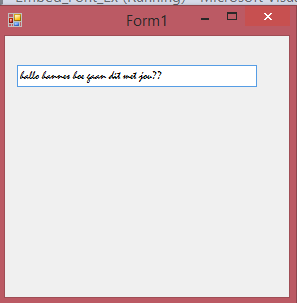
Figure 3: The TextBox Font is changed to the Embedded Font
Conclusion
It is easy to embed a font into your application so that you do not have to worry whether or not the user will have the desired font to make your app’s look and feel as you intended it to be.