


Introduction
Welcome to my article. Today, I will show you how to make a color scroller, the reason being that it is sometimes very difficult getting the precise colour combination. After getting the color combination, get the corresponding color code.
Before I continue, let’s get some background on how precisely colors work and which Color models are there. Have a read through the following to get a better understanding of colors and color models:
For further information on color systems, read here.
Our Project
Create a new Windows Forms project and design the form to resemble Figure 1.
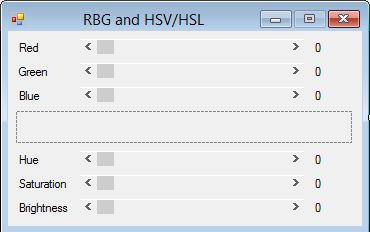
Figure 1: Our design
Get things started by adding the Form Load event:
   Private Sub Form1_Load(ByVal sender As System.Object, _
         ByVal e As System.EventArgs) Handles MyBase.Load
      RBG_Scroll(RedBar, New Windows.Forms.ScrollEventArgs _
         (ScrollEventType.EndScroll, 0))
   End Sub
Add a common event handler for the RGB scrollers:
   Private Sub RBG_Scroll(ByVal sender As System.Object, _
         ByVal e As System.Windows.Forms.ScrollEventArgs) _
         Handles RedBar.Scroll, GreenBar.Scroll, BlueBar.Scroll
      Dim rgbColor As Color

      rgbColor = Color.FromArgb(0, RedBar.Value, _
         GreenBar.Value, BlueBar.Value)
      HueBar.Value = CInt(rgbColor.GetHue())
      SaturationBar.Value = _
         CInt(rgbColor.GetSaturation() * 100.0F)
      BrightnessBar.Value = _
         CInt(rgbColor.GetBrightness() * 100.0F)

      RefreshDisplay()
   End Sub
The Hue, Saturation & Values scrolling event is a bit more work. Let us add that now:
   Private Sub Hue_Scroll(ByVal sender As Object, _
         ByVal e As System.Windows.Forms.ScrollEventArgs) _
         Handles HueBar.Scroll, SaturationBar.Scroll, _
         BrightnessBar.Scroll

      Dim useRed As Integer
      Dim useGreen As Integer
      Dim useBlue As Integer
      Dim useHue As Single
      Dim useSaturation As Single
      Dim useBrightness As Single
      Dim hueSector As Integer
      Dim factor As Single
      Dim target1 As Single
      Dim target2 As Single
      Dim target3 As Single

      useHue = CSng(HueBar.Value)
      useSaturation = _
         CSng(SaturationBar.Value) / 100.0F
      useBrightness = _
         CSng(BrightnessBar.Value) / 100.0F

      If (useSaturation = 0.0F) Then
         useRed = CInt(useBrightness * 255)
         useGreen = useRed
         useBlue = useRed
      Else
         hueSector = CInt(useHue / 60.0F)
         factor = Math.Abs((useHue / 60.0F) - _
            CSng(hueSector))
         target1 = useBrightness * _
            (1 - useSaturation)
         target2 = useBrightness * _
            (1 - (factor * useSaturation))
         target3 = useBrightness * _
            (1 - ((1 - factor) * useSaturation))

         Select Case hueSector
            Case 0, 6
               useRed = CInt(useBrightness * 255.0F)
               useGreen = CInt(target3 * 255.0F)
               useBlue = CInt(target1 * 255.0F)
            Case 1
               useRed = CInt(target2 * 255.0F)
               useGreen = CInt(useBrightness * 255.0F)
               useBlue = CInt(target1 * 255.0F)
            Case 2
               useRed = CInt(target1 * 255.0F)
               useGreen = CInt(useBrightness * 255.0F)
               useBlue = CInt(target3 * 255.0F)
            Case 3
               useRed = CInt(target1 * 255.0F)
               useGreen = CInt(target2 * 255.0F)
               useBlue = CInt(useBrightness * 255.0F)
            Case 4
               useRed = CInt(target3 * 255.0F)
               useGreen = CInt(target1 * 255.0F)
               useBlue = CInt(useBrightness * 255.0F)
            Case 5
               useRed = CInt(useBrightness * 255.0F)
               useGreen = CInt(target1 * 255.0F)
               useBlue = CInt(target2 * 255.0F)
         End Select
      End If

      RedBar.Value = useRed
      GreenBar.Value = useGreen
      BlueBar.Value = useBlue
      RefreshDisplay()


   End Sub
Add the RefreshDisplay sub procedure:
   Private Sub RefreshDisplay()
      NumberRed.Text = CStr(RedBar.Value)
      NumberGreen.Text = CStr(GreenBar.Value)
      NumberBlue.Text = CStr(BlueBar.Value)
      NumberHue.Text = CStr(HueBar.Value)
      NumberSaturation.Text = Format(CDec(SaturationBar.Value) _
         / 100@, "0.00")
      NumberBrightness.Text = Format(CDec(BrightnessBar.Value) _
         / 100@, "0.00")

      ShowColor.BackColor = Color.FromArgb(255, RedBar.Value, _
         GreenBar.Value, BlueBar.Value)
   End Sub
Our scrollers in action:
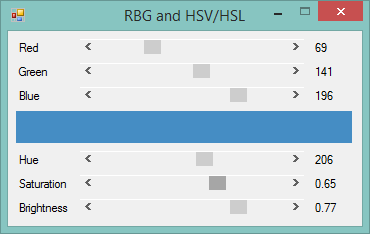
Figure 2 Run time
Conclusion
The world of colors is quite exciting; knowing the difference between each color model and how to use each model properly is quite handy. Until next time, cheers!