


Introduction
Hello again! Today I will try to explain how to create a word search game with Visual Basic.NET. In case you don’t know what a Word Search game is, have a look at this Wikipedia Article.
Our Project
Shaken not stirred. Seeing the fact that the James Bond Movie franchise turned 50 early in October, I have decided to use the James Bond movie titles as the theme for our little complicated project. I have always loved James Bond movies, so I am actually quite excited about our little mission here. MI 6 called. Get your funky gadgets from Q (make sure there is a decent magnifying glass in there as well), and let us start our mission!
Design
As you know, M is quite old fashioned and strict. She won’t be too concerned about our design, as long as our code works. We do have license to do what we want with the design, but since James is always in trouble nowadays, let’s keep it very very basic; after all, it is how the code works that gets our job done.
Start a new Visual Basic Windows Forms Project, name it SpyGame, or licenseToSearch; just make sure it adheres to Bond’s character.
Add the following controls to your form and set their properties appropriately:
| Control | Property | Setting |
| Form1 | Name | frmSearch |
| Size | 834, 532 | |
| Text | HTG Word Search | |
| WindowState | Maximized | |
| Panel | Name | pnlGrid |
| Dock | Left | |
| Size | 518, 380 | |
| Label | Name | lblITBF |
| Dock | Top | |
| Location | 518, 0 | |
| Text | “” | |
| Panel | Name | pnlItems |
| Location | 518, 26 | |
| Size | 308, 363 | |
| Panel | Name | Panel1 |
| Dock | Bottom | |
| Label | Name | lblTimeLeft |
| AutoSize | True | |
| BorderStyle | FixedSingle | |
| Location | 10, 12 ( Inside Panel 1 ) | |
| Label | Name | lblScore |
| Location | 93, 12 ( Inside Panel 1 ) | |
| Size | 706, 103 | |
| Button | Name | btnStart |
| Location | 12, 75 ( Inside Panel 1 ) | |
| Text | Start | |
| Timer | Name | tmrCountDown |
| Interval | 1000 |
It doesn’t look like much, but as I said, you do have license to turn it into something nicer.
Code
Action time, and as you know, our friend 007 always has a plan! Let’s start with the variables and move systematically through all of the necessary code, just as Bond would do. Add the following variables in your General Declarations:
    Private arrBonds(23) As String 'Array of Bond Movies
    Private arrItems(23) As Label 'Array of Lables

    Private strScramble As String = "ABCDEFGHIJKLMNOPQRSTUVWXYZ" 'Each Char of the Alphabet - To Fill In Blanks

    Private lblSel As String 'Selected Label's Text

    Private blnStart As Boolean 'Start Button Clicked?

    Private intScore As Integer 'Score

    Private intItemsFound As Integer 'Total Items Found

    Private timeEnd As DateTime 'Calculates Ending Time
    Private timeDiff As TimeSpan 'Difference Between Start and End Times

    Private intTimeBonus As Integer 'Time bonus
Our next step is to add our grid. This comprises 900 blocks ( 30 x 30 ), luckily this is not a mine-field… yet. Add the next sub:
    Public Sub DrawLabelGrid() 'Draws Grid of 900 blocks - 30 x 30

        Dim NewLoc As New Point 'Location of Each New Block

        For CurrRow As Integer = 0 To 29 'Row By Row
            For CurrCol As Integer = 0 To 29 'Column In Row By Column In Row

                NewLoc.X = 2 + CurrRow * 15 'Height Of Block
                NewLoc.Y = 2 + CurrCol * 15 'Width Of Block

                Dim lbl As New Label 'New Label

                With lbl 'Set Properties
                    .Name = CurrRow.ToString() & "_" & CurrCol.ToString 'Name Ex: 1_2 ( Row 1 _ Col 2 )
                    .BorderStyle = BorderStyle.FixedSingle 'Block Effect
                    .Location = NewLoc 'Set Position
                    .Width = 15 'Width
                    .Height = 15 'Height
                    .TextAlign = ContentAlignment.MiddleCenter 'Text Alignment
                    .BackColor = System.Drawing.Color.White 'BackColour
                    .Font = New Font("Arial", 8, FontStyle.Bold) 'Font Style
                    AddHandler lbl.MouseClick, AddressOf lbl_MouseClick 'Event Handler Click

                    '  AddHandler lbl.MouseDown, AddressOf lbl_MouseDown
                    'AddHandler lbl.MouseMove, AddressOf lbl_MouseMove
                    ' AddHandler lbl.MouseUp, AddressOf lbl_MouseUp

                End With
                Me.pnlGrid.Controls.Add(lbl) 'Add Labels

            Next

        Next

        lblITBF.Text = "Items to find: " & Environment.NewLine & Environment.NewLine 'Items To Find Label

    End Sub
OK, why so many blocks? Well, it seems as if our mission was compromised a bit, with some Bond Movie titles being extremely long–the longest being On Her Majesty’s Secret Service. Sans spaces and apostrophes, it totals 26 characters. If our grid was 26 * 26, it would have been too obvious. Granted, most word search games aren’t this big with so many letters, but this is a Bond mission, and it has to be tough!
What was done in the DrawLabelGrid sub was to create the rows and columns by using a dynamic label with set properties. You will also notice the event handler that was added. The reason for this is so that we can work with these labels during game play.
Add the Form Load event:
    Private Sub frmHTGWordSearch_Load(ByVal sender As Object, ByVal e As System.EventArgs) Handles Me.Load

        DrawLabelGrid() 'Draw Grid

        arrBonds(0) = "DRNO" 'West
        arrBonds(1) = "FROMRUSSIAWITHLOVE" 'East
        arrBonds(2) = "GOLDFINGER" 'East
        arrBonds(3) = "ONHERMAJESTYSSECRETSERVICE" 'South
        arrBonds(4) = "DIAMONDSAREFOREVER" 'West
        arrBonds(5) = "MOONRAKER" 'SouthEast
        arrBonds(6) = "FORYOUREYESONLY" 'West
        arrBonds(7) = "GOLDENEYE" 'North
        arrBonds(8) = "TOMORROWNEVERDIES" 'North
        arrBonds(9) = "DIEANOTHERDAY" 'South
        arrBonds(10) = "CASINOROYALE" 'NorthWest
        arrBonds(11) = "SKYFALL" 'SouthWest
        arrBonds(12) = "THUNDERBALL" 'South
        arrBonds(13) = "YOUONLYLIVETWICE" 'South
        arrBonds(14) = "LIVEANDLETDIE" 'East
        arrBonds(15) = "THEMANWITHTHEGOLDENGUN" 'West
        arrBonds(16) = "THESPYWHOLOVEDME" 'East
        arrBonds(17) = "OCTOPUSSY" 'NorthEast
        arrBonds(18) = "NEVERSAYNEVERAGAIN" 'South
        arrBonds(19) = "AVIEWTOAKILL" 'South
        arrBonds(20) = "THELIVINGDAYLIGHTS" 'North
        arrBonds(21) = "licenseTOKILL" 'SouthEast
        arrBonds(22) = "THEWORLDISNOTENOUGH" 'North
        arrBonds(23) = "QUANTUMOFSOLACE" 'North


        blnStart = False

    End Sub
In the Form_Load event, we call the DrawLabelGrid sub, and initialize our Bond array with all of the Bond movie titles. Many a James Bond fan would argue that there are only 23 Bond movies. I always disagree. A not so well known Bond movie is entitled : Never Say Never Again, starring Sean Connery (the best Bond ever). This movie was produced by a different production studio than all of the others. This confusion causes people to say that it doesn’t actually count as a Bond film, but it does.
You will also notice that all of these array elements do not contain any space or special character. This is very important, because that can make the game too easy.
Now, the tricky part!
There are a total of 8 different directions in which we can populate our letters in the grid. We have the 4 cardinal directions ( North, East, South, West ) then we have the 4 intercardinal, or ordinal directions (North-East, South-East, South-West, North-West ). Have a look at Figure 1 below:
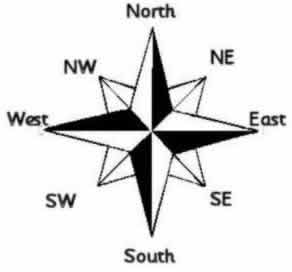
Figure 1 – Directions
Our starting point with all directions would be the middle point. This means that our words must start from there and continue in its associated direction. Let’s start with the cardinal directions first. Add the following subs:
    Private Sub FillEast(ByVal strLetters As String, ByVal strRowEnd As String, ByVal intColStart As Integer) 'Fill Blocks From Left To Right

        Dim i As Integer = 0 'Loop Counter

        Dim charArr() As Char = strLetters.ToCharArray 'Break Letters Appart

        For Each Ll As Label In pnlGrid.Controls 'Loop Through Grid
            If Ll.Name.ToString().StartsWith(intColStart + i & "_") Then 'Determine What Number Name Starts With ( Column )
                If Ll.Name.ToString().EndsWith(strRowEnd) Then 'Determine What Number Name Ends With ( Row )
                    If i <= charArr.Length - 1 Then 'Loop Through Character Array
                        Ll.Text = charArr(i).ToString 'Set The Text of Grid Blocks
                        i += 1
                    End If
                End If
            End If
        Next
    End Sub

    Private Sub FillWest(ByVal strLetters As String, ByVal strRowEnd As String, ByVal intColStart As Integer) 'Fill Blocks From Right To Left
        Dim i As Integer = 0

        Dim charArr() As Char = strLetters.ToCharArray
        Array.Reverse(charArr) 'Reverse String
        For Each Ll As Label In pnlGrid.Controls
            If Ll.Name.ToString().StartsWith(intColStart + i & "_") Then
                If Ll.Name.ToString().EndsWith(strRowEnd) Then
                    If i <= charArr.Length - 1 Then
                        Ll.Text = charArr(i).ToString
                        i += 1
                    End If
                End If
            End If
        Next
    End Sub

    Private Sub FillNorth(ByVal strLetters As String, ByVal intRowEnd As Integer, ByVal strColStart As String) 'Upwards
        Dim i As Integer = 0

        Dim charArr() As Char = strLetters.ToCharArray
        Array.Reverse(charArr)
        For Each Ll As Label In pnlGrid.Controls
            If Ll.Name.ToString().StartsWith(strColStart) Then
                If Ll.Name.ToString().EndsWith("_" & intRowEnd + i) Then
                    If i <= charArr.Length - 1 Then
                        Ll.Text = charArr(i).ToString
                        i += 1
                    End If
                End If
            End If
        Next
    End Sub

    Private Sub FillSouth(ByVal strLetters As String, ByVal intRowEnd As Integer, ByVal strColStart As String) 'Downwards
        Dim i As Integer = 0

        Dim charArr() As Char = strLetters.ToCharArray

        For Each Ll As Label In pnlGrid.Controls
            If Ll.Name.ToString().StartsWith(strColStart) Then
                If Ll.Name.ToString().EndsWith("_" & intRowEnd + i) Then
                    If i <= charArr.Length - 1 Then
                        Ll.Text = charArr(i).ToString
                        i += 1
                    End If
                End If
            End If
        Next
    End Sub
With your quick (golden)eye you can see the resemblance in all of the subs. Each sub has three arguments / parameters – Letters, RowEnd, and ColStart. Letters would be the array element passed to it, which gets broken apart with the use of a character array. RowEnd Identifies the last part of the particular gridblock’s name, and ColStart identifies the first part of the gridblock’s name – that is the whole reasoning behind giving the block with the Column and Row indicators. You, as the local hero need to decipher this name and use it. 🙂
We loop through each gridblock and determine the start and end of the name. Why? So that we know which direction the words must flow. If you take a close look at FillEast, you will see that the row number stays the same, but the columns increment. In FillWest, we Reverse the Letters string, then decrement the Column numbers and the row still remains the same. In FillSouth, the rows increment and the Rows stay the same, whereas FillNorth is just the opposite.
Not so complicated now is it?! Nope 🙂
The intercardinal directions are a bit more complicated. The logic remains the same, but both the column and row indicators need to increment or decrement simultaneously. Let us have a look.
    Private Sub FillNorthWest(ByVal strLetters As String, ByVal intRowEnd As Integer, ByVal intColStart As Integer) 'Up & Left
        Dim i As Integer = 0

        Dim charArr() As Char = strLetters.ToCharArray
        Array.Reverse(charArr)
        For Each Ll As Label In pnlGrid.Controls
            If Ll.Name.ToString().StartsWith(intColStart + i & "_") Then
                If Ll.Name.ToString().EndsWith("_" & intRowEnd + i) Then
                    If i <= charArr.Length - 1 Then
                        Ll.Text = charArr(i).ToString
                        i += 1
                    End If
                End If
            End If
        Next

    End Sub

    Private Sub FillNorthEast(ByVal strLetters As String, ByVal intRowEnd As Integer, ByVal intColStart As Integer) 'Up & Right
        Dim i As Integer = 0

        Dim charArr() As Char = strLetters.ToCharArray


        For Each Ll As Label In pnlGrid.Controls
            If Ll.Name.ToString().StartsWith(intColStart + i & "_") Then
                If Ll.Name.ToString().EndsWith("_" & intRowEnd - i) Then
                    If i <= charArr.Length - 1 Then
                        Ll.Text = charArr(i).ToString
                        i += 1
                    End If
                End If
            End If
        Next
    End Sub

    Private Sub FillSouthWest(ByVal strLetters As String, ByVal intRowEnd As Integer, ByVal intColStart As Integer) 'Down & Left
        Dim i As Integer = 0

        Dim charArr() As Char = strLetters.ToCharArray
        Array.Reverse(charArr)

        For Each Ll As Label In pnlGrid.Controls
            If Ll.Name.ToString().StartsWith(intColStart + i & "_") Then
                If Ll.Name.ToString().EndsWith("_" & intRowEnd - i) Then
                    If i <= charArr.Length - 1 Then
                        Ll.Text = charArr(i).ToString
                        i += 1
                    End If
                End If
            End If
        Next
    End Sub

    Private Sub FillSouthEast(ByVal strLetters As String, ByVal intRowEnd As Integer, ByVal intColStart As Integer) 'Down & Right

        Dim i As Integer = 0

        Dim charArr() As Char = strLetters.ToCharArray

        For Each Ll As Label In pnlGrid.Controls
            If Ll.Name.ToString().StartsWith(intColStart + i & "_") Then
                If Ll.Name.ToString().EndsWith(intRowEnd + i) Then
                    If i <= charArr.Length - 1 Then
                        Ll.Text = charArr(i).ToString
                        i += 1
                    End If
                End If
            End If
        Next

    End Sub
Inside FillNorthWest, we reverse our supplied string and increment the column and row indicators. FillNorthEast increments the Column and decrements the rows. SouthWest is the opposite of NorthEast and SouthEast is the opposite of NorthWest.
Add the following code to btnStart_Click:
    Private Sub btnStart_Click(ByVal sender As Object, ByVal e As System.EventArgs) Handles btnStart.Click

        blnStart = True 'Start Button Clicked

        'Fill Blocks

        FillEast(arrBonds(14), "_6", 8) 'Live and Let Die
        FillEast(arrBonds(1), "_17", 9) 'From Russia With Love
        FillEast(arrBonds(16), "_29", 0) 'The Spy Who Loved Me
        FillEast(arrBonds(2), "_29", 20) 'Goldfinger

        FillWest(arrBonds(15), "_1", 0) 'The Man With the Golden Gun
        FillWest(arrBonds(0), "_7", 17) 'Dr. No
        FillWest(arrBonds(4), "_26", 3) 'Diamonds Are Forever
        FillWest(arrBonds(6), "_28", 4) 'For Your Eyes Only

        FillNorth(arrBonds(22), 8, "1_") 'The World is Not Enough
        FillNorth(arrBonds(8), 8, "4_") 'Tomorrow Never Dies
        FillNorth(arrBonds(23), 11, "9_") 'Quantum of Solace
        FillNorth(arrBonds(7), 10, "11_") 'GoldenEye
        FillNorth(arrBonds(20), 1, "28_") 'The Living Daylights

        FillNorthWest(arrBonds(10), 14, 5) 'Casino Royale

        FillNorthEast(arrBonds(17), 15, 20) 'Octopussy

        FillSouth(arrBonds(3), 0, "0_") 'On Her Majesty's Secret Service
        FillSouth(arrBonds(18), 1, "3_") 'Never Say Never Again
        FillSouth(arrBonds(13), 0, "7_") 'You Only Live Twice
        FillSouth(arrBonds(19), 1, "17_") 'A View To A Kill
        FillSouth(arrBonds(9), 16, "20_") 'Die Another Day
        FillSouth(arrBonds(12), 17, "21_") 'Thunderball

        FillSouthEast(arrBonds(21), 9, 16) 'license To Kill
        FillSouthEast(arrBonds(5), 17, 12) 'Moonraker

        FillSouthWest(arrBonds(11), 14, 12) 'Skyfall

End Sub
Here, we just supply the necessary coordinates and strings to each of our subs. You will notice that not every “Filling” sub has the same amount of strings supplied. This logic took me a while to finish honestly. 🙂
Once run and the Start button are clicked, your screen would resemble Figure 2.
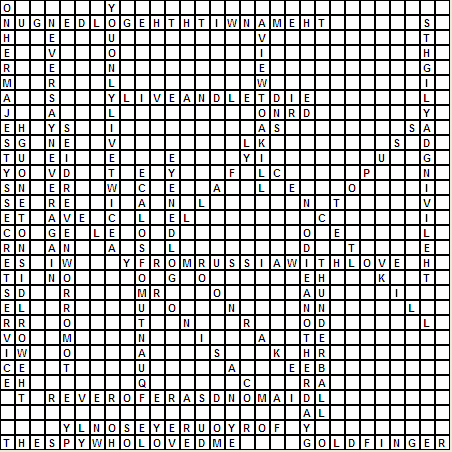
Figure 2 – Our Bond Titles
Not bad at all! Good work so far 007!
The next code segment completes our grid. Let’s add the Scramble sub now:
    Private Sub Scramble() 'Fill In Blank Blocks Randomly
        Dim i As Integer = 0 'Start Index

        Dim RandGen As New Random(Now.Millisecond) 'Generate Random Number

        Dim charArr() As Char = strScramble.ToCharArray 'Break ABC String Apart Into Separate Chars

        For Each Ll As Label In pnlGrid.Controls 'Loop Through Grid

            Dim RandIndex As Integer = RandGen.Next(0, 25) 'Generate New Random Letter

            If Ll.Text = "" OrElse Ll.Text = " " Then 'If Grid Block Is Empty or COntains A Space
                Ll.Text = charArr(RandIndex).ToString 'Fill In Random Letter
            End If
        Next

    End Sub
We break the strScramble string apart, then we determine whether or not the blocks in the grid have text. If they do not have text, we fill it with random letters produced by our Random object. Add the call to the Scramble sub in the click event of the start button. Your screen will look similar to Figure 3.
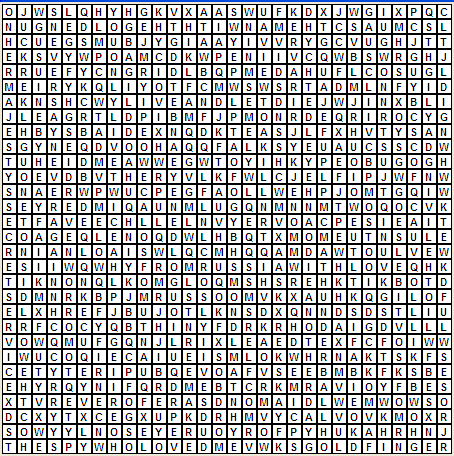
Figure 3 – Our completed grid
What is Left?
Well, not much for now. We need to have a list of items to find, else, unless you’re a Bond fanatic as I am, you will battle to find all the titles. We can add a scoring facility as well as a timer. Let’s complete this game now. Edit your code inside btnStartClick.
    Private Sub btnStart_Click(ByVal sender As Object, ByVal e As System.EventArgs) Handles btnStart.Click

        blnStart = True 'Start Button Clicked

        'Fill Blocks

        FillEast(arrBonds(14), "_6", 8) 'Live and Let Die
        FillEast(arrBonds(1), "_17", 9) 'From Russia With Love
        FillEast(arrBonds(16), "_29", 0) 'The Spy Who Loved Me
        FillEast(arrBonds(2), "_29", 20) 'Goldfinger

        FillWest(arrBonds(15), "_1", 0) 'The Man With the Golden Gun
        FillWest(arrBonds(0), "_7", 17) 'Dr. No
        FillWest(arrBonds(4), "_26", 3) 'Diamonds Are Forever
        FillWest(arrBonds(6), "_28", 4) 'For Your Eyes Only

        FillNorth(arrBonds(22), 8, "1_") 'The World is Not Enough
        FillNorth(arrBonds(8), 8, "4_") 'Tomorrow Never Dies
        FillNorth(arrBonds(23), 11, "9_") 'Quantum of Solace
        FillNorth(arrBonds(7), 10, "11_") 'GoldenEye
        FillNorth(arrBonds(20), 1, "28_") 'The Living Daylights

        FillNorthWest(arrBonds(10), 14, 5) 'Casino Royale

        FillNorthEast(arrBonds(17), 15, 20) 'Octopussy

        FillSouth(arrBonds(3), 0, "0_") 'On Her Majesty's Secret Service
        FillSouth(arrBonds(18), 1, "3_") 'Never Say Never Again
        FillSouth(arrBonds(13), 0, "7_") 'You Only Live Twice
        FillSouth(arrBonds(19), 1, "17_") 'A View To A Kill
        FillSouth(arrBonds(9), 16, "20_") 'Die Another Day
        FillSouth(arrBonds(12), 17, "21_") 'Thunderball

        FillSouthEast(arrBonds(21), 9, 16) 'license To Kill
        FillSouthEast(arrBonds(5), 17, 12) 'Moonraker

        FillSouthWest(arrBonds(11), 14, 12) 'Skyfall

        Scramble() 'Add Rest of Letters

        Dim pntLoc As New Point 'Location of Items Labels

        Dim i As Integer 'Loop Counter

        For i = 0 To 23
            arrItems(i) = New Label 'Create New Label And Set Appropriate Properties
            arrItems(i).AutoSize = True
            arrItems(i).Text = (i + 1).ToString & ") " & arrBonds(i) 'Add Items To Be Found Label Text

            arrItems(i).Left = 30
            arrItems(i).Top = i * 15
            arrItems(i).BringToFront()
            arrItems(i).Visible = True

            pnlItems.Controls.Add(arrItems(i)) 'Add Items To Be Found
        Next

        timeEnd = DateTime.Now 'Get Current Time

        Dim minute As Double = System.Convert.ToDouble(15) '15 Minutes
        Dim second As Double = System.Convert.ToDouble(0) '0 Seconds

        timeEnd = timeEnd.AddMinutes(minute) 'Add Mintues
        timeEnd = timeEnd.AddSeconds(second) 'Add Seconds

        tmrCountDown.Start() 'Start Temp Timer

        btnStart.Enabled = False

    End Sub
We fired two bullets with one shot here, as only Bond can! We created the list of items to be found, as well as started the timer object. 15 Minutes should be enough to complete the mission. Figure 4 shows our items.
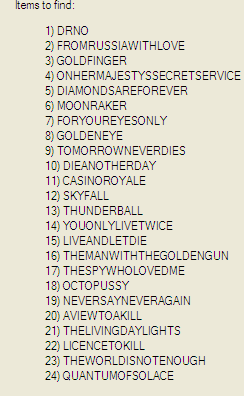
Figure 4 – Our items to be found
Finding the items takes place in the lblMouseClick event.
    Private Sub lbl_MouseClick(ByVal sender As Object, ByVal e As MouseEventArgs) 'Common Event Handler For Labels

        Dim tempstr As String

        Dim lblTemp As Label = DirectCast(sender, Label) 'Get Clicked Label

        lblSel = lblSel & lblTemp.Text 'Concatenate Sequence of Letters

        lblTemp.BackColor = Color.Gold 'Set Back Colour


        Dim i As Integer
        For i = 0 To arrBonds.Length - 1
            Dim charArr() As Char = arrBonds(i).ToCharArray
            Array.Reverse(charArr)
            If lblSel = arrBonds(i) OrElse lblSel = charArr.ToString Then 'Determine Matches
                arrBonds(i) = arrBonds(i) & "  Found!" 'FOund

                intScore += 20
                intItemsFound += 1

                lblScore.Text = "Items Found: " & intItemsFound & Environment.NewLine & _
                    "Score: " & intScore 'Increment Score

                If intItemsFound >= 24 Then
                    ShowSummary() 'Game Completed
                End If

                tempstr = arrBonds(i)

                arrItems(i).Text = tempstr

                lblSel = "" 'Reset Everything For New Matches
                tempstr = ""


            End If
        Next

    End Sub
Once items are found, the score updates. On each click the color changes to gold. Yes, I could have used different logic here, but I wanted to keep it not too complicated. You have the licenseToChange.
The Timer_Tick event and ShowSummary sub follow:
    Private Sub tmrCountDown_Tick(ByVal sender As System.Object, ByVal e As System.EventArgs) Handles tmrCountDown.Tick
        Dim strFinalOutput As String 'Output String

        timeDiff = timeEnd - DateTime.Now

        'Caclulate Difference Between Start and End
        Dim output As TimeSpan = New TimeSpan(timeDiff.Hours, timeDiff.Minutes, timeDiff.Seconds)

        strFinalOutput = "Time Left: " & output.ToString().Substring(3) 'Concatenates Time

        lblTimeLeft.Text = strFinalOutput

        If (timeDiff.Ticks < 0) Then 'If Time is Up

            tmrCountDown.Stop()
            MessageBox.Show("Time's UP!!")
            ShowSummary()
            btnStart.Enabled = True
        End If
    End Sub

    Private Sub ShowSummary() 'Shows Summary After Game Completion

        Dim strSummary As String 'Summary String

        'Calculate Bonus For Minutes and Seconds Left
        If timeDiff.Minutes > 0 Then
            intTimeBonus = timeDiff.Minutes * 50

        End If

        If timeDiff.Seconds > 0 Then
            intTimeBonus += timeDiff.Minutes * 20

        End If

        intScore += intTimeBonus 'Add To Score

        'Compose String For Output
        strSummary = "Summary" & Environment.NewLine & Environment.NewLine & _
            "Items Found: " & intItemsFound.ToString & Environment.NewLine & Environment.NewLine & _
            "TIME BONUS: " & intTimeBonus.ToString & Environment.NewLine & Environment.NewLine & _
            "SCORE: " & intScore.ToString

        lblScore.Text = strSummary 'Write Text

    End Sub
Mission Complete
Play around with this game, the logic is there. Obviously there are far more better ways to accomplish this, but this is how my logic works. Play around, and don’t be afraid of letting me know what you have come up with!
If all items are found, the screen resembles Figure 5.
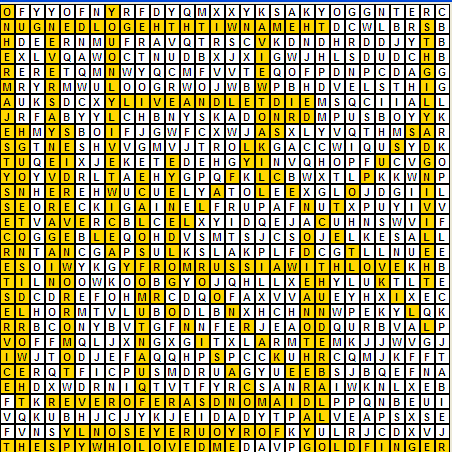
Figure 5 – Everything found
Conclusion
Thank you Mr. Bond for all your hard work during this article. I hope you have enjoyed this mission and that there are many more missions ahead for you. Sincerely, M.