


Part 1 – Designing the Framework
Introduction
I’ve always wanted to do this. Somehow, I never got round to it. With Christmas creeping closer, I decided that my Christmas present this year will be this project. From Hannes. To Hannes. With this article, we will learn how to add a window to an OpenFileDialog. This window will provide us with a preview of the selected picture, along with other picture specific details.
Design
Start Visual Studio and create a VB Windows Forms Project. Name it anything you like. Because there is so much code, I’m going to take a little shortcut for a change. I will not indicate each control’s name and values. I am attaching my working sample here, in case there is any confusion.
Design your default form to look like the following picture:
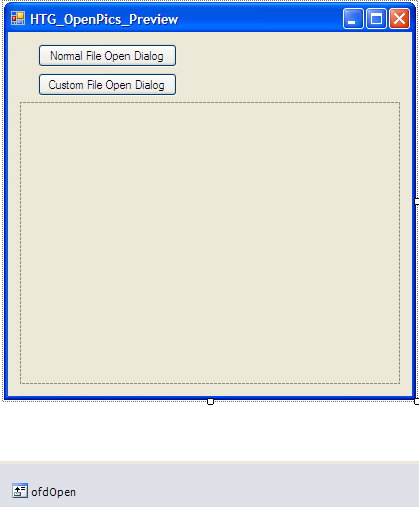
Figure 1 – frmOpenPics
Add a UserControl to your project. Name it HTG_PreviewPics and design it to resemble Figure 2.
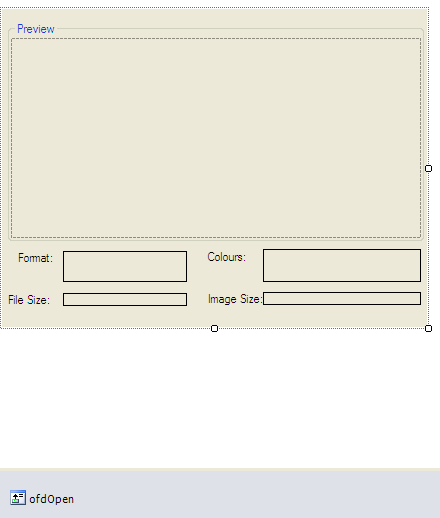
Figure 2 – HTG_PreviewPics
Lastly, add yet another UserControl to your project with the name of HTG_Preview2. All you need to do here is to ensure that the usercontrol’s size is exactly the same as HTG_PreviewPics’ size. You do not need to add the groupboxes and labels here, only an OpenFileDialog with the same name (ofdOpen).
Coding
Right, time for action! Make sure you have enough beverages close by and enough snacks, because this code will take a while!
OS_APIs
Add a class to your project and name it OS_APIs. This class will host all the Windows APIs with their structures, enumerations and constants. If you have never encountered APIs before, have a look at this article. The link I supplied will not seem relevant, but actually is, especially if you’re new to APIs. I also recommend having a look at the API FAQ section here.
Enough talk, let’s get down to business.
Add the following Imports statements to your OS_APIs class :
Imports and Organization of code
Imports System.Runtime.InteropServices 'API Functions
Imports System.Text
These namespaces help us to work with the API functions as well as use advanced Text features such as the StringBuilder.
Modify your class declaration as follows :
Namespace HTG_OpenPics_OSStuff

    Public NotInheritable Class OS_APIs 'Windows APIs + Windows Structs + Windows Constants + Enums

        Private Sub New()

        End Sub
Remember to add the ending statement for your newly created namespace at the bottom of your file. Why did I include the Namespace here? Well, it will make it easier to reference this class in all our other classes, as it gets loaded before the class referencing it does. It also helps with organizing your code a bit better. If you are not sure how namespaces work, have a look here.
API Declarations
Add the following code segment to your OS_APIs class :
#Region "APIs"

        <DllImport("user32.Dll")> _
        Public Shared Function EnumChildWindows(ByVal hWndParent As IntPtr, ByVal lpEnumFunc As EnumWindowsCallBack, ByVal lParam As Integer) As Boolean
        End Function 'Enumerates the child windows that belong to the specified parent window by passing the handle to each child window, in turn, to an application-defined callback

        Public Delegate Function EnumWindowsCallBack(ByVal hWnd As IntPtr, ByVal lParam As Integer) As Boolean

        <DllImport("User32.Dll")> _
        Public Shared Sub GetClassName(ByVal hWnd As IntPtr, ByVal param As StringBuilder, ByVal length As Integer)
        End Sub 'Retrieves the name of the class to which the specified window belongs

        <DllImport("user32.dll")> _
        Public Shared Function GetClientRect(ByVal hwnd As IntPtr, ByRef rect As RECT) As Boolean
        End Function 'Retrieves the coordinates of a window's client area

        <DllImport("User32.Dll")> _
        Public Shared Function GetDlgCtrlID(ByVal hWndCtl As IntPtr) As Integer
        End Function 'GetDlgCtrlID accepts child window handles as well as handles of controls in dialog boxes

        <DllImport("user32.dll", CharSet:=CharSet.Auto)> _
        Public Shared Function GetParent(ByVal hWnd As IntPtr) As IntPtr
        End Function 'Retrieves a handle to the specified window's parent or owner

        <DllImport("user32.dll", SetLastError:=True)> _
        Public Shared Function GetWindowInfo(ByVal hwnd As IntPtr, ByRef pwi As WINDOWINFO) As Boolean
        End Function 'Retrieves information about the specified window

        <DllImport("user32.dll")> _
        Public Shared Function GetWindowRect(ByVal hwnd As IntPtr, ByRef rect As RECT) As Boolean
        End Function 'Retrieves the dimensions of the bounding rectangle of the specified window.

        <DllImport("user32.dll", CharSet:=CharSet.Auto)> _
        Public Shared Function SendMessage(ByVal hWnd As IntPtr, ByVal msg As UInteger, ByVal wParam As IntPtr, ByVal lParam As IntPtr) As Integer
        End Function 'Sends the specified message to a window or windows

        <DllImport("user32.dll", CharSet:=CharSet.Auto)> _
        Public Shared Function SendMessage(ByVal hWnd As IntPtr, ByVal msg As Integer, ByVal wParam As Integer, ByVal lParam As Integer) As Integer
        End Function

        <DllImport("user32.dll", CharSet:=CharSet.Auto)> _
        Public Shared Function SendMessage(ByVal hWnd As IntPtr, ByVal msg As Integer, ByVal wParam As Integer, ByVal param As StringBuilder) As Integer
        End Function

        <DllImport("user32.dll", CharSet:=CharSet.Auto)> _
        Public Shared Function SendMessage(ByVal hWnd As IntPtr, ByVal msg As Integer, ByVal wParam As Integer, ByVal chars As Char()) As Integer
        End Function

        <DllImport("user32.dll")> _
        Public Shared Function SetParent(ByVal hWndChild As IntPtr, ByVal hWndNewParent As IntPtr) As IntPtr
        End Function 'Changes the parent window of the specified child window

        <DllImport("user32.dll", CharSet:=CharSet.Auto)> _
        Public Shared Function SetWindowPos(ByVal hWnd As IntPtr, ByVal hWndInsertAfter As IntPtr, ByVal x As Integer, ByVal y As Integer, ByVal Width As Integer, ByVal Height As Integer, _
               ByVal flags As SetWindowPosFlags) As Boolean
        End Function 'Changes the size, position, and Z order of a child, pop-up, or top-level window
#End Region
Wow! What a mouthful!. OK, take a sip of your choice of beverage and look closely at the above code. This is what they call APIs. There are literally thousands of them, and we can make use of their code inside our program. Why do we need them? Simply because we will be doing system changes – that sounds more complicated than it is. We need these to resize the normal / standard / default open dialogbox and build our own stuff into it. That, is the system changes I’m talking about.
You will notice that I have commented on each API’s function. I found these descriptions on the best site (besides CodeGuru ) ever – MSDN. Later, as we go on, you will clearly see each API’s purpose. For now, let us continue adding the necessary Structures, Enums and Constants that work hand in hand with these functions.
Constants
Add the following System Constants :
#Region "Constants"
        Public Const CDM_FIRST = (&H400 + 100) 'FileNameChanged Constants
        Public Const CDM_GETFILEPATH = (CDM_FIRST + &H1)
        Public Const CDM_GETFOLDERPATH = (CDM_FIRST + &H2)

        Public Const CDN_FIRST = &HFFFFFDA7UI 'FolderChanged Constants
        Public Const CDN_SELCHANGE = (CDN_FIRST - &H1)
        Public Const CDN_FOLDERCHANGE = (CDN_FIRST - &H2)

        Public Const HWND_BOTTOM = 1 'ZOrder

#End Region
These constants are used with the type of event that can happen inside the OpenFileDialog. They deal with two events: FileNameChanged and FolderChanged. We need to always update our custom dialog to reflect the changes happening.
Enums
Add the following Enumerations :
#Region "Enums"


        Public Enum FolderViewMode 'Shortened FolderViewMode Enum

            [Default] = &H7028
            Thumbnails = [Default] + 5

        End Enum

        Public Enum ImeNotify 'Input Method Manager Notify Shortened Enum

            IMN_CLOSESTATUSWINDOW = &H1

        End Enum

        Public Enum Msg 'Shortened Msg Enum

            WM_ACTIVATE = &H6
            WM_SHOWWINDOW = &H18
            WM_WINDOWPOSCHANGING = &H46
            WM_NOTIFY = &H4E
            WM_COMMAND = &H111
            WM_IME_NOTIFY = &H282

        End Enum

        Public Enum SetWindowPosFlags 'Shortened Set Windows Pos Flags Enum

            SWP_NOSIZE = &H1
            SWP_NOMOVE = &H2
            SWP_NOACTIVATE = &H10
            SWP_HIDEWINDOW = &H80
            SWP_NOOWNERZORDER = &H200

        End Enum

        <Flags()> _
        Public Enum SWP_Flags As UInteger

            SWP_NOSIZE = &H1

        End Enum


#End Region
These enums will be used with the APIs. They are just a bunch of “settings” available for certain API functions.
Structures
Lastly, add the Structures :
#Region "Structures"

        Public Structure NMHDR 'Contains information about a notification message

            Public hwndFrom As IntPtr

            Public idFrom As UInteger
            Public code As UInteger

        End Structure

        <StructLayout(LayoutKind.Sequential)> _
        Public Structure OFNOTIFY 'Contains information about a WM_NOTIFY message sent to an OFNHookProc hook procedure for an Open or Save As dialog box
            'Shortened Struct
            Public hdr As NMHDR

            Public lpOFN As IntPtr
            Public CDNShareViolation As IntPtr

        End Structure

        <StructLayout(LayoutKind.Sequential)> _
        Public Structure RECT 'The RECT structure defines the coordinates of the upper-left and lower-right corners of a rectangle.

            Public left As UInteger
            Public top As UInteger
            Public right As UInteger
            Public bottom As UInteger

            Public Property Location() As Point

                Get

                    Return New Point(CInt(left), CInt(top))

                End Get

                Set(ByVal value As Point)

                    right -= (left - CUInt(value.X))
                    bottom -= (bottom - CUInt(value.Y))
                    left = CUInt(value.X)
                    top = CUInt(value.Y)

                End Set

            End Property

            Public Property Width() As UInteger

                Get

                    Return right - left

                End Get

                Set(ByVal value As UInteger)

                    right = left + value

                End Set

            End Property

            Public Property Height() As UInteger

                Get

                    Return bottom - top

                End Get

                Set(ByVal value As UInteger)

                    bottom = top + value

                End Set

            End Property

        End Structure

        <StructLayout(LayoutKind.Sequential)> _
        Public Structure WINDOWINFO 'Contains window information Shortened Struct

            Public rcWindow As RECT
            Public rcClient As RECT

            Public cbSize As UInt32
            Public dwStyle As UInt32
            Public dwExStyle As UInt32
            Public dwWindowStatus As UInt32
            Public cxWindowBorders As UInt32
            Public cyWindowBorders As UInt32

            Public atomWindowType As UInt16
            Public wCreatorVersion As UInt16

        End Structure

        <StructLayout(LayoutKind.Sequential)> _
        Public Structure WINDOWPOS 'Contains information about the size and position of a window.

            Public hwnd As IntPtr
            Public hwndAfter As IntPtr

            Public x As Integer
            Public y As Integer
            Public cx As Integer
            Public cy As Integer
            Public flags As UInteger

        End Structure

#End Region
Time for a break. Eat a snack quickly, run to the little boys room quickly and reorganize your snacks and beverages.
OverrideCoreOFDDialog
Add a class named OverrideCoreOFDDialog to your project. This class will deal with the main OpenFileDialog window’s events. You may recall that I spoke about the FileNameChanged and FolderChanged event handlers earlier. Here, we will instruct the system’s OFD to run our own methods – which we will create later. Add the following code to this class:
Imports System.Runtime.InteropServices 'API Functions
Imports System.ComponentModel 'UserControl Functions
Imports System.Text 'Advanced String Functions
Imports HTG_OpenPics.HTG_OpenPics_OSStuff.OS_APIs 'API Declarations / Structs / Enums

Namespace HTG_OpenPics_UC

    Public Class OverrideCoreOFDDialog
        Inherits NativeWindow
        Implements IDisposable

        'Event Handlers
        Public Delegate Sub FileNameChangedHandler(ByVal sender As OverrideCoreOFDDialog, ByVal strPicPath As String)

        Public Event FileNameChanged As FileNameChangedHandler
        Public Event FolderNameChanged As FileNameChangedHandler

        Private iptDialogHandle As IntPtr

        Public Sub New(ByVal iptHandle As IntPtr)

            iptDialogHandle = iptHandle
            AssignHandle(iptHandle)

        End Sub

        Public Sub Dispose() Implements System.IDisposable.Dispose

            ReleaseHandle()

        End Sub


        Protected Overrides Sub WndProc(ByRef m As Message)

            Select Case m.Msg

                Case CInt(Msg.WM_NOTIFY) 'Get FileNameChanged Event + FolderChange Events And Fire Our Own Instead

                    Dim ofnNotify As OFNOTIFY = DirectCast(Marshal.PtrToStructure(m.LParam, GetType(OFNOTIFY)), OFNOTIFY)

                    If ofnNotify.hdr.code = CUInt(CDN_SELCHANGE) Then

                        Dim sbPicPath As New StringBuilder(256)

                        SendMessage(GetParent(iptDialogHandle), CInt(CDM_GETFILEPATH), CInt(256), sbPicPath)

                        RaiseEvent FileNameChanged(Me, sbPicPath.ToString())

                    ElseIf ofnNotify.hdr.code = CUInt(CDN_FOLDERCHANGE) Then

                        Dim sbFolder As New StringBuilder(256)

                        SendMessage(GetParent(iptDialogHandle), CInt(CDM_GETFOLDERPATH), CInt(256), sbFolder)

                        RaiseEvent FolderNameChanged(Me, sbFolder.ToString())

                    End If

                    Exit Select

            End Select

            MyBase.WndProc(m)

        End Sub

    End Class

End Namespace
Here, we created temporary event handlers for our real events that will be fired via the use of the SendMessage API, inside the WndProc procedure. WndProc invokes the default window procedure associated with the OFD window.
BuildOpenDialog
Now, the fun part. Hungry? Thirsty?
This class is responsible in most part, for the displaying of our preview pane. We need to know where we want our Picture preview. We need to update our preview pane’s user interface when a file selection has been made. Follow? Good.
Imports and Class definition
Add and modify your code to look like the next code segment:
Imports System.Runtime.InteropServices 'API Functions
Imports System.ComponentModel 'UserControl Functions
Imports System.Text 'Advanced String Functions
Imports HTG_OpenPics.HTG_OpenPics_OSStuff.OS_APIs 'API Declarations / Structs / Enums

Namespace HTG_OpenPics_UC

    Public Class BuildOpenDialog 'Override OFD Functionalities
        Inherits NativeWindow 'Provides a low-level encapsulation of a window handle and a window procedure.
        Implements IDisposable 'Release unmanaged resources
Variables & Constructor
Add the following underneath your previous code:
        Private onbBaseDialog As OverrideCoreOFDDialog 'Contains main OFD Events to Override
        Private htpSource As HTG_Preview2 'Preview Pane

        Private szOrig As Size 'Original OFD Size

        Private iptOpenHandle As IntPtr 'OFD Handle
        Private iptListView As IntPtr 'OFD ListView Window Handle

        Private wiListView As WINDOWINFO 'OFD ListView Window Information

        Private rctOpenWin As New RECT() 'Coordinates For OFD Window
        Private rctOpenClient As New RECT()

        Private blnClosing As Boolean = False 'Closing?
        Private blnLoaded As Boolean = False 'Loaded Into Memory?

        Public Sub New(ByVal iptHandle As IntPtr, ByVal ctlSource As HTG_Preview2) 'Constructor

            iptOpenHandle = iptHandle 'Determine Handles

            htpSource = ctlSource 'Source Control

            AssignHandle(iptOpenHandle)

        End Sub
Subs & Functions
Add the following events and procedures:
        Private Sub OS_OverrideNativeOpenDialog_FileNameChanged(ByVal sender As OverrideCoreOFDDialog, ByVal strPicPath As String)

            If htpSource IsNot Nothing Then 'If Source Control Visible / Active

                htpSource.OnFileNameChanged(strPicPath) 'Call Event Appropriate Handler

            End If

        End Sub

        Private Sub OS_OverrideNativeOpenDialog_FolderNameChanged(ByVal sender As OverrideCoreOFDDialog, ByVal strPicFolder As String)

            If htpSource IsNot Nothing Then 'If Source Control Visible / Active

                htpSource.OnFolderNameChanged(strPicFolder)

            End If

        End Sub

        Public Property Closing() As Boolean 'Are We Closing the Dialog?

            Get

                Return blnClosing

            End Get

            Set(ByVal value As Boolean)

                blnClosing = value

            End Set

        End Property

        Public Sub Dispose() Implements System.IDisposable.Dispose 'Remove From Memory

            ReleaseHandle() 'Release All Window Handles References

            If onbBaseDialog IsNot Nothing Then 'Remove All Events

                RemoveHandler onbBaseDialog.FileNameChanged, New  _
                    OverrideCoreOFDDialog.FileNameChangedHandler(AddressOf OS_OverrideNativeOpenDialog_FileNameChanged)
                RemoveHandler onbBaseDialog.FolderNameChanged, New  _
                    OverrideCoreOFDDialog.FileNameChangedHandler(AddressOf OS_OverrideNativeOpenDialog_FolderNameChanged)

                onbBaseDialog.Dispose()

            End If

        End Sub

        Private Sub GetAllHandlers() 'Get OFD Window and Sub Window Handles

            EnumChildWindows(iptOpenHandle, New EnumWindowsCallBack(AddressOf ofdEnumWindowCallBack), 0)

        End Sub

        Private Function ofdEnumWindowCallBack(ByVal hwnd As IntPtr, ByVal lParam As Integer) As Boolean

            Dim sbClassName As New StringBuilder(256) 'Hold Class Names of Windows

            GetClassName(hwnd, sbClassName, sbClassName.Capacity) 'Get Sub Windows Class Names So We Can Reference It

            Dim intControlID As Integer = GetDlgCtrlID(hwnd) 'Control ID

            Dim wiWindow As WINDOWINFO 'Window Information Object

            GetWindowInfo(hwnd, wiWindow) 'Get Window Information

            'OFD Dialog Window
            If sbClassName.ToString().StartsWith("#32770") Then

                onbBaseDialog = New OverrideCoreOFDDialog(hwnd) 'Override Events

                AddHandler onbBaseDialog.FileNameChanged, New  _
                    OverrideCoreOFDDialog.FileNameChangedHandler(AddressOf OS_OverrideNativeOpenDialog_FileNameChanged)
                AddHandler onbBaseDialog.FolderNameChanged, New  _
                    OverrideCoreOFDDialog.FileNameChangedHandler(AddressOf OS_OverrideNativeOpenDialog_FolderNameChanged)

                Return True

            End If

            Select Case DirectCast(intControlID, OFDControls) 'Determine Current Subwindows

                Case OFDControls.DefView 'ListView

                    iptListView = hwnd

                    GetWindowInfo(hwnd, wiListView)

                    If htpSource.vmDefault <> FolderViewMode.[Default] Then

                        SendMessage(iptListView, CInt(Msg.WM_COMMAND), CInt(htpSource.vmDefault), 0)

                    End If

                    Exit Select

                    'Can Use All Sub Windows Here If Needed
            End Select

            Return True

        End Function

        Private Sub Init() 'Initialize Everything

            blnLoaded = True

            'Get Inner and Outer Window Rectangles - Dimensions
            GetClientRect(iptOpenHandle, rctOpenClient)
            GetWindowRect(iptOpenHandle, rctOpenWin)

            'Obtain All Window Handles
            GetAllHandlers()

            'Resize OFD to Compensate For Our Preview Pane
            Select Case htpSource.locStartup

                Case WinLoc.Right 'Right Side Of OFD

                    'Set Preview Pane Location
                    htpSource.Location = New System.Drawing.Point(CInt(rctOpenClient.Width - htpSource.Width), 0)

                    'Make Preview Pane A Child Of The Normal OFD
                    SetParent(htpSource.Handle, iptOpenHandle)

                    'Set Proper Z-Order For Control
                    SetWindowPos(htpSource.Handle, HWND_BOTTOM, 0, 0, 0, 0, _
                     SetWindowPosFlags.SWP_NOACTIVATE _
                                 Or SetWindowPosFlags.SWP_NOMOVE _
                                 Or SetWindowPosFlags.SWP_NOSIZE)

                    Exit Select
                    'We Could Use Bottom, Left Etc. Here As Well
            End Select

        End Sub
The above procedures sets up our preview pane for display and updating procedures. All we need to do now is to use the WndProc event here, to ensure these settings and events get called when they should. Let us add the WndProc procedure now:
        Protected Overrides Sub WndProc(ByRef m As Message) 'Window Procedure

            Select Case m.Msg 'What Message Has Been Fired

                Case CInt(Msg.WM_SHOWWINDOW) 'OFD Is Showing

                    blnLoaded = True 'Everything Is Loaded

                    Init()

                    Exit Select

                Case CInt(Msg.WM_WINDOWPOSCHANGING) 'Compensate For Moving Of OFD Window

                    If Not blnClosing Then 'If Still In Memory

                        If Not blnLoaded Then

                            Dim pos As WINDOWPOS = DirectCast(Marshal.PtrToStructure(m.LParam, GetType(WINDOWPOS)), WINDOWPOS) 'Get Window Position Of OFD

                            If htpSource.locStartup = WinLoc.Right Then 'Move Preview Pane Together With OFD

                                If pos.flags <> 0 AndAlso ((pos.flags And CInt(SWP_Flags.SWP_NOSIZE)) <> CInt(SWP_Flags.SWP_NOSIZE)) Then

                                    szOrig = New Size(pos.cx, pos.cy)

                                    pos.cx += htpSource.Width

                                    Marshal.StructureToPtr(pos, m.LParam, True)

                                End If

                            End If

                            'Could Use Other Directions / Locations Here As Well

                        End If

                        Dim rctCurrSize As RECT

                        Select Case htpSource.locStartup

                            Case WinLoc.Right

                                rctCurrSize = New RECT()

                                GetClientRect(iptOpenHandle, rctCurrSize)

                                htpSource.Height = CInt(rctCurrSize.Height)

                                Exit Select

                                'Could Use Other Directions / Locations Here As Well

                        End Select

                    End If

                    Exit Select

                Case CInt(Msg.WM_IME_NOTIFY) 'Get IME Messages

                    If m.WParam = ImeNotify.IMN_CLOSESTATUSWINDOW Then 'Closing? Revert Back To Old OFD

                        blnClosing = True

                        htpSource.OnClosingDialog()

                        SetWindowPos(iptOpenHandle, IntPtr.Zero, 0, 0, 0, 0, _
                         SetWindowPosFlags.SWP_NOACTIVATE _
                                  Or SetWindowPosFlags.SWP_NOOWNERZORDER _
                                  Or SetWindowPosFlags.SWP_NOMOVE _
                                  Or SetWindowPosFlags.SWP_NOSIZE _
                                  Or SetWindowPosFlags.SWP_HIDEWINDOW)

                        GetWindowRect(iptOpenHandle, rctOpenWin)

                        SetWindowPos(iptOpenHandle, IntPtr.Zero, CInt(rctOpenWin.left), CInt(rctOpenWin.top), CInt(szOrig.Width), CInt(szOrig.Height), _
                         SetWindowPosFlags.SWP_NOACTIVATE _
                                   Or SetWindowPosFlags.SWP_NOOWNERZORDER _
                                   Or SetWindowPosFlags.SWP_NOMOVE)

                    End If

                    Exit Select

            End Select

            MyBase.WndProc(m)

        End Sub
All this code and a whole bunch of errors when we attempt to run it. We obviously cannot run it now, because we have only now built the framework – we still need to build the hosting form, and ensure that everything displays and works correctly. That is what we do in Part 2. I have decided to draw the line here, because this information is quite a lot to soak up in one sitting. I am attaching the project’s source files here, just so you can make sure you have done everything correctly.
Conclusion
As said, we are only halfway done now. There is still a lot to learn and do. The onus is obviously on you now to do some further research on these APIs, to know exactly what makes them tick. With part 2, we will complete this project and make it work. I honestly didn’t think it will be so much work, but hey, it’s almost the holiday season – until then, we still need to work a great deal…. Sadly. Until next time, cheers!