


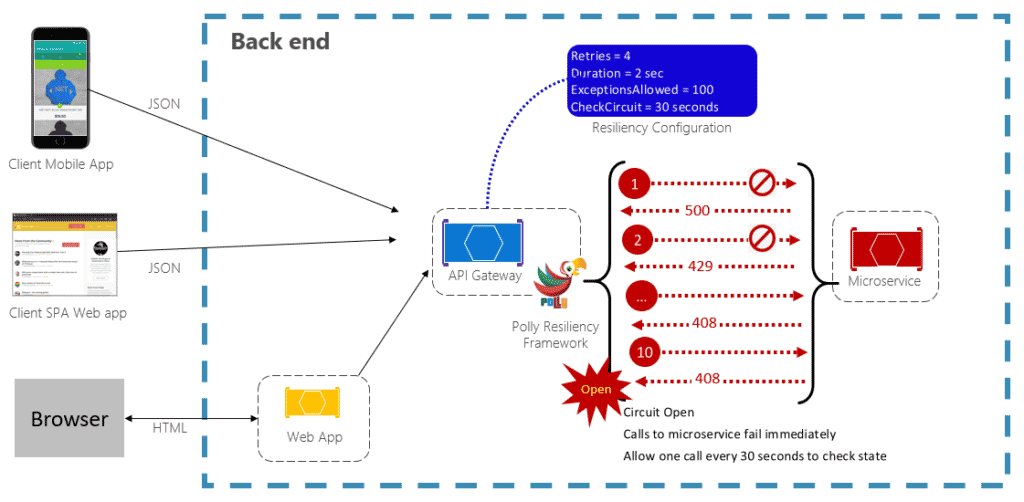
Applications need to communicate with many other services and components to function properly. During this communication, temporary faults may arise due to some of the services or components being unable to respond on time. These faults can come in the form of timeouts, overloaded resources, networking hiccups, and so on. Retry and circuit-breaker patterns are useful for solving these temporary faults. In fact, these are the most common approaches when coding for resiliency.
In this article, developers will create a simple example to demonstrate how to use Polly to implement both retry and circuit-breaker policies.
What is Retry in .NET?
Retry in .NET terms basically means “if something goes wrong, try repeating the same operation again for a certain number of times before giving up.” One example of this might be your service calling a third-party API, failing, and then retrying again until a connection is made or until 10 attempts have been made.
What is a Circuit-breaker Pattern in .NET?
A circuit-breaker pattern in .NET programming basically says “if something goes wrong, hit the panic button that prevents any further attempts to repeat the operation.” An example of a circuit-breaker pattern might be an overloaded database that you want your program to quit querying if an overload is detected or occurs.
Read: Step-by-step Guide to Developing a SOHO HTTP Filter
What is Polly in .NET?
Polly is a .NET resilience and transient-fault-handling library that allows developers to express policies such as retry, circuit breaker, timeout, bulkhead isolation, and so forth. It is a mature library that is almost synonymous with app resiliency.
How to Implement Polly
Implementing a retry pattern with an HTTP(s) request with .NET is very easy; all developers need to do is write an extension method named AddPolicyHandler in order to add the retry policy for the HttpClient. Refer to the following code snippet to see how this is achieved. Note that the GetRetryPolicy method will be invoked during network failures or if HTTP errors are triggered.
public void ConfigureServices(IServiceCollection services)
{
    services.AddHttpClient("MysampleClient")
        .SetHandlerLifetime(TimeSpan.FromMinutes(10))
        .AddPolicyHandler(GetRetryPolicy())
        ;

    services.AddMvc().SetCompatibilityVersion(CompatibilityVersion.Version_2_2);
}

private IAsyncPolicy GetRetryPolicy()
{
    return HttpPolicyExtensions
        .HandleTransientHttpError()
        .OrResult(msg => msg.StatusCode == System.Net.HttpStatusCode.NotFound)
        .WaitAndRetryAsync(3, retryAttempt => TimeSpan.FromSeconds(Math.Pow(3, retryAttempt)))
        ;
}
Next, the following code snippet demonstrates how to run the above code in a controller; the behavior will be the same when we use HttpClient:
[Route("api/[controller]")]
[ApiController]
public class ValuesController : ControllerBase
{
    private readonly IHttpClientFactory _clientFactory;
    public ValuesController(IHttpClientFactory clientFactory)
    {
        _clientFactory = clientFactory;
    }

    [HttpGet]
    public async Task GetAsync()
    {
        var url = $"https://www.mywebsite.com/homepage";
        var client = _clientFactory.CreateClient("MysampleClient");
        var response = await client.GetAsync(url);
        var result = await response.Content.ReadAsStringAsync();
        return result;
    }
}
Read: Consuming an ASP.NET Web API Using HttpClient
How to Push a Message in a Message Queue in .NET
The .NET code below demonstrates how to push the message in a message queue:
Route("api/[controller]")]
[ApiController]
public class ValuesController : ControllerBase
{
    [HttpGet]
    public ActionResult<IEnumerable> Get()
    {
        var message = Encoding.UTF8.GetBytes("My retry pattern");

        var retry = Policy
            .Handle()
            .WaitAndRetry(2, retryAttempt => TimeSpan.FromSeconds(Math.Pow(2, retryAttempt)));

        try
        {
            retry.Execute(() =>
            {
                Console.WriteLine($"begin at {DateTime.Now.ToString("yyyy-MM-dd HH:mm:ss")}.");
                var factory = new ConnectionFactory
                {
                    HostName = "localhost",
                    UserName = "Test",
                    Password = "Tes"
                };

                var connection = factory.CreateConnection();
                var model = connection.CreateModel();
                model.ExchangeDeclare("retrypattern", ExchangeType.Topic, true, false, null);
                model.BasicPublish("retrypattern", "retrypattern.#", false, null, message);
            });
        }
        catch
        {
            Console.WriteLine("exception here.");
        }

        return new string[] { "TestValue1", "TestValue2" };
    }
}
Conclusion to Implementing Circuit-breaker with Polly and .NET
In this article, we have introduced Polly circuit breaker policies and showed how to use them with a .NET application that uses the HttpClientFactory pattern to create instances of HttpClient. Be sure to check back often for more .NET programming tutorials and developer articles.