MessageQueue in .NET, Part 1: The Background Work on Windows | CodeGuru

MessageQueue in .NET, Part 1: The Background Work on Windows

Introduction Hello and welcome to my article. Today, I’d like to speak about MessageQueue in .NET. But, to do that, I need to explain how MSMQ works in the background. So, this will be Part 1, and in Part 2 we will do it practically in .NET What Is MSMQ? Microsoft Message Queuing (MSMQ) is […]

Written By
Hannes DuPreez
Hannes DuPreez
Jan 15, 2020
2 minute read
CodeGuru content and product recommendations are editorially independent. We may make money when you click on links to our partners. Learn More

Introduction

Hello and welcome to my article. Today, I’d like to speak about MessageQueue in .NET. But, to do that, I need to explain how MSMQ works in the background. So, this will be Part 1, and in Part 2 we will do it practically in .NET

What Is MSMQ?

Microsoft Message Queuing (MSMQ) is a messaging protocol that allows applications running on separate processes or servers to communicate. A queue, in this sense, is a temporary storage location from which messages can be sent and received, thus enabling communication across networks and between Windows PCs, which may not always be connected.

MSMQ delivers messages reliably between applications inside and outside the enterprise. Reliably because it places messages that fail to reach their destinations in a queue and then resends them when the destination becomes reachable.

Installing MSMQ

To install MSMQ, you do not need any third-party software (just in case you were wondering). Follow these steps:

  1. Open your Control Panel.
  2. Open Programs and Features, as shown in Figure 1.
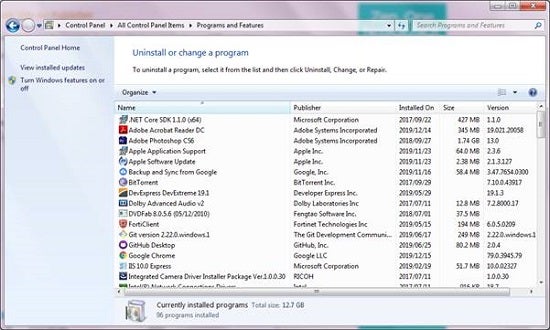
    Programs and Features
    Figure 1: Programs and Features

  3. Select Turn Windows Features on or off. This produces another dialog box.
  4. Select the checkboxes next to MSMQ, as shown in Figure 2.
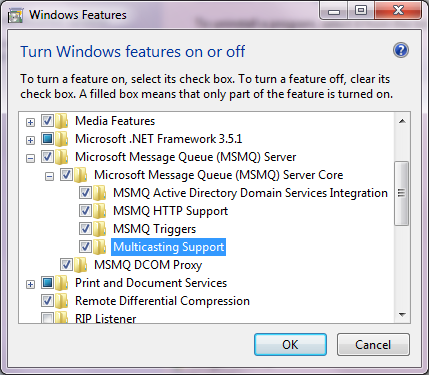
    Install MSMQ
    Figure 2: Install MSMQ

  5. Click OK. It will install and it will take some time, so be patient.

After it has installed, let’s make sure by using the next few steps:

  1. Open the Control Panel.
  2. Open Administrative Tools, as shown in Figure 3.
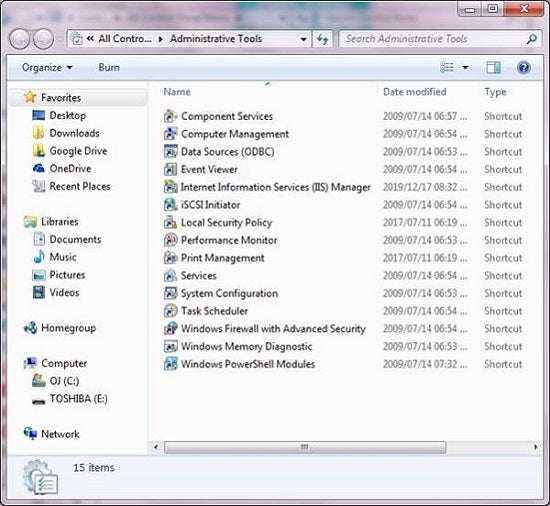
    Administrative Tools
    Figure 3: Administrative Tools

  3. Open Computer Management, as you can see in Figure 4.
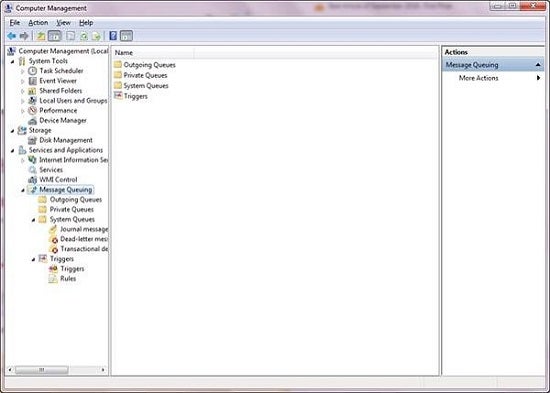
    Computer Management
    Figure 4: Computer Management

You should see the Message Queueing service. This means it is ready.

We will come back to this after we have written the programs to communicate with one another.

Advertisement

Conclusion

Now that we have done the background work, we are ready to create two different apps to communicate with one another. This will be the substance of Part 2. Until then, happy coding.

Hannes DuPreez

Ockert J. du Preez is a passionate coder and always willing to learn. He has written hundreds of developer articles over the years detailing his programming quests and adventures. He has written the following books: Visual Studio 2019 In-Depth (BpB Publications) JavaScript for Gurus (BpB Publications) He was the Technical Editor for Professional C++, 5th Edition (Wiley) He was a Microsoft Most Valuable Professional for .NET (2008–2017).

CodeGuru Logo

CodeGuru covers topics related to Microsoft-related software development, mobile development, database management, and web application programming. In addition to tutorials and how-tos that teach programmers how to code in Microsoft-related languages and frameworks like C# and .Net, we also publish articles on software development tools, the latest in developer news, and advice for project managers. Cloud services such as Microsoft Azure and database options including SQL Server and MSSQL are also frequently covered.

Property of TechnologyAdvice. © 2026 TechnologyAdvice. All Rights Reserved

Advertiser Disclosure: Some of the products that appear on this site are from companies from which TechnologyAdvice receives compensation. This compensation may impact how and where products appear on this site including, for example, the order in which they appear. TechnologyAdvice does not include all companies or all types of products available in the marketplace.