


Introduction
I love pictures, as some of my articles can attest to. I have just about done everything I could with images (drawing them, giving them special filter effects, manipulated them to become desktop wallpapers, and so on), or so I thought.
It is possible to obtain certain information from your pictures. Some information you can obtain include: Equipment maker and model of the device that took the picture, or created the picture, was the flash used, Aperture, and Geolocation to name a few. This information is called EXIF data.
EXIF Data
EXIF (EXchangeable Image File format) is a standard that specifies the formats for images, sound, and ancillary tags used by digital cameras, smartphones, and scanners. The EXIF tag structure is borrowed from TIFF files.
Practical
Create a new Visual Basic.NET Windows Forms application and design it as shown in Figure 1.
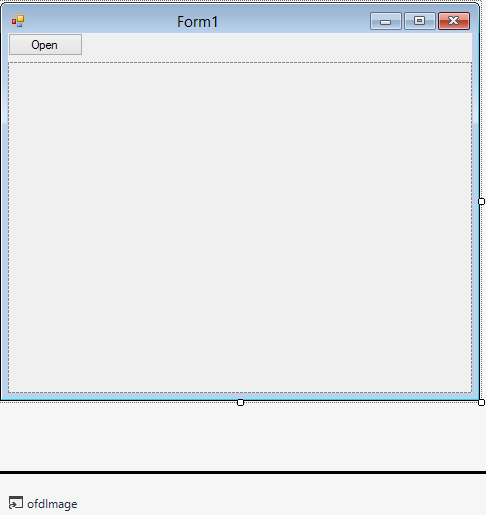
Figure 1: Design
The Design simply includes a PictureBox, OpenFileDialog, and a Button. The Button will spawn the Open File DialogBox, allowing you to select an Image file. The Image then will be displayed inside the PictureBox.
Code
Add a new Class to your project, name it EXIFData, and implement the IDisposable Interface.
Public Class EXIFData

   Implements IDisposable
Add the fields.
   Private bmp As Bitmap
   Private enc As System.Text.Encoding = Text.Encoding.UTF8
Bmp represents the Bitmap object to be read. Enc represents the Encoding of your Image. Now, for the Enums.
   Public Enum PicStart

      TopLeft = 1
      TopRight = 2
      BottomRight = 3
      BottomLeft = 4
      LeftTop = 5
      RightTop = 6
      RightBottom = 7
      LftBottom = 8

   End Enum

   Public Enum EXIFExposures

      Manual = 1
      Normal = 2
      AperturePriority = 3
      ShutterPriority = 4
      Creative = 5
      Action = 6
      Portrait = 7
      Landscape = 8

   End Enum

   Public Enum EXIFExposureModes

      Unknown = 0
      Average = 1
      CenterWeightedAverage = 2
      Spot = 3
      MultiSpot = 4
      MultiSegment = 5
      [Partial] = 6
      Other = 255

   End Enum

   Public Enum Flash

      NotFired = 0
      Fired = 1
      FiredButNoStrobeReturned = 5
      FiredAndStrobeReturned = 7

   End Enum
   Public Enum LightSources

      Unknown = 0
      Daylight = 1
      Fluorescent = 2
      Tungsten = 3
      Flash = 10
      StandardLightA = 17
      StandardLightB = 18
      StandardLightC = 19
      D55 = 20
      D65 = 21
      D75 = 22
      Other = 255

   End Enum

   Public Enum EXIFDataTypes As Short

      UnsignedByte = 1
      AsciiString = 2
      UnsignedShort = 3
      UnsignedLong = 4
      UnsignedRational = 5
      SignedByte = 6
      Undefined = 7
      SignedShort = 8
      SignedLong = 9
      SignedRational = 10
      SingleFloat = 11
      DoubleFloat = 12

   End Enum
These Enumerations enable you to determine the Picture’s starting point, types of exposure options, and Flash settings. The next Enumeration you are going to add next contains all the tags that can exist in a picture. I have chosen to include all them in here so that you can see for yourself all the properties we can get from just one picture.
   Public Enum EXIFTags As Integer

      ExifIFD = &H8769
      GpsIFD = &H8825
      NewSubfileType = &HFE
      SubfileType = &HFF
      ImageWidth = &H100
      ImageHeight = &H101
      BitsPerSample = &H102
      Compression = &H103
      PhotometricInterp = &H106
      ThreshHolding = &H107
      CellWidth = &H108
      CellHeight = &H109
      FillOrder = &H10A
      DocumentName = &H10D
      ImageDescription = &H10E
      EquipMake = &H10F
      EquipModel = &H110
      StripOffsets = &H111
      Orientation = &H112
      SamplesPerPixel = &H115
      RowsPerStrip = &H116
      StripBytesCount = &H117
      MinSampleValue = &H118
      MaxSampleValue = &H119
      XResolution = &H11A
      YResolution = &H11B
      PlanarConfig = &H11C
      PageName = &H11D
      XPosition = &H11E
      YPosition = &H11F
      FreeOffset = &H120
      FreeByteCounts = &H121
      GrayResponseUnit = &H122
      GrayResponseCurve = &H123
      T4Option = &H124
      T6Option = &H125
      ResolutionUnit = &H128
      PageNumber = &H129
      TransferFunction = &H12D
      SoftwareUsed = &H131
      DateTime = &H132
      Artist = &H13B
      HostComputer = &H13C
      Predictor = &H13D
      WhitePoint = &H13E
      PrimaryChromaticities = &H13F
      ColorMap = &H140
      HalftoneHints = &H141
      TileWidth = &H142
      TileLength = &H143
      TileOffset = &H144
      TileByteCounts = &H145
      InkSet = &H14C
      InkNames = &H14D
      NumberOfInks = &H14E
      DotRange = &H150
      TargetPrinter = &H151
      ExtraSamples = &H152
      SampleFormat = &H153
      SMinSampleValue = &H154
      SMaxSampleValue = &H155
      TransferRange = &H156
      JPEGProc = &H200
      JPEGInterFormat = &H201
      JPEGInterLength = &H202
      JPEGRestartInterval = &H203
      JPEGLosslessPredictors = &H205
      JPEGPointTransforms = &H206
      JPEGQTables = &H207
      JPEGDCTables = &H208
      JPEGACTables = &H209
      YCbCrCoefficients = &H211
      YCbCrSubsampling = &H212
      YCbCrPositioning = &H213
      REFBlackWhite = &H214
      ICCProfile = &H8773
      Gamma = &H301
      ICCProfileDescriptor = &H302
      SRGBRenderingIntent = &H303
      ImageTitle = &H320
      Copyright = &H8298
      ResolutionXUnit = &H5001
      ResolutionYUnit = &H5002
      ResolutionXLengthUnit = &H5003
      ResolutionYLengthUnit = &H5004
      PrintFlags = &H5005
      PrintFlagsVersion = &H5006
      PrintFlagsCrop = &H5007
      PrintFlagsBleedWidth = &H5008
      PrintFlagsBleedWidthScale = &H5009
      HalftoneLPI = &H500A
      HalftoneLPIUnit = &H500B
      HalftoneDegree = &H500C
      HalftoneShape = &H500D
      HalftoneMisc = &H500E
      HalftoneScreen = &H500F
      JPEGQuality = &H5010
      GridSize = &H5011
      ThumbnailFormat = &H5012
      ThumbnailWidth = &H5013
      ThumbnailHeight = &H5014
      ThumbnailColorDepth = &H5015
      ThumbnailPlanes = &H5016
      ThumbnailRawBytes = &H5017
      ThumbnailSize = &H5018
      ThumbnailCompressedSize = &H5019
      ColorTransferFunction = &H501A
      ThumbnailData = &H501B
      ThumbnailImageWidth = &H5020
      ThumbnailImageHeight = &H502
      ThumbnailBitsPerSample = &H5022
      ThumbnailCompression = &H5023
      ThumbnailPhotometricInterp = &H5024
      ThumbnailImageDescription = &H5025
      ThumbnailEquipMake = &H5026
      ThumbnailEquipModel = &H5027
      ThumbnailStripOffsets = &H5028
      ThumbnailOrientation = &H5029
      ThumbnailSamplesPerPixel = &H502A
      ThumbnailRowsPerStrip = &H502B
      ThumbnailStripBytesCount = &H502C
      ThumbnailResolutionX = &H502D
      ThumbnailResolutionY = &H502E
      ThumbnailPlanarConfig = &H502F
      ThumbnailResolutionUnit = &H5030
      ThumbnailTransferFunction = &H5031
      ThumbnailSoftwareUsed = &H5032
      ThumbnailDateTime = &H5033
      ThumbnailArtist = &H5034
      ThumbnailWhitePoint = &H5035
      ThumbnailPrimaryChromaticities = &H5036
      ThumbnailYCbCrCoefficients = &H5037
      ThumbnailYCbCrSubsampling = &H5038
      ThumbnailYCbCrPositioning = &H5039
      ThumbnailRefBlackWhite = &H503A
      ThumbnailCopyRight = &H503B
      LuminanceTable = &H5090
      ChrominanceTable = &H5091
      FrameDelay = &H5100
      LoopCount = &H5101
      PixelUnit = &H5110
      PixelPerUnitX = &H5111
      PixelPerUnitY = &H5112
      PaletteHistogram = &H5113
      ExifExposureTime = &H829A
      ExifFNumber = &H829D
      ExifExposureProg = &H8822
      ExifSpectralSense = &H8824
      ExifISOSpeed = &H8827
      ExifOECF = &H8828
      ExifVer = &H9000
      ExifDTOrig = &H9003
      ExifDTDigitized = &H9004
      ExifCompConfig = &H9101
      ExifCompBPP = &H9102
      ExifShutterSpeed = &H9201
      ExifAperture = &H9202
      ExifBrightness = &H9203
      ExifExposureBias = &H9204
      ExifMaxAperture = &H9205
      ExifSubjectDist = &H9206
      ExifMeteringMode = &H9207
      ExifLightSource = &H9208
      ExifFlash = &H9209
      ExifFocalLength = &H920A
      ExifMakerNote = &H927C
      ExifUserComment = &H9286
      ExifDTSubsec = &H9290
      ExifDTOrigSS = &H9291
      ExifDTDigSS = &H9292
      ExifFPXVer = &HA000
      ExifColorSpace = &HA001
      ExifPixXDim = &HA002
      ExifPixYDim = &HA003
      ExifRelatedWav = &HA004
      ExifInterop = &HA005
      ExifFlashEnergy = &HA20B
      ExifSpatialFR = &HA20C
      ExifFocalXRes = &HA20E
      ExifFocalYRes = &HA20F
      ExifFocalResUnit = &HA210
      ExifSubjectLoc = &HA214
      ExifExposureIndex = &HA215
      ExifSensingMethod = &HA217
      ExifFileSource = &HA300
      ExifSceneType = &HA301
      ExifCfaPattern = &HA302
      GpsVer = &H0
      GpsLatitudeRef = &H1
      GpsLatitude = &H2
      GpsLongitudeRef = &H3
      GpsLongitude = &H4
      GpsAltitudeRef = &H5
      GpsAltitude = &H6
      GpsGpsTime = &H7
      GpsGpsSatellites = &H8
      GpsGpsStatus = &H9
      GpsGpsMeasureMode = &HA
      GpsGpsDop = &HB
      GpsSpeedRef = &HC
      GpsSpeed = &HD
      GpsTrackRef = &HE
      GpsTrack = &HF
      GpsImgDirRef = &H10
      GpsImgDir = &H11
      GpsMapDatum = &H12
      GpsDestLatRef = &H13
      GpsDestLat = &H14
      GpsDestLongRef = &H15
      GpsDestLong = &H16
      GpsDestBearRef = &H17
      GpsDestBear = &H18
      GpsDestDistRef = &H19
      GpsDestDist = &H1A

   End Enum
To make proper use of these Enumerations, let us add the associated Properties which can be called from the Form.
   Public Property Encoding() As System.Text.Encoding

      Get

         Return enc

      End Get

      Set(ByVal Value As System.Text.Encoding)

         If Not Value Is Nothing Then

            enc = Encoding

         End If

      End Set

   End Property

   Public ReadOnly Property EquipmentMake() As String

      Get

         Return GetPropString(EXIFTags.EquipMake)

      End Get

   End Property

   Public ReadOnly Property EquipmentModel() As String

      Get

         Return GetPropString(EXIFTags.EquipModel)

      End Get

   End Property

   Public ReadOnly Property Soft() As String

      Get

         Return GetPropString(EXIFTags.SoftwareUsed)

      End Get

   End Property

   Public ReadOnly Property Start() As PicStart

      Get

         Dim i As Int32 = GetPropInt16(EXIFTags.Orientation)


         If Not [Enum].IsDefined(GetType(PicStart), i) Then

            Return PicStart.TopLeft

         Else

            Return CType([Enum].Parse(GetType(PicStart), _
               [Enum].GetName(GetType(PicStart), i)), PicStart)

         End If

      End Get

   End Property

   Public Property LastModified() As DateTime

      Get

         Try

            Return DateTime.ParseExact(GetPropString(EXIFTags _
               .DateTime), "yyyy\:MM\:dd HH\:mm\:ss", Nothing)

         Catch ex As Exception

            Return DateTime.MinValue

         End Try

      End Get

      Set(ByVal Value As DateTime)

         Try

            SetPropString(EXIFTags.DateTime, _
               Value.ToString("yyyy\:MM\:dd HH\:mm\:ss"))

         Catch ex As Exception

         End Try

      End Set

   End Property

   Public Property OriginalDate() As DateTime

      Get

         Try

            Return DateTime.ParseExact(GetPropString(EXIFTags _
               .ExifDTOrig), "yyyy\:MM\:dd HH\:mm\:ss", Nothing)

         Catch ex As Exception

            Return DateTime.MinValue

         End Try

      End Get

      Set(ByVal Value As DateTime)

         Try

            SetPropString(EXIFTags.ExifDTOrig, _
               Value.ToString("yyyy\:MM\:dd HH\:mm\:ss"))

         Catch ex As Exception

         End Try

      End Set

   End Property

   Public Property DigitizedDate() As DateTime

      Get

         Try

            Return DateTime.ParseExact(GetPropString(EXIFTags _
               .ExifDTDigitized), "yyyy\:MM\:dd HH\:mm\:ss", _
               Nothing)

         Catch ex As Exception

            Return DateTime.MinValue

         End Try

      End Get

      Set(ByVal Value As DateTime)

         Try

            SetPropString(EXIFTags.ExifDTDigitized, _
               Value.ToString("yyyy\:MM\:dd HH\:mm\:ss"))

         Catch ex As Exception

         End Try

      End Set

   End Property

   Public ReadOnly Property Width() As Int32

      Get

         Return Me.bmp.Width

      End Get

   End Property

   Public ReadOnly Property Height() As Int32

      Get

         Return Me.bmp.Height

      End Get

   End Property

   Public ReadOnly Property XRes() As Double

      Get

         Dim i As Double = GetPropRational(EXIFTags.XResolution) _
               .ToDouble()


            If GetPropInt16(EXIFTags.ResolutionUnit) = 3 Then 'CM'

               Return i * 2.54

            Else

               Return i

            End If

      End Get

   End Property

   Public ReadOnly Property YRes() As Double

      Get

         Dim i As Double = GetPropRational(EXIFTags.YResolution) _
            .ToDouble()


         If GetPropInt16(EXIFTags.ResolutionUnit) = 3 Then

            Return i * 2.54

         Else

            Return i

         End If

      End Get

   End Property
   Public Property ImageTitle() As String

      Get

         Return GetPropString(EXIFTags.ImageTitle)

      End Get

      Set(ByVal Value As String)

         Try

            SetPropString(EXIFTags.ImageTitle, Value)

         Catch ex As Exception

         End Try

      End Set

   End Property

   Public Property Comment() As String

      Get

         Return GetPropString(EXIFTags.ExifUserComment)

      End Get

      Set(ByVal Value As String)

         Try

            SetPropString(EXIFTags.ExifUserComment, Value)

         Catch ex As Exception

         End Try

      End Set

   End Property

   Public Property ArtistName() As String

      Get

         Return GetPropString(EXIFTags.Artist)

      End Get

      Set(ByVal Value As String)

         Try

            SetPropString(EXIFTags.Artist, Value)

         Catch ex As Exception

         End Try

      End Set

   End Property

   Public Property ImageDescription() As String

      Get

         Return GetPropString(EXIFTags.ImageDescription)

      End Get

      Set(ByVal Value As String)

         Try

            SetPropString(EXIFTags.ImageDescription, Value)

         Catch ex As Exception

         End Try

      End Set

   End Property

   Public Property Copyright() As String

      Get

         Return GetPropString(EXIFTags.Copyright)

      End Get

      Set(ByVal Value As String)

         Try

            SetPropString(EXIFTags.Copyright, Value.ToString)

         Catch ex As Exception

         End Try

      End Set

   End Property

   Public ReadOnly Property ExposureTime() As Double

      Get

         If IsPropDefined(EXIFTags.ExifExposureTime) Then

            Return GetPropRational(EXIFTags.ExifExposureTime) _
                     .ToDouble

         ElseIf IsPropDefined(EXIFTags.ExifShutterSpeed) Then


            Return 1 / (2 ^ GetPropRational(EXIFTags _
               .ExifShutterSpeed).ToDouble)

         Else

            Return 0

         End If

      End Get

   End Property

   Public ReadOnly Property Aperture() As Double

      Get

         If IsPropDefined(EXIFTags.ExifFNumber) Then

            Return GetPropRational(EXIFTags.ExifFNumber).ToDouble()

         ElseIf IsPropDefined(EXIFTags.ExifAperture) Then

            Return Math.Sqrt(2) ^ GetPropRational(EXIFTags _
               .ExifAperture).ToDouble()

         Else

            Return 0

         End If

      End Get

   End Property

   Public ReadOnly Property ExposureProgram() As EXIFExposures

      Get

         Dim i As Int32 = GetPropInt16(EXIFTags.ExifExposureProg)


         If [Enum].IsDefined(GetType(EXIFExposures), i) Then

            Return CType([Enum].Parse(GetType(EXIFExposures), _
               [Enum].GetName(GetType(EXIFExposures), i)), _
               EXIFExposures)

         Else

            Return EXIFExposures.Normal

         End If

      End Get

   End Property

   Public ReadOnly Property ISOSensitivity() As Int16

      Get

         Return GetPropInt16(EXIFTags.ExifISOSpeed)

      End Get

   End Property

   Public ReadOnly Property SubjectDistance() As Double

      Get

         Return GetPropRational(EXIFTags.ExifSubjectDist) _
            .ToDouble()

      End Get

   End Property

   Public ReadOnly Property ExposureMeteringMode() As _
         EXIFExposureModes

      Get

         Dim i As Int32 = GetPropInt16(EXIFTags.ExifMeteringMode)


         If [Enum].IsDefined(GetType(EXIFExposureModes), i) Then

            Return CType([Enum].Parse(GetType(EXIFExposureModes), _
               [Enum].GetName(GetType(EXIFExposureModes), i)), _
               EXIFExposureModes)

         Else

            Return EXIFExposureModes.Unknown

         End If

      End Get

   End Property

   Public ReadOnly Property FocalLength() As Double

      Get

            Return GetPropRational(EXIFTags.ExifFocalLength) _
               .ToDouble

      End Get

   End Property

   Public ReadOnly Property FlashMode() As Flash

      Get

         Dim i As Int32 = GetPropInt16(EXIFTags.ExifFlash)


         If [Enum].IsDefined(GetType(Flash), i) Then

            Return CType([Enum].Parse(GetType(Flash), _
               [Enum].GetName(GetType(Flash), i)), Flash)

         Else

            Return Flash.NotFired

         End If

      End Get

   End Property

   Public ReadOnly Property LightSource() As LightSources

      Get

         Dim X As Int32 = GetPropInt16(EXIFTags.ExifLightSource)


         If [Enum].IsDefined(GetType(LightSources), X) Then

            Return CType([Enum].Parse(GetType(LightSources), _
               [Enum].GetName(GetType(LightSources), X)), _
               LightSources)

         Else

            Return LightSources.Unknown

         End If

      End Get

   End Property
Add the Functions to interpret the EXIF data and display the output in a legible and understandable format.
   Public Function GetBitmap() As Bitmap

      Return DirectCast(Me.bmp.Clone(), Bitmap)

   End Function

   Public Overrides Function ToString() As String

      Dim SB As New Text.StringBuilder

      SB.Append("Image:")
      SB.Append("\n\tDimensions:       " & Width & " x " _
         & Height & " px")
      SB.Append("\n\tResolution:       " & XRes & " x " _
         & YRes & " dpi")
      SB.Append("\n\tOrientation:      " & _
         [Enum].GetName(GetType(PicStart), Start))
      SB.Append("\n\tTitle:            " & ImageTitle)
      SB.Append("\n\tDescription:      " & ImageDescription)
      SB.Append("\n\tCopyright:        " & Copyright)
      SB.Append("\nEquipment:")
      SB.Append("\n\tMaker:            " & EquipmentMake)
      SB.Append("\n\tModel:            " & EquipmentModel)
      SB.Append("\n\tSoftware:         " & Soft)
      SB.Append("\nDate and time:")
      SB.Append("\n\tGeneral:          " & LastModified.ToString())
      SB.Append("\n\tOriginal:         " & OriginalDate.ToString())
      SB.Append("\n\tDigitized:        " & DigitizedDate.ToString())
      SB.Append("\nShooting conditions:")
      SB.Append("\n\tExposure time:    " & _
         ExposureTime.ToString("N4") & " s")
      SB.Append("\n\tExposure program: " & _
         [Enum].GetName(GetType(EXIFExposures), ExposureProgram))
      SB.Append("\n\tExposure mode:    " & _
         [Enum].GetName(GetType(EXIFExposureModes), _
         ExposureMeteringMode))
      SB.Append("\n\tAperture:        F" & _
         Aperture.ToString("N2"))
      SB.Append("\n\tISO sensitivity:  " & ISOSensitivity)
      SB.Append("\n\tSubject distance: " & _
         SubjectDistance.ToString("N2") & " m")
      SB.Append("\n\tFocal length:     " & FocalLength)
      SB.Append("\n\tFlash:            " & _
         [Enum].GetName(GetType(Flash), FlashMode))
      SB.Append("\n\tLight source (WB):" & _
         [Enum].GetName(GetType(LightSources), LightSource))

      SB.Replace("\n", vbCrLf)
      SB.Replace("\t", vbTab)

      Return SB.ToString()

   End Function

   Public Function IsPropDefined(ByVal p As Int32) As Boolean

      Return CBool([Array].IndexOf(Me.bmp.PropertyIdList, p) > -1)

   End Function

   Public Function GetPropInt32(ByVal p As Int32, Optional ByVal _
      val As Int32 = 0) As Int32

      If IsPropDefined(p) Then

         Return GetInt32(Me.bmp.GetPropertyItem(p).Value)

      Else

         Return val

      End If

   End Function

   Public Function GetPropInt16(ByVal p As Int32, Optional ByVal _
         val As Int16 = 0) As Int16

      If IsPropDefined(p) Then

         Return GetInt16(Me.bmp.GetPropertyItem(p).Value)

      Else

         Return val

      End If

   End Function

   Public Function GetPropString(ByVal p As Int32, Optional ByVal _
         val As String = "") As String

      If IsPropDefined(p) Then

         Return GetString(Me.bmp.GetPropertyItem(p).Value)

      Else

         Return val

      End If

   End Function

   Public Function GetProp(ByVal p As Int32, Optional ByVal val _
         As Byte() = Nothing) As Byte()

      If IsPropDefined(p) Then

         Return Me.bmp.GetPropertyItem(p).Value

      Else

         Return val

      End If

   End Function

   Public Function GetPropRational(ByVal p As Int32) As _
         EXIFRational

      If IsPropDefined(p) Then

         Return GetExifRational(Me.bmp.GetPropertyItem(p).Value)

      Else

         Dim i As EXIFRational

         i.iNumerator = 0

         i.iDenominator = 1

         Return i

      End If

   End Function

   Public Sub SetPropString(ByVal p As Int32, ByVal val As String)

      Dim Bytes() As Byte = enc.GetBytes(val & vbNullChar)

      SetProp(p, Bytes, EXIFDataTypes.AsciiString)

   End Sub

   Public Sub SetPropInt16(ByVal p As Int32, ByVal val As Int16)

      Dim Bytes(1) As Byte

      Bytes(0) = CType(val And &HFF, Byte)
      Bytes(1) = CType((val And &HFF00) >> 8, Byte)

      SetProp(p, Bytes, EXIFDataTypes.SignedShort)

   End Sub

   Public Sub SetPropInt32(ByVal p As Int32, ByVal val As Int32)

      Dim Bytes(3) As Byte

      For i As Int32 = 0 To 3

         Bytes(i) = CType(val And &HFF, Byte)

         val >>= 8

      Next

      SetProp(p, Bytes, EXIFDataTypes.SignedLong)

   End Sub

   Public Sub SetProp(ByVal p As Int32, ByVal Bytes() As Byte, _
         ByVal Type As EXIFDataTypes)

      Dim PI As Imaging.PropertyItem = Me.bmp.PropertyItems(0)

      PI.Id = p
      PI.Value = Bytes
      PI.Type = Type
      PI.Len = Bytes.Length

      Me.bmp.SetPropertyItem(PI)

   End Sub

   Private Function GetInt32(ByVal Bt As Byte()) As Int32

      Return Bt(3) << 24 Or Bt(2) << 16 Or Bt(1) << 8 Or Bt(0)

   End Function

   Private Function GetInt16(ByVal Bt As Byte()) As Int16

      Return Bt(1) << 8 Or Bt(0)

   End Function

   Private Function GetString(ByVal Bt As Byte()) As String

      Dim s As String = enc.GetString(Bt)

      If s.EndsWith(vbNullChar) Then s = s.Substring(0, _
         s.Length - 1)

      Return s

   End Function

   Private Function GetExifRational(ByVal B As Byte()) _
         As EXIFRational

      Dim i As New EXIFRational, N(3), D(3) As Byte

      Array.Copy(B, 0, N, 0, 4)
      Array.Copy(B, 4, D, 0, 4)

      i.iDenominator = GetInt32(D)
      i.iNumerator = GetInt32(N)

      Return i

   End Function
Add the Class Initialization and Disposal.
   Public Structure EXIFRational

      Dim iNumerator As Int32
      Dim iDenominator As Int32

      Shadows Function ToString(Optional ByVal Delimiter _
         As String = "/") As String

         Return iNumerator & Delimiter & iDenominator

      End Function

      Function ToDouble() As Double

         Return iNumerator / iDenominator

      End Function

   End Structure

   Public Sub New(ByRef bmp As Bitmap)

      If Not bmp Is Nothing Then

         Me.bmp = bmp

      End If

   End Sub

   Public Sub New(ByVal strFileName As String)

      Me.bmp = DirectCast(Image.FromFile(strFileName), Bitmap)

   End Sub


   Public Sub Dispose() Implements IDisposable.Dispose

      Me.bmp.Dispose()

   End Sub
Add the following code to the Button’s Click event on the Form.
   Private Sub btnOpen_Click(sender As Object, e As EventArgs) _
         Handles btnOpen.Click

      Dim ofd As New OpenFileDialog
      ofd.Filter = "Bitmap|*.bmp|JPEG|*.jpg"

      If ofd.ShowDialog = Windows.Forms.DialogResult.Cancel Then _
         Exit Sub


      Dim bmp As New Bitmap(ofd.FileName)

      If Not IsNothing(picImage.Image) Then _
         picImage.Image.Dispose()

      picImage.Image = bmp

      Dim EW As New EXIFData(ofd.FileName)

      Console.WriteLine(EW.ToString())

      EW.Dispose()

   End Sub
When a valid Picture has been selected, the Data output would be similar to the data shown in Listing 1.
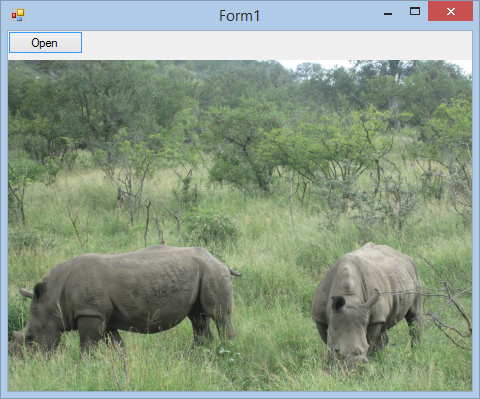
Figure 2: Run time
Figure 2 is a picture I took in April of 2018 in the Kruger National Park in South Africa. Now, let’s look at the output.
Image:
   Dimensions:         4608 x 3456 px
   Resolution:         180 x 180 dpi
   Orientation:        TopLeft
   Title:
   Description:
   Copyright:
Equipment:
   Maker:              Canon
   Model:              Canon PowerShot A1400
   Software:
Date and time:
   General:            2018-03-31 08:03:05 AM
   Original:           2018-03-31 08:03:05 AM
   Digitized:          2018-03-31 08:03:05 AM
Shooting conditions:
   Exposure time:      0.0063 s
   Exposure program:   Normal
   Exposure mode:      MultiSegment
   Aperture:           F6.90
   ISO sensitivity:    250
   Subject distance:   0.00 m
   Focal length:       0.991489361702128
   Flash:              NotFired
   Light source (WB):  Unknown
Listing 1: Output
Conclusion
I have only covered the tip of the iceberg with information you can obtain from pictures. Now, you have a lot of techniques you can explore further. I hope my article helped.