


Introduction
A lot of things happen in the background of your computer, and a lot of things make it possible to remember settings and simple strings. No, I am not talking about Windows services; I am talking about environment variables. Let’s have a look at most of the available environment variables on Windows systems, and what information they can supply us with.
Environment Variables
Environment variables are dynamic-named values that affect the way running processes behave on a computer. Environment variables form part of the environment in which processes run.
Some examples of environment variables include the following:
- PATH: List of directory paths
- USERPROFILE: User’s home directory
- TEMP: Location to store temporary files
Let’s create a quick and simple app to make use of these and more. Open Visual Studio and create a new VB.NET or C# Windows Forms application. After the project has loaded, design the form to resemble Figure 1. All that you needed to include is one button control and one listbox control.
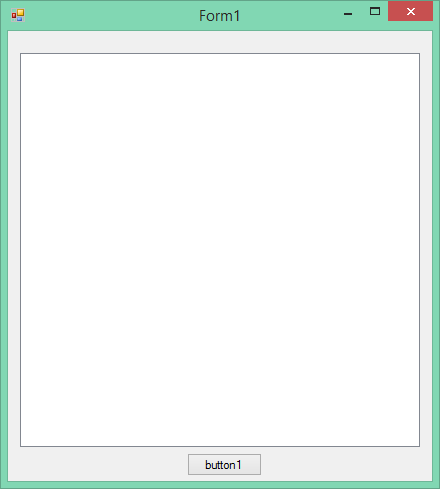
Figure 1: Design
In regards to coding, we do not need to import any namespaces or declare too many variables, because we are simply dealing with one button’s code. Let’s add the complete code for it, and do the explanations afterwards.
Add the following code for your button:
C#
   private void button1_Click(object sender, EventArgs e)
   {
      string strExpand;
      string strNewLine = Environment.NewLine;

      listBox1.Items.Add(String.Format("Environment Example"));

      listBox1.Items.Add(String.Format("CommandLine: {0}",
         Environment.CommandLine));

      string[] strArgs = Environment.GetCommandLineArgs();
      listBox1.Items.Add(String.Format("GetCommandLineArgs: {0}",
         String.Join(", ", strArgs)));

      listBox1.Items.Add(String.Format("CurrentDirectory: {0}",
         Environment.CurrentDirectory));

      listBox1.Items.Add(String.Format("ExitCode: {0}",
         Environment.ExitCode));

      listBox1.Items.Add(String.Format("HasShutdownStarted: {0}",
         Environment.HasShutdownStarted));

      listBox1.Items.Add(String.Format("MachineName: {0}",
         Environment.MachineName));

      listBox1.Items.Add(String.Format("NewLine: {0}  first line{0}
           second line{0}  third line", Environment.NewLine));

      listBox1.Items.Add(String.Format("OSVersion: {0}",
         Environment.OSVersion.ToString()));

      listBox1.Items.Add(String.Format("StackTrace: '{0}'",
         Environment.StackTrace));

      listBox1.Items.Add(String.Format("SystemDirectory: {0}",
         Environment.SystemDirectory));

      listBox1.Items.Add(String.Format("TickCount: {0}",
         Environment.TickCount));

      listBox1.Items.Add(String.Format("UserDomainName: {0}",
         Environment.UserDomainName));

      listBox1.Items.Add(String.Format("UserInteractive: {0}",
         Environment.UserInteractive));

      listBox1.Items.Add(String.Format("UserName: {0}",
         Environment.UserName));

      listBox1.Items.Add(String.Format("Version: {0}",
         Environment.Version.ToString()));

      listBox1.Items.Add(String.Format("WorkingSet: {0}",
         Environment.WorkingSet));

      string strSystem = "System drive = %SystemDrive% and
         System root = %SystemRoot%";

      strExpand = Environment.ExpandEnvironmentVariables
         (strSystem);
      listBox1.Items.Add(String.Format("ExpandEnvironmentVariables:
         {0}  {1}", strNewLine, strExpand));

      listBox1.Items.Add(String.Format("GetEnvironmentVariable:
         {0}  My temporary directory is {1}.", strNewLine,
         Environment.GetEnvironmentVariable("TEMP")));

      listBox1.Items.Add(String.Format("GetEnvironmentVariables:
         "));
      IDictionary evEnvironment =
         Environment.GetEnvironmentVariables();

      foreach (DictionaryEntry de in evEnvironment)
      {
         listBox1.Items.Add(String.Format("  {0} = {1}", de.Key,
            de.Value));
      }

      listBox1.Items.Add(String.Format("GetFolderPath: {0}",
         Environment.GetFolderPath(Environment.SpecialFolder
         .System)));

      string[] drives = Environment.GetLogicalDrives();
      listBox1.Items.Add(String.Format("GetLogicalDrives: {0}",
         String.Join(", ", drives)));
   }
VB.NET
   Private Sub button1_Click(ByVal sender As Object, ByVal e _
         As EventArgs) Handles button1.Click
      Dim strExpand As String
      Dim strNewLine As String = Environment.NewLine
      listBox1.Items.Add(String.Format("Environment Example"))
      listBox1.Items.Add(String.Format("CommandLine: {0}", _
         Environment.CommandLine))
      Dim strArgs As String() = Environment.GetCommandLineArgs()
      listBox1.Items.Add(String.Format("GetCommandLineArgs: {0}", _
         String.Join(", ", strArgs)))
      listBox1.Items.Add(String.Format("CurrentDirectory: {0}", _
         Environment.CurrentDirectory))
      listBox1.Items.Add(String.Format("ExitCode: {0}", _
         Environment.ExitCode))
      listBox1.Items.Add(String.Format("HasShutdownStarted: {0}", _
         Environment.HasShutdownStarted))
      listBox1.Items.Add(String.Format("MachineName: {0}", _
         Environment.MachineName))
      listBox1.Items.Add(String.Format("NewLine: {0}  first _
         line{0}  second line{0}  third line", _
         Environment.NewLine))
      listBox1.Items.Add(String.Format("OSVersion: {0}", _
         Environment.OSVersion.ToString()))
      listBox1.Items.Add(String.Format("StackTrace: '{0}'", _
         Environment.StackTrace))
      listBox1.Items.Add(String.Format("SystemDirectory: {0}", _
         Environment.SystemDirectory))
      listBox1.Items.Add(String.Format("TickCount: {0}", _
         Environment.TickCount))
      listBox1.Items.Add(String.Format("UserDomainName: {0}", _
         Environment.UserDomainName))
      listBox1.Items.Add(String.Format("UserInteractive: {0}", _
         Environment.UserInteractive))
      listBox1.Items.Add(String.Format("UserName: {0}", _
         Environment.UserName))
      listBox1.Items.Add(String.Format("Version: {0}", _
         Environment.Version.ToString()))
      listBox1.Items.Add(String.Format("WorkingSet: {0}", _
         Environment.WorkingSet))
      Dim strSystem As String = "System drive = %SystemDrive% and _
         System root = %SystemRoot%"
      strExpand = Environment.ExpandEnvironmentVariables(strSystem)
      listBox1.Items.Add(String.Format("ExpandEnvironment _
         Variables: {0}  {1}", strNewLine, strExpand))
      listBox1.Items.Add(String.Format("GetEnvironmentVariable: _
         {0}  My temporary directory is {1}.", strNewLine, _
         Environment.GetEnvironmentVariable("TEMP")))
      listBox1.Items.Add(String.Format("GetEnvironmentVariables: "))
      Dim evEnvironment As IDictionary = _
         Environment.GetEnvironmentVariables()

      For Each de As DictionaryEntry In evEnvironment
         listBox1.Items.Add(String.Format("  {0} = {1}", de.Key, _
         de.Value))
      Next

      listBox1.Items.Add(String.Format("GetFolderPath: {0}", _
         Environment.GetFolderPath(Environment.SpecialFolder _
         .System)))
      Dim drives As String() = Environment.GetLogicalDrives()
      listBox1.Items.Add(String.Format("GetLogicalDrives: {0}", _
         String.Join(", ", drives)))
   End Sub
What happens here?
Well, every line is almost unique, except for the common Environment Variable. We interrogate the following Environment Variables in our code:
| Environment Variable | Description |
| CommandLine | Shows current directory |
| GetCommandLineArgs | Shows current directory and optional arguments |
| CurrentDirectory | Shows current directory |
| ExitCode | Shows the exit code, which is 0 |
| HasShutdownStarted | True or False if Shutdown has started or not |
| MachineName | The PC’s name |
| NewLine | Shows new lines with the Return key |
| OSVersion | What version of Windows you have |
| StackTrace | If there is an error, it shows where |
| SystemDirectory | Default System directory |
| UserDomainName | Which domain the user belongs to |
| UserInteractive | Is the user busy on the PC? |
| Username | The User name |
When run, your screen will resemble Figures 2 and 3.
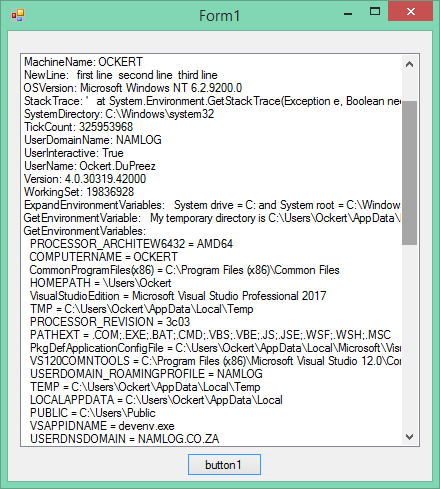
Figure 2: Top part of list
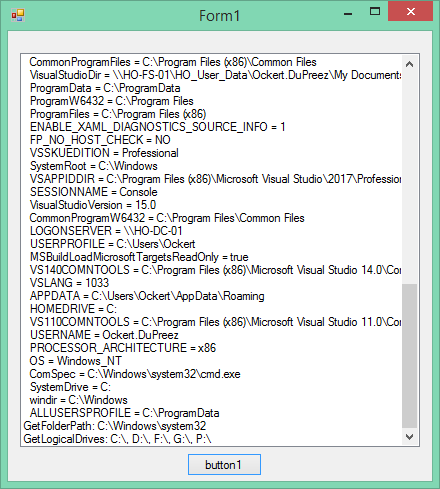
Figure 3: Bottom part of listbox
Conclusion
This was a very quick introduction to Environment variables in general, but I sincerely hope that you have learned a few tricks with this article.