


Introduction
What would the world be without electronic communication? In the fourth Industrial Revolution, everything is centered around data. For data to be so valuable, it needs to be input electronically. This is where ASCII comes in. Today, you will learn about ASCII and how to create your own ASCII table in .NET.
ASCII
American Standard Code for Information Interchange, ASCII, is a character encoding standard for electronic communication. ASCII codes represent electronic text in computers and telecommunications equipment.
Practical
Start Visual Studio and create either a Visual Basic.NET or C# Windows Forms project. Once the project has loaded, resize the form to increase its size and add a Docked RichTexBox to your form. The RichTextBox will be used to display your ASCII Table.
Add a Class and name it clsASCII. Remember that my naming of objects may differ from yours. Import the proper Namespaces so that it is easier to make use of the objects in the respective .NET classes.
C#
using System;
using System.Collections.Generic;
using System.Text;
VB.NET
Imports System.Text
Add an Enumeration for the characters that aren’t printed. These are the the non-printing characters.
C#
   enum NonPrintingChars
   {
      NUL,    // Null character//
      SOH,    // Start of Header//
      STX,    // Start of Text//
      ETX,    // End of Text//
      EOT,    // End of Transmission//
      ENQ,    // Enquiry//
      ACK,    // Acknowledgment//
      BEL,    // Bell//
      BS,     // Backspace//
      HT,     // Horizontal Tab//
      LF,     // Line feed//
      VT,     // Vertical Tab//
      FF,     // Form feed//
      CR,     // Carriage return//
      SO,     // Shift Out//
      SI,     // Shift In//
      DLE,    // Data Link Escape//
      DC1,    // Device Control 1//
      DC2,    // Device Control 2//
      DC3,    // Device Control 3 //
      DC4,    // Device Control 4//
      NAK,    // Negative Acknowledgement//
      SYN,    // Synchronous idle//
      ETB,    // End of Transmission Block//
      CAN,    // Cancel//
      EM,     // End of Medium//
      S_B,    // SUB Substitute//
      ESC,    // Escape//
      FS,     // File Separator//
      GS,     // Group Separator//
      RS,     // Record Separator//
      US,     // Unit Separator//
      SPC,    // Space//
      DEL = 127,    // Delete//
      SHYP = 173,   // Soft Hyphen//
      NBSP = 255,   // NBSP//

   }
VB.NET
   Enum NonPrintingChars

      NUL    ' Null character'
      SOH    ' Start of Header'
      STX    ' Start of Text'
      ETX    ' End of Text'
      EOT    ' End of Transmission'
      ENQ    ' Enquiry'
      ACK    ' Acknowledgment'
      BEL    ' Bell'
      BS     ' Backspace'
      HT     ' Horizontal Tab'
      LF     ' Line feed'
      VT     ' Vertical Tab'
      FF     ' Form feed'
      CR     ' Carriage return'
      SO     ' Shift Out'
      SI     ' Shift In'
      DLE    ' Data Link Escape'
      DC1    ' Device Control 1'
      DC2    ' Device Control 2'
      DC3    ' Device Control 3'
      DC4    ' Device Control 4'
      NAK    ' Negative Acknowledgement'
      SYN    ' Synchronous idle'
      ETB    ' End of Transmission Block'
      CAN    ' Cancel'
      EM     ' End of Medium'
      S_B    ' SUB Substitute'
      ESC    ' Escape'
      FS     ' File Separator'
      GS     ' Group Separator'
      RS     ' Record Separator'
      US     ' Unit Separator'
      SPC    ' Space'
      DEL = 127    ' Delete'
      SHYP = 173   ' Soft Hyphen'
      NBSP = 255   'NBSP'

   End Enum
Add the Class’ fields and Properties.
C#
   public Dictionary<int, Characters> dicChars { get; set; } =
      new Dictionary<int, Characters>();
   private NonPrintingChars[] npcNonPrintingCharcaters =
      (NonPrintingChars[])Enum.GetValues(typeof(NonPrintingChars));
   private StringBuilder sbTable = new StringBuilder();
   private Encoding encEncoding;
   public Encoding EncodingType
   {

      get
      {

         return encEncoding;

      }

      set
      {

         encEncoding = value;

         for (int i = 0; i <= 255; i++)
         {

            Characters chrCurrent = new Characters(i,
               ShowCharacter(i));

            dicChars.Add(i, chrCurrent);

         }

      }

   }
VB.NET
   Property dicChars As New Dictionary(Of Integer, Characters)
   Private npcNonPrintingCharcaters() As NonPrintingChars =_
      CType([Enum].GetValues(GetType(NonPrintingChars)), _
      NonPrintingChars())
   Private sbTable As New StringBuilder
   Private encEncoding As Encoding
   Public Property EncodingType() As Encoding

      Get

         Return encEncoding

      End Get

      Set(ByVal value As Encoding)

         encEncoding = value

         For i As Integer = 0 To 255

            Dim chrCurrent As New Characters(i, ShowCharacter(i))

            dicChars.Add(i, chrCurrent)

         Next

      End Set

   End Property
diChars is a Dictionary object that will hold the characters. ncpNonPrintingCharacters is a representation of the NonPrintingChars Enum. sbTable is a StringBuilder object that will end up being the ASCII Table. encEncoding is of type Encoding, which will handle the character encoding. Add the rest of the class.
C#
   public clsASCII()
   {

      EncodingType = Encoding.Default;

   }

   private void CreateRows(int intStartPos)
   {

      for (int i = 0; i <= 31; i++)
      {

         for (int j = intStartPos; j <= intStartPos + 96; j += 32)
         {

            int chCurrent = i + j;

            Characters chrCharacter = dicChars[chCurrent];

            sbTable.Append(string.Format(" {0} {1} x{2} o{3} |",
               chrCharacter.Character, chrCharacter.Decimal,
               chrCharacter.Hexadecimal, chrCharacter.Octal));

         }

         sbTable.AppendLine();

      }

   }
   public string CreateTable(bool blnAll)
   {

      sbTable.Clear();

      for (int i = 1; i <= 4; i++)

         sbTable.Append(string.Format(" {0}  {1}  {2}  {3} |",
            "Char", "Dec", "Hex", "Oct"));

      sbTable.AppendLine();

      CreateRows(0);

      if (blnAll)
      {

         sbTable.AppendLine();

         CreateRows(128);

      }

      return sbTable.ToString();

   }

   private string ShowCharacter(int intCode)
   {

      return (char)255 + ((NonPrintingChars)intCode).ToString()
         .Replace('_', 'U');

   }
VB.NET
   Public Sub New()

      EncodingType = Encoding.Default

   End Sub

   Private Sub CreateRows(intStartPos As Integer)

      For i As Integer = 0 To 31

         For j As Integer = intStartPos To intStartPos + 96 _
            Step 32

            Dim chCurrent As Integer = i + j

            Dim chrCharacter As Characters = dicChars(chCurrent)

            sbTable.Append(String.Format(" {0} {1} x{2} o{3} |", _
               chrCharacter.Character, chrCharacter.Decimal, _
               chrCharacter.Hexadecimal, chrCharacter.Octal))

         Next

         sbTable.AppendLine()

      Next

   End Sub
   Public Function CreateTable(blnAll As Boolean) As String

      sbTable.Clear()

      For i As Integer = 1 To 4

         sbTable.Append(String.Format(" {0}  {1}  {2}  {3} |", _
            "Char", "Dec", "Hex", "Oct"))

      Next

      sbTable.AppendLine()

      CreateRows(0)

      If blnAll Then

         sbTable.AppendLine()


         CreateRows(128)

      End If

      Return sbTable.ToString

   End Function

   Private Function ShowCharacter(intCode As Integer) As String

      If npcNonPrintingCharcaters.Contains(DirectCast(intCode, _
            NonPrintingChars)) Then

         Return Chr(255) & DirectCast(intCode, NonPrintingChars) _
            .ToString.Replace("_"c, "U"c)

      Else

         Dim bTemp(0) As Byte

         bTemp(0) = CByte(intCode)

         Return EncodingType.GetChars(bTemp)

      End If

   End Function
The class gets instantiated and the Encoding gets set. The CreateRows Sub procedure creates the rows of the ASCII Table. CreateTable adds the table headings and separators. ShowCharacter obtains the current character in the ASCII table and adds it with the help of the CreateRows procedure.
Create a new class and name it Characters. Add the following code into it.
C#
   public class Characters
   {
      public string Character { get; set; }
      public string Decimal { get; set; }
      public string Hexadecimal { get; set; }
      public string Octal { get; set; }
      public string Binary { get; set; }
      public bool Visible { get; set; } = true;
      public int Code { get; set; }
      public string ControlSequence { get; set; } = "";

      public Characters(int intCode, string strChar)
      {

         Code = intCode;
         Character = strChar.PadRight(5, ' ').Replace(((char)255)
            .ToString(), "*");
         Decimal = Code.ToString().PadLeft(3, ' ');
         Hexadecimal = Convert.ToString(Code, 16).PadLeft(2, '0')
            .ToUpper();
         Octal = Convert.ToString(Code, 8).PadLeft(3, '0');
         Binary = Convert.ToString(Code, 2).PadLeft(8, '0');

         if (strChar.StartsWith(((char)255).ToString()))

            Visible = false;

            if (Code < 32 && !Visible)

               ControlSequence = "CTRL " + (char)(Code + 64);

      }
   }
VB.NET
Public Class Characters
   Property Character As String
   Property [Decimal] As String
   Property Hexadecimal As String
   Property Octal As String
   Property Binary As String
   Property Visible As Boolean = True
   Property Code As Integer
   Property ControlSequence As String = ""

   Public Sub New(intCode As Integer, strChar As String)

      Code = intCode
      Character = strChar.PadRight(5, " "c).Replace(Chr(255), "*")
      [Decimal] = Code.ToString.PadLeft(3, " "c)
      Hexadecimal = Convert.ToString(Code, 16).PadLeft(2, "0"c) _
         .ToUpper
      Octal = Convert.ToString(Code, 8).PadLeft(3, "0"c)
      Binary = Convert.ToString(Code, 2).PadLeft(8, "0"c)

      If strChar.StartsWith(Chr(255)) Then

         Visible = False

      End If

      If Code < 32 AndAlso Not Visible Then

         ControlSequence = "CTRL " & Chr(Code + 64)

      End If

   End Sub

End Class
The Character class obtains the printable characters according to their encoding (Decimal, Hexadecimal, Octal, or Binary). Finally, add the code for the form.
C#
   private void Form1_Load(object sender, EventArgs e)
   {

      clsASCII Table = new clsASCII();

      RichTextBox1.Text = Table.CreateTable(true);

   }
VB.NET
   Private Sub Form1_Load(sender As Object, e As EventArgs) _
         Handles Me.Load

      Dim Table As New clsASCII

      RichTextBox1.Text = Table.CreateTable(True)

   End Sub
When run, your form will display as shown in Figures 1 and 2.
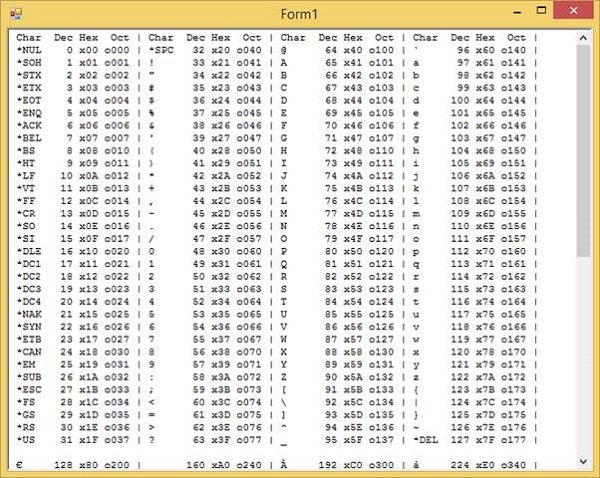
Figure 1: End Result, Part one
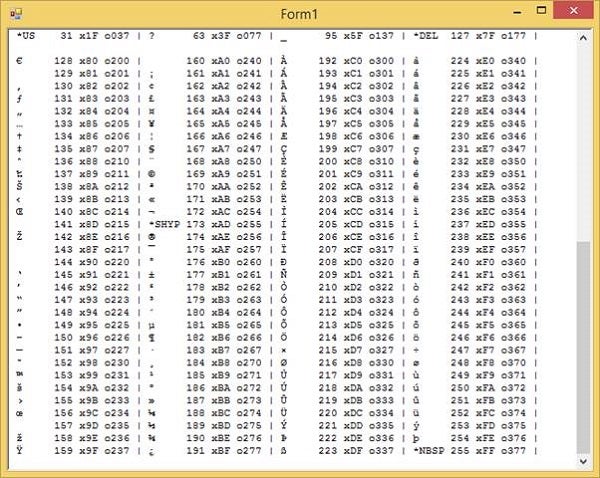
Figure 2: End Result, Part two
Conclusion
This was fun! I hope you have learned a great deal today. Until next time, cheers!