


Introduction
No. No-one is spying on you through your webcam. I just had to mention that, because this is the latest theory people believe after the whole Facebook selling data debacle. Your data is more valuable than gold, or a video or a picture of you. The fourth Industrial revolution is here, and data is the most valuable commodity.
I digress.
In today’s article, you will learn how to make a program that works with your webcam. There is a lot of work, so let’s get cracking.
Our Project
Open Visual Studio and create a new Visual Basic.NET Windows Forms application. Add the following objects, and set the following properties:
| Form | Name | frmCam |
| Size | 695; 509 | |
| Text | webcam | |
| PictureBox | Name | picCam |
| Size | 593; 465 | |
| Button | Name | btnStart |
| Text | Start | |
| Button | Name | btnStop |
| Text | Stop |
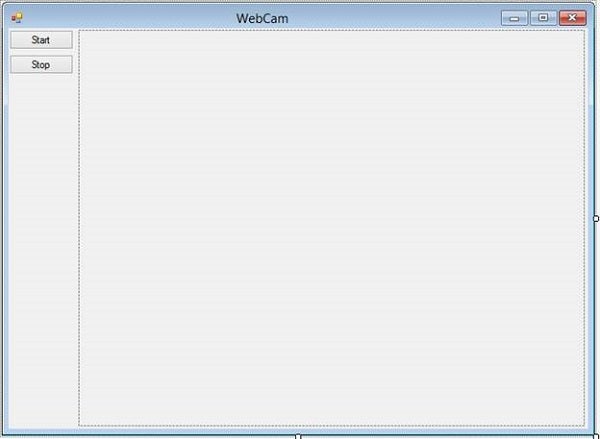
Figure 1: Design
Add a class to your project, and name it clsWebCam.
Import the System.InterOpServices Namespace. This allows you to make use of the Windows API in .NET properly.
Imports System.Runtime.InteropServices
Add the following APIs:
   Private Declare Auto Function SendMessage _
      Lib "user32.dll" (ByVal hWnd As IntPtr, _
      ByVal wMsg As Int32, ByVal wParam As IntPtr, _
      ByVal lParam As IntPtr) As IntPtr

   Private Declare Auto Function capCreateCaptureWindow _
      Lib "avicap32.dll" (ByVal lpszWindowName As String, _
      ByVal dwStyle As Int32, ByVal x As Int32, ByVal y As Int32, _
      ByVal nWidth As Int32, ByVal nHeight As Int32, _
      ByVal hWndParent As IntPtr, ByVal nID As Int32) As IntPtr

   Private Declare Function DestroyWindow _
      Lib "user32.dll" (ByVal hWnd As IntPtr) As Int32
SendMessage sends a system message to a desired Window. DestroyWindow removes the particular window from memory, and capCreateCaptureWindow creates a window capable of rendering video.
Add the following API Structures:
   <StructLayout(LayoutKind.Sequential)>
   Private Structure VIDEOHDR

      Public lpData As IntPtr
      Public dwBufferLength As Int32
      Public dwBytesUsed As Int32
      Public dwTimeCaptured As Int32
      Public dwUser As Int32
      Public dwFlags As Int32
      <MarshalAs(UnmanagedType.ByValArray, SizeConst:=3)> _
         Public dwReserved() As Int32

   End Structure

   <StructLayout(LayoutKind.Sequential)>
   Private Structure CAPTUREPARMS

      Public dwRequestMicroSecPerFrame As Int32
      Public fMakeUserHitOKToCapture As Int32
      Public wPercentDropForError As Int32
      Public fYield As Int32
      Public dwIndexSize As Int32
      Public wChunkGranularity As Int32
      Public fUsingDOSMemory As Int32
      Public wNumVideoRequested As Int32
      Public fCaptureAudio As Int32
      Public wNumAudioRequested As Int32
      Public vKeyAbort As Int32
      Public fAbortLeftMouse As Int32
      Public fAbortRightMouse As Int32
      Public fLimitEnabled As Int32
      Public wTimeLimit As Int32
      Public fMCIControl As Int32
      Public fStepMCIDevice As Int32
      Public dwMCIStartTime As Int32
      Public dwMCIStopTime As Int32
      Public fStepCaptureAt2x As Int32
      Public wStepCaptureAverageFrames As Int32
      Public dwAudioBufferSize As Int32
      Public fDisableWriteCache As Int32
      Public AVStreamMaster As Int32

   End Structure

   <StructLayout(LayoutKind.Sequential)>
   Private Structure BITMAPINFO

      Public bmiHeader As BITMAPINFOHEADER
      Public bmiColors() As RGBQUAD

   End Structure

   <StructLayout(LayoutKind.Sequential)>
   Private Structure BITMAPINFOHEADER

      Public biSize As Int32
      Public biWidth As Int32
      Public biHeight As Int32
      Public biPlanes As Int16
      Public biBitCount As Int16
      Public biCompression As Int32
      Public biSizeImage As Int32
      Public biXPelsPerMeter As Int16
      Public biYPelsPerMeter As Int16
      Public biClrUsed As Int32
      Public biClrImportant As Int32

   End Structure

   <StructLayout(LayoutKind.Sequential)>
   Private Structure RGBQUAD

      Public rgbBlue As Byte
      Public rgbGreen As Byte
      Public rgbRed As Byte
      Public rgbReserved As Byte

   End Structure

   Private Structure YCbCrPixel

      Public Y As Int32
      Public Cb As Int32
      Public Cr As Int32

   End Structure
Add the following API constants:
   Private cpParams As New CAPTUREPARMS
   Private bmiVideoFormat As BITMAPINFO

   Private hPreviewWindow As IntPtr

   Private iFrame As Int32
   Private bRunning As Boolean

   Private Const WS_CHILD As Int32 = &H40000000
   Private Const WS_VISIBLE As Int32 = &H10000000

   Private Const INVALID_HANDLE_VALUE As Int32 = -1

   Private Const WM_USER As Int32 = &H400
   Private Const WM_CAP_SET_CALLBACK_VIDEOSTREAM As Int32 = _
      WM_USER + 6
   Private Const WM_CAP_DRIVER_CONNECT As Int32 = WM_USER + 10
   Private Const WM_CAP_DRIVER_DISCONNECT As Int32 = WM_USER + 11
   Private Const WM_CAP_DLG_VIDEOFORMAT As Int32 = WM_USER + 41
   Private Const WM_CAP_DLG_VIDEODISPLAY As Int32 = WM_USER + 43
   Private Const WM_CAP_GET_VIDEOFORMAT As Int32 = WM_USER + 44
   Private Const WM_CAP_SET_VIDEOFORMAT As Int32 = WM_USER + 45
   Private Const WM_CAP_DLG_VIDEOCOMPRESSION As Int32 = _
      WM_USER + 46
   Private Const WM_CAP_SET_PREVIEW As Int32 = WM_USER + 50
   Private Const WM_CAP_SET_PREVIEWRATE As Int32 = WM_USER + 52
   Private Const WM_CAP_SET_SCALE As Int32 = WM_USER + 53
   Private Const WM_CAP_SEQUENCE As Int32 = WM_USER + 62
   Private Const WM_CAP_SEQUENCE_NOFILE As Int32 = WM_USER + 63
   Private Const WM_CAP_SET_SEQUENCE_SETUP As Int32 = WM_USER + 64
   Private Const WM_CAP_GET_SEQUENCE_SETUP As Int32 = WM_USER + 65
   Private Const WM_CAP_STOP As Int32 = WM_USER + 68
Add the remaining Delegates, events, and Properties:
   <MarshalAs(UnmanagedType.ByValArray)> Public PictureData() _
      As Byte

   Private Delegate Function VideoStreamCallback(ByVal hwnd _
      As IntPtr, ByRef lpVHdr As VIDEOHDR) As Int32
   Private vsCallBack As New VideoStreamCallback(AddressOf _
      CallbackVideoStream)

   Public Event Frame()

   Public ReadOnly Property Data() As Byte()

      Get

         Data = PictureData

      End Get

   End Property
I told you it is a lot of work!
Add the constructor:
   Public Sub New(ByRef Preview As PictureBox)

      ClearMem()

      hPreviewWindow = capCreateCaptureWindow("picCam", _
         WS_VISIBLE Or WS_CHILD, 0, 0, Preview.Width, _
         Preview.Height, Preview.Handle, 0)

      SendMessage(hPreviewWindow, WM_CAP_DRIVER_CONNECT, 0, 0)
      SendMessage(hPreviewWindow, WM_CAP_DRIVER_CONNECT, 0, 0)
      SendMessage(hPreviewWindow, WM_CAP_SET_PREVIEWRATE, 100, 0)
      SendMessage(hPreviewWindow, WM_CAP_SET_PREVIEW, 1, 0)
      SendMessage(hPreviewWindow, WM_CAP_SET_SCALE, 1, 0)

      Dim lParam As IntPtr

      lParam = Marshal.AllocHGlobal(Marshal.SizeOf(cpParams))

      If SendMessage(hPreviewWindow, WM_CAP_GET_SEQUENCE_SETUP, _
         Marshal.SizeOf(cpParams), lParam) <> 0 Then

         cpParams = CType(Marshal.PtrToStructure(lParam, _
            GetType(CAPTUREPARMS)), CAPTUREPARMS)

         With cpParams

            .fYield = 1
            .fAbortLeftMouse = 0
            .fAbortRightMouse = 0

         End With

         Marshal.StructureToPtr(cpParams, lParam, True)

      End If
      Marshal.FreeHGlobal(lParam)

      lParam = Marshal.AllocHGlobal(Marshal.SizeOf(bmiVideoFormat))

      If SendMessage(hPreviewWindow, WM_CAP_GET_VIDEOFORMAT, _
            Marshal.SizeOf(bmiVideoFormat), lParam.ToInt32) <> _
            0 Then

         bmiVideoFormat.bmiHeader = CType(Marshal.PtrToStructure _
            (lParam, GetType(BITMAPINFOHEADER)), BITMAPINFOHEADER)

      End If

      Marshal.FreeHGlobal(lParam)

      With bmiVideoFormat.bmiHeader

         ReDim PictureData(.biSizeImage - 1I)

      End With

   End Sub
This sets up everything. It clears the necessary memory locations and creates a window capable of accepting input from your webcam. Add the Start and Stop methods. The Start and Stop methods will be used by the Form.
   Public Sub Start()

      SendMessage(hPreviewWindow, WM_CAP_SET_CALLBACK_VIDEOSTREAM, _
         0, Marshal.GetFunctionPointerForDelegate(vsCallBack))
      SendMessage(hPreviewWindow, WM_CAP_SEQUENCE_NOFILE, 0, 0)

      bRunning = True
      iFrame = 0

   End Sub

   Public Sub [Stop]()

      If bRunning Then

         SendMessage(hPreviewWindow, WM_CAP_STOP, 0, 0)

         bRunning = False

      End If

   End Sub

   Public Sub ClearMem()

      [Stop]()

      If hPreviewWindow = 0 Then

      ElseIf hPreviewWindow <> INVALID_HANDLE_VALUE Then

         SendMessage(hPreviewWindow, _
            WM_CAP_DRIVER_DISCONNECT, 0, 0)

         DestroyWindow(hPreviewWindow)
         hPreviewWindow = INVALID_HANDLE_VALUE

      End If

   End Sub

   Protected Overrides Sub Finalize()

      ClearMem()

      MyBase.Finalize()

   End Sub

   Private Function CallbackVideoStream(ByVal hwnd As IntPtr, _
         ByRef lpVHdr As VIDEOHDR) As Int32

      iFrame += 1

      Marshal.Copy(lpVHdr.lpData, PictureData, 0, _
         lpVHdr.dwBytesUsed)

      RaiseEvent Frame()

   End Function
The Start method Starts the viewing process, and the Stop method stops the viewing process. ClearMem clears the memory. Add the following code for your Form:
   Private wc As clsWebCam

   Private Sub Button1_Click(sender As Object, e As EventArgs) _
         Handles btnStart.Click

      wc = New clsWebCam(picCam)

      wc.Start()

   End Sub

   Private Sub btnStop_Click(sender As Object, e As EventArgs) _
         Handles btnStop.Click

      wc.ClearMem()

   End Sub
You create a webcam object and start or stop the viewing process.
Conclusion
You have learned how to open and view the webcam from within VB. I hope you have enjoyed it and make good use of it. Until next time, cheers!