


Introduction
The mobile landscape has grown tremendously, as has the Web landscape. They still are growing. People are becoming more and more connected. Smartwatches communicate with phones, phones communicate with Web pages, and Web pages communicate other devices. Everything is becoming connected.
There are scores of smart device manufacturers and many operating systems for each. Apple has macOS and iPhone. Google has Android. Windows has UWP (Universal Windows Platform). Creating apps compatible with all these operating systems used to be quite a lot of work; you most likely had to create separate versions of your app for each platform, or, have an app (created by a toolkit or SDK capable of creating multi OS apps) that is not fully native for each device.
There are numerous products that can create one app that works for all platforms, but the main problem with them are that they lacked the ability to be truly native and make use of native device functionality. This is where Xamarin comes in.
In Part 1 of my Xamarin article series, I will explain what Xamarin is and how to get it installed on your computer.
Xamarin
Apps that are built using Xamarin contain standard, native user interface controls, so that they look and behave the way the end users expect. Xamarin built apps have access to all the functionality exposed by the underlying device, and they can leverage platform-specific hardware acceleration.
Xamarin.Forms
Xamarin.Forms is a cross-platform User Interface (UI) toolkit that allows mobile developers to create native user interface layouts that can be shared across Android, iOS, and UWP (Universal Windows Platform) apps. With Xamarin.Forms, you can share the business logic and data structures, and define the UI using common platform-independent controls.
Requirements
Windows
- Operating System: Windows 10
- Xamarin.iOS: iOS 10 SDK (installed on a Mac)
- Xamarin.Android: Android 6.0/API level 23
macOS
- Operating System: macOS High Sierra
- Xamarin.iOS: iOS 11 SDK
- Xamarin.Android: Android 6.0/API level 23
- Xamarin.Mac:macOS High Sierra (10.13) SDK
| Note: The requirements listed above are to ensure you have the optimal functionality of Xamarin and all its features. |
Installing Xamarin
Download any Visual Studio 2017 edition (Visual Studio 2017 Community, Visual Studio Professional, or Visual Studio Enterprise).
- Start the Installation.
- Select the Mobile development with .NET from the installation screen.
- Then, on the right hand side of the Installation screen, select or deselect your desired mobile development options.
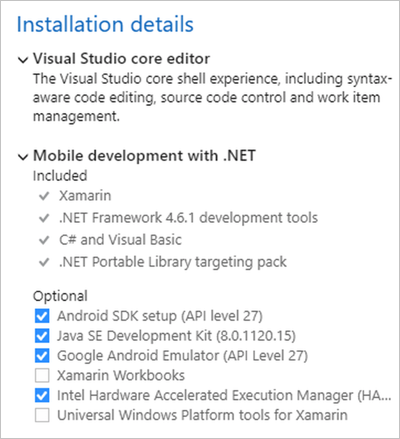
Figure 1: Installation Details - Click Install.
- Visual Studio will install with the selected options.
- To install Visual Studio on macOS, follow the steps outlined here.
Your environment is now technically set up and you can start developing Xamarin apps, but you may still have to ensure that all your SDKs are up to date.
Conclusion
Setting up Xamarin is quite easy. Please be on the lookout for my Part 2 of the Xamarin series, coming soon.