


Today we are looking at some of the most exciting new features and language changes coming to .Net 6.0 and, specifically, Windows Forms. These new features include changes to fonts, runtime designers, and TaskDialogue controls.
Windows Forms New Features: .Net 6.0
Here is a list of some of the new features coming to Windows Forms and .Net 6. We include some code examples to better explain their use and how they will affect .Net developers.
Application-wide Default Font
As its name implies, the Application-wide Default Font feature allows you to set a font application-wide one time without having to worry about setting fonts on each form and control manually. This saves developers a lot of time and reduces errors. Here’s how you can implement Application-wide default fonts in Window Forms in .Net 6:
class Program
{
    [STAThread]
    static void Main()
    {
        Application.EnableVisualStyles();
        Application.SetHighDpiMode(HighDpiMode.PerMonitorV2);
        Application.SetDefaultFont(new Font(new FontFamily("Microsoft Sans Serif"), 8f));
        Application.Run(new Form1());
    }
}
The Application.SetDefaultFont method accepts a font family and a size as arguments. As you can see, I have included this code in the Main method of the Program.cs. If you were to attempt to set the default application wide font at a later stage of your program, it will not work and will produce an exception.
New Runtime Designers in Windows Forms
More runtime designers have been added in the latest Windows Forms update. Where we were accustomed to one big designer handling all the controls and the form designing duties before, the form’s designer has now been split up into multiple designers. Here is list of separate designers:
- System.ComponentModel.Design.ComponentDesigner System.Windows.Forms.Design.ButtonBaseDesigner
- System.Windows.Forms.Design.ComboBoxDesigner System.Windows.Forms.Design.ControlDesigner
- System.Windows.Forms.Design.DocumentDesigner System.Windows.Forms.Design.FormDocumentDesigner
- System.Windows.Forms.Design.GroupBoxDesigner System.Windows.Forms.Design.LabelDesigner
- System.Windows.Forms.Design.ListBoxDesigner System.Windows.Forms.Design.ListViewDesigner
- System.Windows.Forms.Design.MaskedTextBoxDesigner System.Windows.Forms.Design.PanelDesigner
- System.Windows.Forms.Design.ParentControlDesigner System.Windows.Forms.Design.PictureBoxDesigner
- System.Windows.Forms.Design.RadioButtonDesigner System.Windows.Forms.Design.RichTextBoxDesigner
- System.Windows.Forms.Design.ScrollableControlDesigner System.Windows.Forms.Design.TextBoxBaseDesigner
- System.Windows.Forms.Design.TextBoxDesigner System.Windows.Forms.Design.ToolStripDesigner
- System.Windows.Forms.Design.ToolStripDropDownDesigner System.Windows.Forms.Design.ToolStripItemDesigner
- System.Windows.Forms.Design.ToolStripMenuItemDesigner System.Windows.Forms.Design.TreeViewDesigner
- System.Windows.Forms.Design.UpDownBaseDesigner System.Windows.Forms.Design.UserControlDocumentDesigner
This separation helps with creating controls individually. For instance, if you were to create a button, the normal System.Forms designer would not be used. Instead, a subset(System.Windows.Forms.Design.ButtonBaseDesigner)would be used.
New TaskDialog Control
The new TaskDialogue control is similar to a MessageBox except it shows more information. Here is an example of what it looks like in Windows Forms:
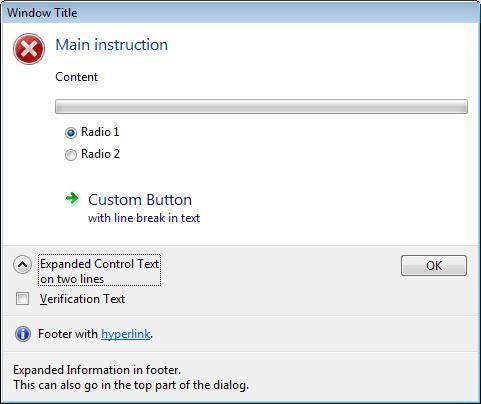
Figure 1 – TaskDialog control *Image Credit: GitHub
ListView Enhancements
In the new update, the ListView now includes the following new Properties:
| CollapsedState | 0 – Default: Non-collapsible group, expanded
1 – Expanded: Collapsible group, expanded 2 – Collapsed: Collapsible group, collapsed |
|
|
Footer |
|
|
| Subtitle |
|
|
|
TaskLink |
|
|
|
TitleImageIndex |
|
Table 1 – ListView properties
A preview of the new ListView can be seen below:
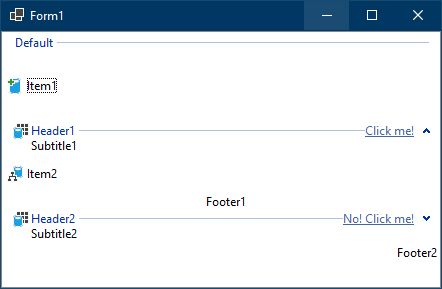
Figure 2 – ListView *Image credit: Microsoft
Other Updates to Windows Forms and New .Net 6 Features
For now, this seems to be some of the most important changes to Windows Forms and .NET 5. We will continue to update this article as more features are announced and added, so be sure to check back often for the latest on Windows Forms and .Net updates.
You can also check the DevBlog at Windows for more updates about features coming to Windows Forms and .Net 6.