


Introduction
Caching is a technique for performance enhancements, especially when user interface interaction, with application speed, needs to be increased. It’s also a state management strategy that helps you reduce the consumption of resources. There are several caching frameworks available, but in this article I will share information about Redis Cache, a noSQL caching technique and its integration with .NET applications. Redis keeps information as a key-value NoSQL pair.
Most developers choose Redis for its ability of interaction with external systems.
What Are Redis Cache and Its Advantages?
Redis is an open source caching framework. This extremely fast framework stores caching information in a hash table format. Apart from faster execution, Redis features a rich, in-memory caching engine that can be used to store and retrieve data from your applications. Redis supports a variety of data structures, such as strings, hashes, sets, lists, and so forth. It also provides built-in support for replication and transactions, and has excellent support for data persistence. For storing and retrieving huge amount of data, Redis is a good choice for your application. For a .NET developer, the following are the advantages of using Redis:
- Very easy configuration with ASP.NET/MVC application
- Simple usage
- High performance application caching
- Supports a list of data types, mentioned above
- Redis provides a Web UI for viewing cache content
Installing Redis
Redis Cache is very easy to set up and has relatively much less performance overhead when storing and retrieving data. You can download Redis and extract the executables from a zip file. Follow the instructions provided in the following link for downloading and installing Redis on Windows.
Redis Cache Implementation Using .NET
I will be using Visual Studio Community Edition to show the Redis client demo.
Step 1
I have created a Console Application from Visual Studio using the .NET 4.5 or higher framework version. I named it ‘RedisSample’.
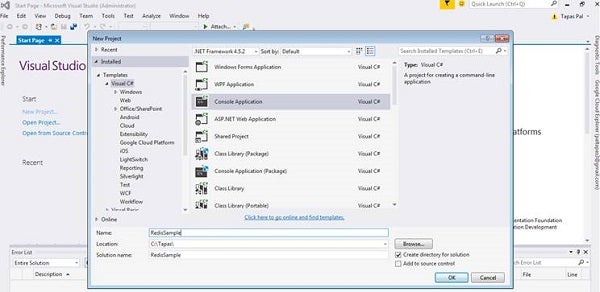
Figure 1: Creating Redis Cache sample application
Once the empty project is created, we need a NuGet package (StackExchange.Redis) that will be our connector to Redis Cache. From Visual Studio tools or NuGet package manager, we will add this NuGet package.
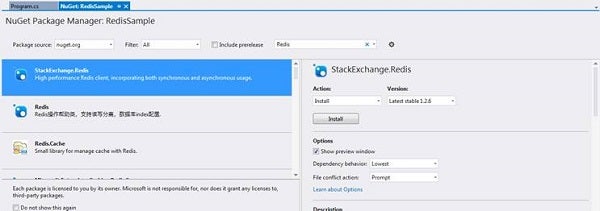
Figure 2: Adding Redis NuGet package
Step 2
After installing the NuGet package, we are going to create a new class, named MyRedisConnectorHelper.cs. To have an easy way to manage our connection to Redis, the MyRedisConnectorHelper class will have the following functions.
using System;
using System.Collections.Generic;
using System.Linq;
using System.Text;
using System.Threading.Tasks;

namespace RedisSample
{
   public class MyRedisConnectorHelper
   {
      static MyRedisConnectorHelper()
      {
         MyRedisConnectorHelper.RedisConnection = new Lazy
            <StackExchange.Redis.ConnectionMultiplexer >(() =>
         {
            return StackExchange.Redis.ConnectionMultiplexer.
               Connect(System.Configuration.ConfigurationManager
               .AppSettings["RedisKey"]);
         );
      });
}

      private static Lazy <StackExchange.Redis
         .ConnectionMultiplexer> RedisConnection;

      public static StackExchange.Redis.ConnectionMultiplexer
         RedisConnection
      {
         get
         {
            return RedisConnection.Value;
         }
      }
   }

}
The connection to Redis Cache is maintained by the ConnectionMultiplexer class. In the preceding code snippet to connect the Redis instance, we used the static method ConnectionMultiplexer.Connect, that takes a string parameter with the connection string.
To add the connection string the configuration file, I have added the following key in the app.config file.
<?xml version = "1.0" encoding = "utf-8" ?>
<configuration>
   <appSettings>
      <!-- ... -->
      <add key = "RedisKey" value = "SampleValue"/>
      <!-- ... -->
   </appSettings>
   <startup>
      <supportedRuntime version = "v4.0"
         sku = ".NETFramework,Version=v4.5.2" />
   </startup>
</configuration>
Step 3
Now, we have to add code to save and retrieve data from the cache. I have added the SaveRedisBigData method to save 10,000 items with random values between 0 and 10,000. Also, the ReadRedisData method will retrieve the values from Redis and display them. This is how the connection to Redis using the StackOverflow framework works. Refer to the following code snippet.
using System;
using System.Collections.Generic;
using System.Linq;
using System.Text;
using System.Threading.Tasks;

namespace RedisSample
{
   class Program
   {
      static void Main(string[] args)
      {
         var program = new Program();

         Console.WriteLine("Saving Sample data in Redis cache");
         program.SaveRedisBigData();

         Console.WriteLine("Reading data from Redis cache");
         program.ReadRedisData();

         Console.ReadLine();
      }
      public void ReadRedisData()
      {
         var cache = MyRedisConnectorHelper
            .RedisConnection.GetDatabase();
         var devicesCount = 10000;
         for (int i = 0; i < devicesCount; i++)
         {
            var value = cache.StringGet($"MySampleData:{i}");
            Console.WriteLine($"Value={value}");
         }
      }

      public void SaveRedisBigData()
      {
         var devicesCount = 10000;
         var rnd = new Random();
         var cache = MyRedisConnectorHelper.RedisConnection
            .GetDatabase();

         for (int i = 1; i < devicesCount; i++)
         {
            var value = rnd.Next(0, 10000);
            cache.StringSet($"MySampleData:{i}", value);
         }
      }
   }
}
Conclusion
Remember, Redis cache doesn’t store data locally; for lightweight caching requirements, use System.Runtime.Caching.ObjectCache. As example, in the Web application, it is better to use for light objects. Microsoft Azure provides Redis Cache to improve an app’s performance.