


Background
Developing add-ins can be a bit of a hassle, especially if the add-in is currently used by Visual Studio. How do you test/debug it? Well, after you compile it you have to…
- Close Visual Studio.
- Copy the add-in to the AddIns folder.
- Start Visual Studio and load the add-in project.
- Realize it has some bug.
- Modify and compile it.
- Go back to Step 1….
Not only is it cumbersome, if it breaks (as things may do in their development phase) during this process so that Visual Studio can’t load it, you obviously can’t debug it.
What Does VSStub Do?
VSStub loads an add-in (path to it shall be given as a command-line parameter) and, from the add-in’s point of view, behaves pretty much like Visual Studio.
It implements the basic interfaces of the Developer Studio Object model: IApplication, IDebugger, ITextDocument, and so forth.
It is naturally not as sophisticated as Visual Studio itself (for example, it re-uses the same IDocument instance over and over even if the add-in tells it to create a new one), but it gives something for the add-in to interact with. Most of the attributes can be modified through the GUI and you can, of course, tweak it to better suit your needs.
You can call the add-in’s commands and fire various events to see how the add-in behaves; for instance, by setting a breakpoint at the add-in’s command/event implementation. If you find some bug in the add-in, just fix it, compile, and run…
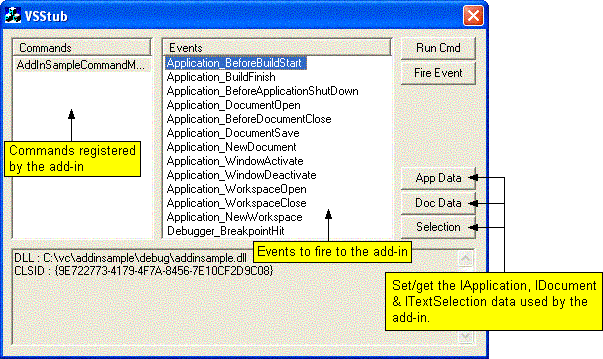
Typical Usage
In the add-in’s project settings:
- Set VSStub to be the add-in’s executable.
- Set the path to the add-in as program arguments.
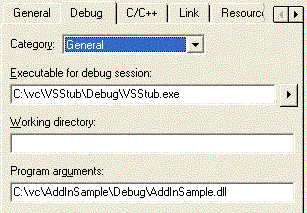
Set breakpoints or whatever and run it…
About the Source Code
VSStub is an ordinary (if there is such a thing) MFC Dialog application.
Getting the add-in’s CLSID is somewhat difficult because there is no way to just ask for it. The CLSID is required as input when calling DllGetClassObject to get the IClassFactory.
VSStub solves this by:
- Unregistering the add-in (DllUnregisterServer). This ensures the add-in’s CLSID is not in HKEY_CLASSES_ROOT/CLSID.
- Checking the time stamp.
- Registering the add-in (DllRegisterServer). This should put the CLSID in HKEY_CLASSES_ROOT/CLSID.
- Enumerating sub keys in HKEY_CLASSES_ROOT/CLSID, looking for keys where LastWriteTime>=time stamp.
Note: If Visual Studio uses the add-in, the next time Visual Studio starts it will use the add-in that was last registered.
(If anyone knows of a better way to get the CLSID, I’d be glad to hear about it.)