


Back in 2005, when covering the upcoming release of Visual C++ 2005, the use of the Class Designer to document and create C++ code was discussed, but unfortunately this functionality was pulled in the Beta 2 release of Visual C++ 2005. With Visual C++ 2008, support for C++ in the Class Designer is back, but with a few limitations. Getting the bad news out of the way first, the biggest surprise is that managed C++ classes are not supported by the Class Designer, and only native types can be displayed. The second major limitation is that the Class Designer has no support for modifying the displayed types using the Class Designer surface, unlike C# and Visual Basic.NET which support a bi-directional design experience where modifications in the Class Designer are reflected in code.
With these major limitations out of the way, it’s worth looking at how much the Class Designer can actually do for C++ developers. The range of native C++ constructs that the Class Designer can display is quite impressive. Starting with a simple example, consider the following native C++ type definition:
class NativeClass
{
public:
   NativeClass(void) {};
   ~NativeClass(void) {};
   int PublicInt;
   virtual char* GetString(int number) {return NULL;}
   ///<summary>Always returns zero</summary>
   inline int GetInt() {return 0;}
private:
   double PrivateD;
};
To view this type in the Class Designer, simply select the header file in Solution Explorer, and click the view Class Diagram button, which is located in a toolbar at the top of the Solution Explorer window, as shown in Figure 1.
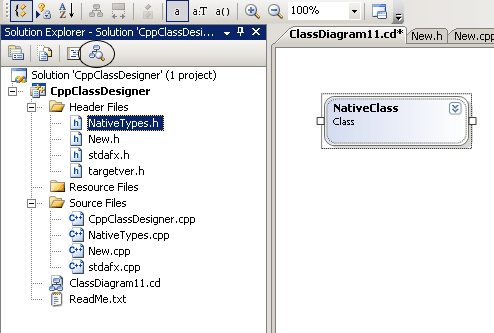
Figure 1: Basic Class Diagram View
Figure 1 shows the default display for a type on the Class Designer surface, and the Class Designer toolbar is also visible in Figure 1. As is apparent, the default view is fairly useless, and it will generally be necessary to change the display layout to get some useful information. By clicking on the small double-arrow head located near the name of the class (circled in Figure 2), detailed information on the member variables and methods of the class can be seen, as shown in Figure 2.
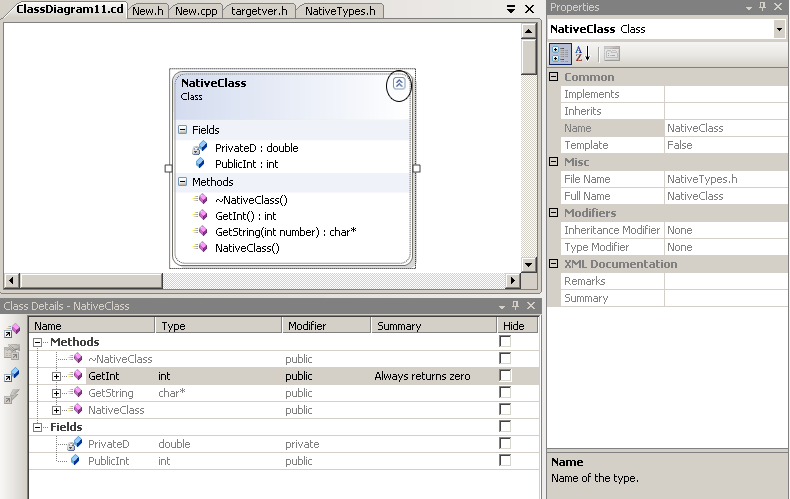
Figure 2: Class Diagram Detailed View
Figure 2 also shows the Properties window and Class Details windows displayed, and with this information, the visibility, return type, and summary of all methods and member variables can be seen. When a method is selected in the Class Details window, further information about whether the method is virtual or inline can be seen in the Properties window. The detailed class information in Figure 2 is achieved by selecting the Display Full Signature option from the Class Designer toolbar. The other two display options are Display Name, which only shows method and member variable names as the option suggest, and Display Name and Type, which shows all the information in Figure 2 with the exception of parameters to methods.