


Introduction
One of the features available in Siccolo – Management Tool For SQL Server is the ability to back up a database. The idea is trivial: A mobile device sends its request to a web service and executes a web method. The web method runs a “backup” command on a remote SQL Server to back up a database to/in a folder on that SQL Server:
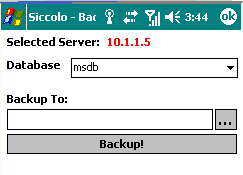
Because the process of backing up a database may take a few “lengthy” moments, the Siccolo application uses an asynchronous method call to a web service. The code presented allows the mobile device to back up a database on a remote SQL Server.
Server Code
First, here is the web method to back up a database on a SQL Server. For this, you can use a standard “backup database” command.
<WebMethod()> Public Function BackupDatabase _
   (ByVal ServerAddress  As String, _
    ByVal UserName       As String, _
    ByVal UserPassword   As String, _
    ByVal DatabaseName   As String, _
    ByVal BackupFileName As String, _
    ByVal BackupName     As String, _
    ByRef ErrorInfo As String) As Boolean
   Try
      With oLoginInfo
                    .sServer    = ServerAddress
                    .sLoginName = UserName
                    .sPassword  = UserPassword
                    .sDatabase  = “”
      End With
      Dim ToDebugSetting As String =
         System.Configuration.ConfigurationSettings.
            AppSettings.Get(“DebugMode”)
      Dim ToDebug As Boolean = (ToDebugSetting <> “”)
      If oCon.BackupDatabase(oLoginInfo, _
                                        DatabaseName, _
                                        BackupFileName, _
                                        BackupName, _
                                        ToDebug, _
                                        ErrorInfo) Then
         Return True
      Else
         If ToDebug Then
            oCon.UpdateIncomingStatus(“BackupDatabase: failed” _
               & ErrorInfo, EventLogEntryType.Information)
         End If
         Return False
      End If
   Catch ex As Exception
      ErrorInfo = ex.Message()
      Return False
   End Try
End Function
where:
- oCon: The instance of a class handling all database/SQL Server interactions
- oLoginInfo: The instance of a structure to hold a SQL Server name and user credentials
- UpdateIncomingStatus: The method that writes to the event log on a server hosting this web service
The web method itself calls BackupDatabase():
Public Function BackupDatabase(ByVal oLogInf        As LoginInfo, _
                               ByVal DatabaseName   As String, _
                               ByVal BackupFileName As String, _
                               ByVal BackupName     As String, _
                               ByVal ToDebug        As Boolean, _
                               ByRef ErrorInfo As String) As Boolean
   Try
      oLoginInfo = oLogInf
      Dim SqlCommand = BackupDatabaseCommand(DatabaseName, _
                       BackupFileName, BackupName)
      If (objConnection.State.ToString() <> “Open”) Then
         Connect(ToDebug, ErrorInfo)
      End If
      Dim objCommand As SqlCommand = New SqlCommand(SqlCommand, _
                                                    objConnection)
      objCommand.CommandType    = CommandType.Text
      objCommand.CommandTimeout = 60    ‘600 seconds = 10 min.
      ‘The time (in seconds) to wait for the command to execute.
      ‘The default is 30 seconds.
      ‘A value of 0 indicates no limit
      objCommand.ExecuteNonQuery()
      DisConnect()
      Return True
   Catch ex As Exception
                ErrorInfo = ex.Message
                Return False
   End Try
End Function
where BackupDatabaseCommand() simply builds a “backup command” string based on passed Database Name, Backup File Name, and Backup Name:
‘ VB.NET
Private Function BackupDatabaseCommand(ByVal DatabaseName As String, _
                                       ByVal BackupFileName _
                                       As String, _
                                       ByVal BackupName As String) _
                                       As String
   Dim strBackupCommand As String =
      “Backup Database [” & DatabaseName & “]” & _
                        “TO DISK = N'” & BackupFileName & “‘” & _
                        “WITH INIT ” & _
                        “, NAME = ‘” & BackupName & “‘” & _
                        “, NOSKIP” & _
                        “, NOFORMAT”
   Return strBackupCommand
   ‘INIT
   ‘   Specifies that all backup sets should be overwritten, but
   ‘   preserves the media header.
   ‘   If INIT is specified, any existing backup set data on that
   ‘   device is overwritten.
   ‘
   ‘NAME = backup_set_name
   ‘   Specifies the name of the backup set. Names can have a
   ‘   maximum of 128 characters.
   ‘   If NAME is not specified, it is blank.
   ‘Siccolo passes something like this:
   ‘   DatabaseName + “_SiccoloBackup_” +
   ‘   System.DateTime.Now.ToString(“MM_dd_yyyy”)
   ‘NOSKIP
   ‘   Instructs the BACKUP statement to check the expiration date
   ‘   of all backup sets on the media before allowing them to be
   ‘   overwritten.
   ‘NOFORMAT
   ‘   Specifies the media header should not be written on all
   ‘   volumes used for this backup operation and does not
   ‘   rewrite the backup device unless INIT is specified.
End Function
And that’s it for a web method/web service.