


“I hope you don’t mind that I put down in words,
How wonderful life is while you’re in the world.”
–Bernie Taupin
Introduction
Multithreading or parallelism is a big topic. There are a lot of issues to consider: what is available, how much parallelism should be employed, what performance benefits will I achieve, and what is the added cost of debugging? All of this complexity suggests that developers need higher levels of abstraction to make using multi-core and multi-processor computers and parallelism easier. That is what Microsoft has done with .NET framework 4.0 with the Task Parallelism Library (TPL). One still needs to consider things like how much is too much, best practices, and what are the debugging costs, but with higher abstractions at least using parallelism is technically easier.
Prior to .NET framework 4.0 we had asynchronous calls, the thread pool, lower level threading, worker controls, and the parallel extensions that could be downloaded. Now higher levels of abstraction and new tools have been incorporated into the framework, but learning about all these tools is a big job.
In this article I will start with a pretty basic aspect of the TPL, for loops. The example compares a sequential for loop, a threaded for loop, and the new Partitioner class that is sort of a hybrid of sequential and parallel processing. For loops are bread and butter constructs, so it is a good place to start.
Implementing a Sequential For Loop
Using a simple for loop is an easy task. Write the for loop and process the data. You don’t have to worry about thread issues, they are easy to debug, and in many cases the performance is probably not a big factor. The for loop demo in Listing 1 is to establish a baseline for the other two parts of this article.
Const max As Integer = 1000
Dim numbers = Enumerable.Range(0, max).ToArray()
‘ Sequential loop
Dim stopwatch As Stopwatch = New Stopwatch()
stopwatch.Start()
For i As Integer = 0 To numbers.Count – 1
  numbers(i) = Math.Pow(numbers(i), 2)
Next
stopwatch.Stop()
Console.WriteLine(“Elapsed sequental time {0}”, stopwatch.Elapsed)
Listing 1: Writing a simple for loop to square an array of integers.
In the sample the Stopwatch class is used to track how long the sequential loop takes to process. The for loop accesses the array of integers and uses Math.Pow to square each integer in the array. Simple, no worries. On my PC the example ran in about 1 millisecond.
Implementing a Parallel For Loop
To use Parallel.For you need to import System.Threading.Tasks. Parallel is has static members and accepts the inclusive and exclusive range variables–the loop extent–and a generic delegate, Action(Of T) that can be satisfied with a Lambda expression, to perform the action on the data-see Listing 2.
Imports System.Threading.Tasks
Module Module1
    Sub Main()
      Const max As Integer = 1000
      Dim numbers = Enumerable.Range(0, max).ToArray()
      Dim stopwatch As Stopwatch = New Stopwatch()
      stopwatch.Start()
      Parallel.For(0, numbers.Count, Sub(i)
        numbers(i) = Math.Pow(numbers(i), 2)
      End Sub)
      stopwatch.Stop()
      Console.WriteLine(“Elapsed parallel time {0}”, stopwatch.Elapsed)
…
In Listing 2 iteration starts at 0 and goes up to but doesn’t include the numbers.Count. The second argument, the exclusive range variable is equivalent to Count – 1. The Lambda expression starting with the keyword Sub performs the action. (In the example a multi-line Lambda sub is used. This is also new in .NET framework 4.0.)
The performance in the second example is much slower, here is why. For each iteration the delegate satisfied by the Lambda expression is called on a different thread. This means the thread is set up, the delegate is called, and then all of that infrastructure is deconstructed, or approximately that is what happens.
If you move the action to a delegate containing a breakpoint–see the fragment in Listing 3–and Figure 1, you can see that there aren’t a thousand threads because threads are reused but the threads do pile up. Spinning up all of those workers and partitioning the worker threads for each delegate call take time; consequently the performance of the code in Listing 2 or 3–depending on how you write the code–is much slower.
Dim action As Action(Of Integer) =
  Sub(i)
    numbers(i) = Math.Pow(numbers(i), 2)
  End Sub
Parallel.For(0, numbers.Count, action)
Listing 3: This fragment is equivalent to shorter Parallel.For in Listing 2.
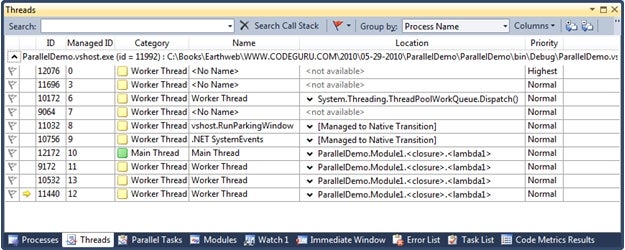
Figure 1: Threads being created for the code fragment in Listing 3
The caveat is that multithreading is available but doesn’t always help you, especially in behaviors that are so simple. The next section demonstrates how to theoretically speed up small loops by combining sequential behaviors with parallelism.