


It’s important to establish the fact that VB.NET is truly
a first-class citizen when it comes to writing applications based on
Microsoft’s .NET runtime. VB.NET has carried the label "object-based"
for quite a long time, and many have viewed it as a "toy" language.
The fact is VB.NET does support all the main tenets of Object
Oriented Programming (OOP) including abstraction, encapsulation, inheritance
and polymorphism. Visual
Studio 2010 includes the most recent version of VB.NET, also referred
to as VB 10.0. It contains many enhancements and features to take full
advantage of version 4 of the .NET common language runtime (CLR).
If you’re coming to VB.NET from another language with OOP roots, you should
understand most of the concepts here.
One of the main goals in OOP design is to create reusable
components so programmers don’t have to keep reinventing the wheel, so to
speak. An object is the most basic entity containing executable code, data, or
both. VB.NET adds the concept of a Module to the mix mainly because it’s been
there for a very long time. In reality, a VB.NET module is something similar to
a C#
static class. For now, it’s probably sufficient to view a module as a way to
group a similar set of functions.
Modules contain subroutines marked by the keywords
"Sub" and "End Sub". There is also a special subroutine
called Main that is present in every console program. If you open Visual Basic 2010 Express
Edition and create a new console application, you’ll have a total of four
lines of code generated for you (see Figure 1), which are Module Module1, Sub
Main(), End Sub, and End Module. This shows the default hierarchy of
subroutines contained within modules.
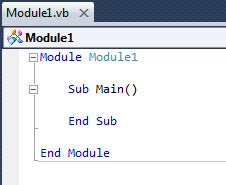
Figure 1: The default hierarchy of subroutines contained within
modules
In VB.NET, a Namespace is the highest container
encapsulating classes and modules. We’ll take a much deeper look at .NET
namespaces at another time, but for now you should at least know how to
reference some of the common .NET namespaces. This is done in Visual Basic with
the Imports keyword. Intellisense is your friend here and will help when you’re
not sure of the exact spelling of the Namespace (see Figure 2).
Figure 2: Intellisense is your friend
As soon as you type the period after System you will see a
list of options available to you. Namespaces use the curly brace
"{}"pair as an identifying icon while classes use three boxes
connected by lines (see Figure 3). If you scroll through the popup box, you
will get tooltip help describing each item.
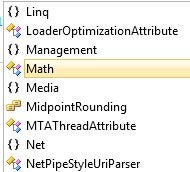
Figure 3: Namespaces use the curly brace "{}"pair as an
identifying icon
Once you have imported a namespace, such as System.IO, you
have access to all the functionality contained within that namespace. For
example, in a console program you can now type something like the following:
Dim oFile as file
You can also directly reference the System.IO namespace by
using it as a prefix as in:
Dim oFile as System.IO.File
Both ways will work and will instantiate a file object named
oFile. You then have access to all the nice Intellisense produced from the File
object as shown in Figure 4. We’ll dive in to other namespaces in later
articles and talk more about how and when to use a class in VB.NET.
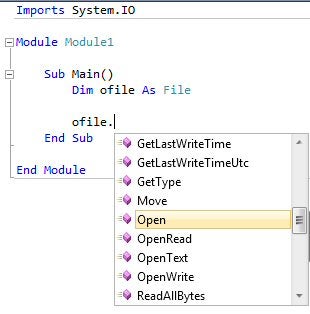
Figure 1: You have access to all the Intellisense produced from the
File object