


Introduction
Hello and welcome to my article! Today I will introduce you to the world of globalization in your Visual Basic .NET programs
Globalization
Globalization is basically the process of making your application culture-friendly. You have to realize that the users of your application may speak a different language than you, and therefore their language adheres to different rules, apart from being a different language. For example, some languages are displayed left to right, while others should be displayed right to left. Now, you have to not only think about the different language, but different currencies, date and time settings as well as different colors being used with different cultures.
With Globalization you can make your application useable with any culture irrespective of their language.
Here are some more articles on Globalization
- http://msdn.microsoft.com/en-us/library/vstudio/system.globalization.cultureinfo
- http://msdn.microsoft.com/en-us/library/system.globalization.cultureinfo%28v=vs.80%29.aspx
- http://msdn.microsoft.com/en-us/library/system.globalization.cultureinfo%28vs.71%29.aspx
- http://www1.cs.columbia.edu/~lok/csharp/refdocs/System.Globalization/types/CultureInfo.html
Today I will concentrate on the CultureInfo class; perhaps in a future article I can delve a bit deeper into more Globalization techniques and other classes.
Let’s do a project!
The aim of today’s little project is to load all available culture settings, and then use those settings to display the various days inside any given culture. Create a new Visual Basic Windows Forms application and design your form to resemble Figure 1.
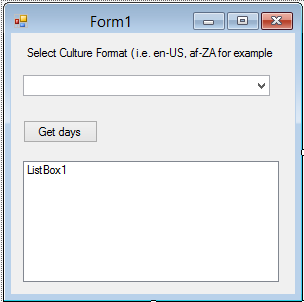
Figure 1 – Our design
Coding
As usual, let me star with the namespaces. Add the following namespace to your code:
Imports System.Globalization 'Import Globalization Namespace
This imports the Globalization namespace, which in turn imports all its functionalities as well. Create the following modular array:
Private ciAllCultures() As CultureInfo 'Array To Hold All Cultures
This array will hold all the information available in the CultureInfo class. Here is some more information on the CultureInfo class.
Double click your form to show the Form_Load event procedure, then add this code inside it:
   Private Sub Form1_Load(sender As Object, e As EventArgs) Handles MyBase.Load

        ' Get & Enumerate All Cultures.
        ciAllCultures = CultureInfo.GetCultures(CultureTypes.AllCultures)

        Dim ciCurrentCulture As CultureInfo

        For Each ciCurrentCulture In ciAllCultures

            ' Display Name Of Each Culture And English Name
            ComboBox1.Items.Add(ciCurrentCulture.Name & " [ " & ciCurrentCulture.EnglishName & " ]")

        Next

    End Sub
The first line of code, obtains all the cultures and stores it inside the ciAllCultures array, then, I looped through each of the cultures and loaded them inside the Combobox. Inside the Combobox, I display both the Culture’s native name as well as its English name. The user is now able to select any culture from this list. Now, let us make use of this list productively. Add the following code behind the ‘Get days‘ button:
    Private Sub Button1_Click(sender As Object, e As EventArgs) Handles Button1.Click

        ListBox1.Items.Clear() 'Clear ListBox

        'Get Selected Culture Via ComboBox
        Dim ciCulture As CultureInfo = New CultureInfo(ciAllCultures(ComboBox1.SelectedIndex).ToString())

        Dim ciDays As String() = ciCulture.DateTimeFormat.DayNames 'Display Day Names

        For Each day As String In ciDays 'Show All Days

            ListBox1.Items.Add("Day Name for " & ciCulture.DisplayName & " " & day)

        Next

    End Sub
I cleared the listbox, then get the chosen culture from the combobox. I specify what I want from the Culture object; in this case I want the DayNames. Lastly, I then loop through the days and display each day inside the listbox, as per Figure 2.
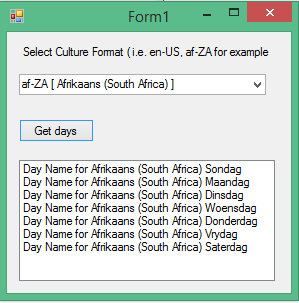
Figure 2 – Days in a different language
Obviously this is only a tiny part of globalization; you can have a look at some of these articles to learn more:
- http://www.c-sharpcorner.com/UploadFile/ankithakur/Globalization_Localization_in_DotNet_CSharp07032006023510AM/Globalization_Localization_in_DotNet_CSharp.aspx
- http://visualbasic.about.com/od/usingvbnet/a/globvbnet1.htm
- http://careerride.com/VB-NET-how-to-implement-globalization-and-localization.aspx
Conclusion
Short and sweet! I hope you liked today’s article, until next time, this is me signing off!