


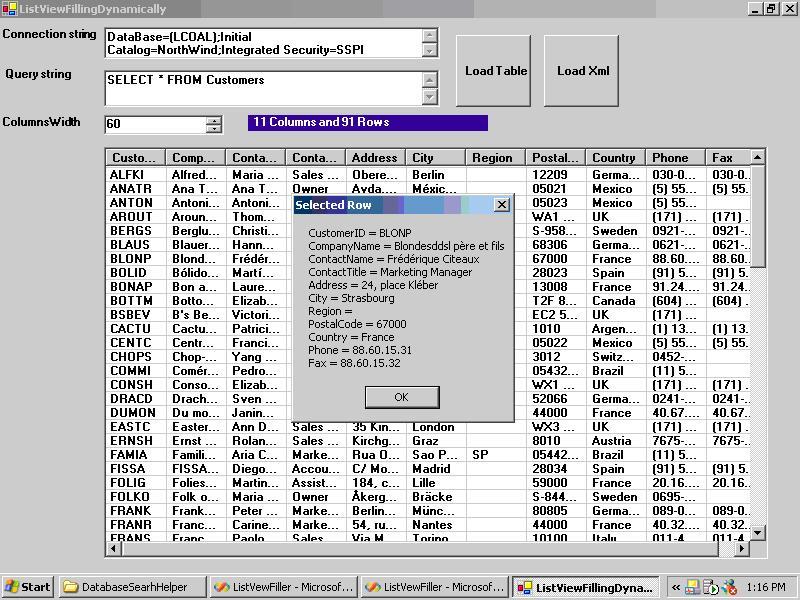
Filling ListView Dynamically from Any Data Sources with VB.NET
When I was developing different front-end data entry modules for data entry operators, I found that it is very common in different modules to fill a listview according to given query strings, but I was designing a listview for each module from scratch. Then, I thought to make a user control that just takes a connection and query strings and add columns to it dynamically and fills it in the data grid style. Thanks a lot, .NET user control features.
Then, I decided to modify this control and make it more simple, just to share an idea with you about how to fill the list view dynamically.
Let us consider some important parts of the code:
Dim c As DataColumn
For Each c In ds.Tables(0).Columns

   'adding names of columns as Listview columns
   Dim h As New ColumnHeader
   h.Text = c.ColumnName
   h.Width = Convert.ToInt32(Me.numericUpDown1.Value)
   Me.listView1.Columns.Add(h)
Next
The above-mentioned code takes each column name from the query and adds it as the Listview Columns headers.
Dim dt As DataTable = ds.Tables(0)
Dim str(Me.ds.Tables(0).Columns.Count)
'adding Datarows as listview Grids
Dim rr As DataRow
For Each rr In dt.Rows
   For col As Integer = 0 To Me.ds.Tables(0).Columns.Count - 1

      str(col) = rr(col).ToString()
   Next
   Dim ii As New ListViewItem(str)
   Me.listView1.Items.Add(ii)
   'showing the number of records still added
   Me.ShowStatus()

Next
The above-mentioned code is a very important part of the code. We declare an array string equal to the numbers of columns, and then we fill this array with the help of a counter loop. Use a foreach loop to ensure that each row has been filled. So, this basic ideas control was ready to serve me.
However, when I used it with complex queries—for example, those with 8 inner joins having more than 60,000 records—it hung and did not respond, so I had to restart my system.
Then, I decided to use my programming servants (threads) to share my burden after initializing a thread loaded with database querying Hurrah!! I was jubilant now because I did not have to restart my system and I could even see adding records to listView as smoothly as it was a simple query. Thanks, threads (my friends now).
'check if thread is allow to run
   If Me.runThread = True Then
      Dim t As New Thread(AddressOf Me.FillMethod)
      t.Start()
         End If
This is a very basic way to initialize a thread and pass it the reference of a method to be called.
So, be happy, and enjoy the code.