


written by Mark Gordon (msg555)
Using the same method as Aarot, Aaform can transform an image into any convex1 quadrilateral. By treating a pixel like a square, I believe the best transformation possible can be achieved.
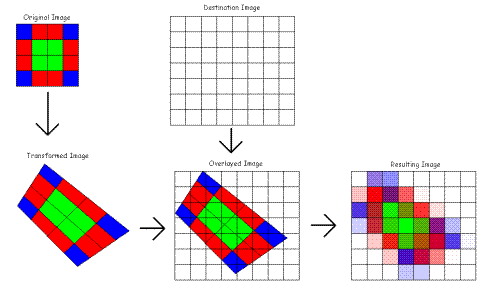
Aaform begins by creating a grid of the transformed image’s pixels. Then, it overlays that grid on top of the destination bitmap and finds the area of overlap for each transformed source pixel on each destination pixel. It then uses that overlap to decide how much of each source pixel’s color information belongs in each destination pixel.
This illustrates how Aaform works:
Functions Included
- Transform: Transforms the source image onto the destination image passed
- CreateTransform: Creates a new bitmap of appropriate size to fit the transformed source image and passes it to Transform
The following functions all just calculate the corners of the transformed image and pass those on to CreateTransform:
- Rotate: Rotates an image by the passed degrees
- Stretch: Stretches an image by the passed ratios
- SkewHorizontal: Skews the image horizontally by the passed degrees (-90, 90)
- SkewVerticle: Skews the image vertically by the passed degrees (-90, 90)
For information on each of the methods’ uses, see the sample projects attached to this article.
Using the Callback Function
Unfortunately, Aaform does not complete quickly. The average transformation will take several seconds to complete. Because of this, there is a need for a CallBack function to update the client code on Aaform’s progress as well as give the client code an opportunity to abort the transformation
In C++, the callback function should look like this:
bool AaformCallbackFunc(double percentdone)
{
   ...
}
Where percentdone is the amount of the image that has processed. 0 is 0%; 1 is 100%.
If you are using the DLL in VB, your callback function should look like this:
Public Function AaformCallbackFunc(ByVal Percentage As Double) As Long
...
End Function
Likewise, if you are using VB.NET, you should pass a CallBack delegate:
Public Delegate Function CallBack(ByVal PercentDone As Double) As Boolean
On the other hand, if you are using the VB module, your callback should look like this (due to a need to have 16 bytes’ worth of parameters to use CallWindowProc):
Public Function AaformCallbackFunc(ByVal Percentage As Double, _
                                   ByVal Numerator As Long, _
                                   ByVal Denominator As Long) As Long
...
End Function
Where Percentage means the same thing, and Numerator and Denominator make up the rationale used to calculate Percentage.
No matter what you’re using, if your callback function returns true (anything but 0), the main algorithm will immediately exit (after clearing the memory) and return a null bitmap.
End Note
1 Aaform will attempt to transform concave polygons (and it will create a reasonable result), but there is no guarantee it will work due to the way Aaform generates the transformed pixel grid.