


Introduction
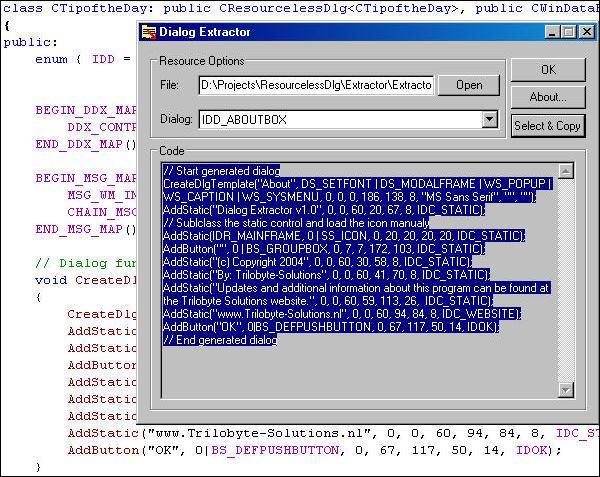
There is one problem if you have designed a dialog and you want to share it with other people. For example: I thought about creating a typical “Tip of the Day” dialog able to read in an XML file. I wanted to share it with anyone who needs it. The problem was: How can I distribute the code without messing around with multiple resource scripts? I searched the Internet for a while and found some information about the Windows API. It was rather easy, but it had some nasty things you needed to look out for. For example, all data had to be aligned at DWORD boundaries. I found out is was really hard to create a dialog without the dialog editor, so I wrote a small tool capable of parsing a resource script and export a dialog from it. I packeted those two things together and the Resourceless Dialog Toolkit was born.
Using the Code
I have spent a few hours creating documentation and a tutorial, so I’m giving you a small class showing you how the code works.
class CSampleDlg: public CResourcelessDlg<CSampleDlg>,
                  public CWinDataExchange<CSampleDlg>
{
public:
  BEGIN_MSG_MAP(CSampleDlg)
      MSG_WM_INITDIALOG(OnInitDialog)
      CHAIN_MSG_MAP(CResourcelessDlg<CSampleDlg>)
   END_MSG_MAP()
   BEGIN_DDX_MAP(CSampleDlg)
   END_DDX_MAP()

   // Dialog function
   void CreateDlg()
   {
      CreateDlgTemplate("About", DS_SETFONT|DS_MODALFRAME|
                                 WS_CAPTION|WS_SYSMENU,
                                 0, 0, 0, 186, 138, 8,
                                 "MS Sans Serif", "", "");
      AddStatic("Dialog Extractor v1.0", 0, 0, 60, 20, 67, 8,
                IDC_STATIC);
      AddStatic(IDR_MAINFRAME, SS_ICON, 0, 20, 20, 20, 20, 18);
      AddButton("", 0 | BS_GROUPBOX, 0, 7, 7, 172, 103, IDC_STATIC);
      AddStatic("(c) Copyright 2004", 0, 0, 60, 30, 58, 8,
                IDC_STATIC);
      AddStatic("By: Trilobyte-Solutions", 0, 0, 60, 41, 70, 8,
                IDC_STATIC);
      AddStatic("Updates and additional information about this
                 program can be found at the Trilobyte Solutions
                 website.", 0, 0, 60, 59, 113, 26,  IDC_STATIC);
      AddStatic("www.Trilobyte-Solutions.nl", 0, 0, 60, 94, 84, 8,
                IDC_STATIC);
      AddButton("OK", 0|BS_DEFPUSHBUTTON, 0, 67, 117, 50, 14, IDOK);
   }
   LRESULT OnInitDialog(HWND, LPARAM)
   {
      DoDataExchange(false);

      CenterWindow(GetParent());
      return IDOK;
   }
};
As you can see, it is really easy to use the code. More information can be found in the documentation and tutorial inside the toolkit.
If you want to know more about the underlaying technique, look one of the following items up in the MSDN: DLGTEMPLATE, DLGITEMTEMPLATE, CreateDialogIndirectParam, and DialogBoxIndirectParam. If there are enough requests, I will write an article about the Windows dialog API.
The Tip of the Day Dialog
The dialog I told you about earlier in this article is not ready yet. At the end of the next week it probably will be ready.
Download
Download the Resourceless Dialog Toolkit – 166 Kb from my Web site, or use the download at the bottom of this page.
History
The code is version 1.0. The tool is version 1.1.
Additional Information
For additional information, questions, and bug reports, visit my Web site: http://www.Trilobyte-Solutions.nl, or contact me at bertwillems@trilobyte-solutions.nl.