


by Jerry Nixon
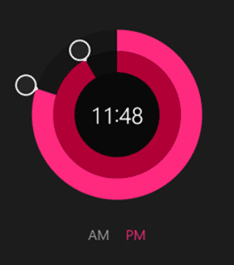
If you are like me, then every time you get a new MSDN magazine, you flip to the advertisements first. There’s nothing cooler than looking to see what component and control vendors come up with and present as next-gen UI. I have my own ideas on UX, but I would be dishonest if I didn’t admit those ads, over the years, haven’t influenced me.
So, when new apps were included in the Windows 8.1 update, I immediately opened them to see if I could glean some UX ideas. Many of them are quite nice. But the timer app is particularly distinctive in its look and interaction. The interesting dial control is quite usable – it’s intuitive and flashy looking. I like both of those.
Um, rocket science?
Then I started to wonder. Has the development team split the atom here? Would this be difficult for me to include in my own app, if I wanted it? So I started to think about it. You know I love XAML. And XAML has all these transform and clipping and manipulation features that, together, helped me come up with a reasonable facsimile. And, I wanted to share it.

Aside: It’s important that you don’t think this is actually how the Windows 8.1 app team built this control. I don’t know how they built the control. In fact, now that XAML apps install as compiled XAML, instead of the raw XAML you could view in Notepad, we can’t spelunk into XAML apps like we used to – which is probably for the best.
Okay, let’s do this thing
In the video above, we built the whole prototype. It’s barely usable, but gets a long way down the road if you wanted to build this control for yourself. It’s MVVM-based and leverages the WinRT Toolkit’s RingSlice class. In addition, I leverage my other article where I built a Dial control. That was handy. By reusing those two blocks of code, I was able to come up with a pretty simplistic solution.
Download the code here.
Best of luck!
Reprinted with permission.