To work with ADO.NET, the first thing you’ll need is a database. A database sample has been provided in the attachment; it consists of a few simple fields in the tbl_master table:
- EmployeeID
- FirstName
- LastName
- Location
You will be creating a simple form for navigating through the records in the table.
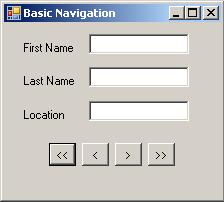
Start by placing three labels, three textboxes, and four buttons on a form as shown in the following figure. Name the textboxes txtFirstName, txtLastName, and txtLocation. The buttons should be self explanatory as well: btnFirst, btnPrevious, btnNext, and btnLast.
Now you can begin the coding. Declare a dataset at the class level and import the System.Data.OleDb namespace.
Dim ds As New DataSet()
In the Form’s Load event, fill the dataset. To do this, create a DataAdapter and use its Fill() method to fill up the dataset.
conn.ConnectionString = "Provider=Microsoft.Jet.OLEDB.4.0; _
   Data Source=C:\Documents and Settings\mendhak\My Documents\ _
   Visual Studio 2005\Projects\ADONetTutorial1\ADONetTutorial1\ _
   sample.mdb;User Id=admin;Password=;"

   Dim strSQL As String = "SELECT EmployeeID, FirstName, LastName, _
                           Location FROM tbl_Master"
   Dim da As New OleDbDataAdapter(strSQL, conn)

   da.Fill(ds)
(You will have to modify the connection string to point the location of the MDB file on your machine.)
The dataset has now been filled. If you have worked with classic ADO, think of a dataset as something like a recordset, except that a dataset is disconnected from the dataset, so you don’t need to worry about cursors, EOF, BOF, or closing connections. Datasets are .NET collections as well; this makes them more flexible.
Anyway, you now fill the textboxes with the data in the dataset. Remember that a dataset is a collection. More specifically, it is a collection of DataTables. A DataTable simply represents a table of data you have retrieved from the database. You’ll start with the first row. Immediately after the Fill() method, do this:
'Check if the table is empty
If ds.Tables(0).Rows.Count > 0 Then
   txtFirstName.Text = ds.Tables(0).Rows(0).Item("FirstName").ToString()
   txtLastName.Text  = ds.Tables(0).Rows(0).Item("LastName").ToString()
   txtLocation.Text  = ds.Tables(0).Rows(0).Item("Location").ToString()
End If[/HIGHLIGHT]
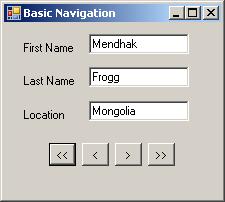
Run your form, and it should look like this.