Resources Explorer | CodeGuru

Resources Explorer

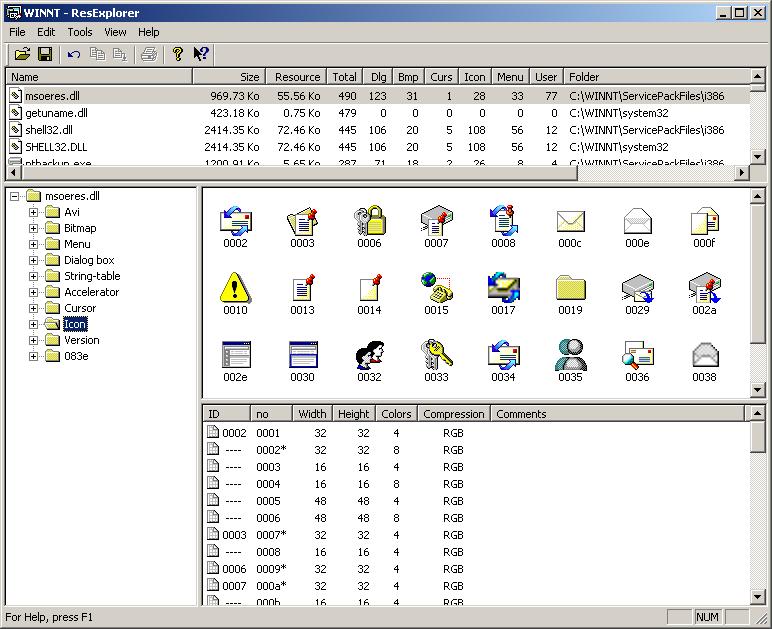
ResExplorer is a tool that helps you find resources in EXE or DLL files. The first time you use it, it makes a list of files with resource counts. After that, it can show you a selected resource in a selected file (image and attributes). It is possible to save this to a file or […]

Written By
CodeGuru Staff
CodeGuru Staff
Mar 22, 2005
1 minute read
CodeGuru content and product recommendations are editorially independent. We may make money when you click on links to our partners. Learn More

ResExplorer is a tool that helps you find resources in EXE or DLL files. The first time you use it, it makes a list of files with resource counts. After that, it can show you a selected resource in a selected file (image and attributes). It is possible to save this to a file or the Clipboard. Some formats are available; these are compatible with Visual Studio (such as BMP, AVI, VAW, RES, ICO, or CUR). The program can easily be extended to support all other resource types.

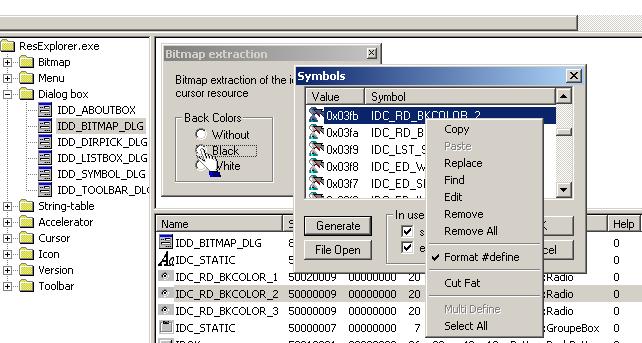
A management of table of the symbols makes it possible to replace the numerical values
indicating the resources by symbols such those defined in the files Resource.h
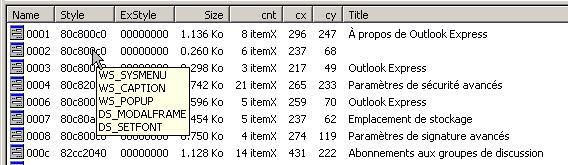
Special tooltips give attribute details.
This tool is an example of MFC usage (sources available): SDI with variable splitter windows (list view, tree view, and scroll view) to show files listing and tree, and a list for resource attributes.

Parts are directly usable in other applications such as for example:

  • Management of the columns and sorting in CListCtrl in Report mode: Utilities.cpp and Utilities.h.
  • Edition in place of subitems in CListCtrl in Report mode: ListCtrlEx.cpp and ListCtrlEx.h.
  • Display and writing in file of the resoures Bitmap, icon and Curseur: BitmapRW.cpp and BitmapRW.h

It does not use special classes to read resources in the EXE or DLL files.

A help (in French) is implemented but is it necessary to use this tool.

CodeGuru Logo

CodeGuru covers topics related to Microsoft-related software development, mobile development, database management, and web application programming. In addition to tutorials and how-tos that teach programmers how to code in Microsoft-related languages and frameworks like C# and .Net, we also publish articles on software development tools, the latest in developer news, and advice for project managers. Cloud services such as Microsoft Azure and database options including SQL Server and MSSQL are also frequently covered.

Property of TechnologyAdvice. © 2026 TechnologyAdvice. All Rights Reserved

Advertiser Disclosure: Some of the products that appear on this site are from companies from which TechnologyAdvice receives compensation. This compensation may impact how and where products appear on this site including, for example, the order in which they appear. TechnologyAdvice does not include all companies or all types of products available in the marketplace.