


Introduction
For a variety of business and technical reasons, Microsoft Windows XP/2000 operating systems are increasingly being considered as a platform for deployment of real-time systems. The reasons include:
- The many applications available on the platform.
- The variety of development tools available on the platform.
- The richness of the Microsoft Win32 application programming interface (API).
- The large number of developers, support personnel, and end users who are familiar with the system.
The Hadcon’s real time module (RTM) has been developed to bring “hard ” real time capabilities (such as creation of timers, system thread, of management by resources—memory, ports, interrupts) to Windows, excepting the necessity of creating the driver.
RTM Architecture
Precise execution of events is critical in a real-time system. RTM provides complete flexibility to the developer to determine the appropriate timer resolution for their system. Timer interval values can be set between 100 microsecond and 1 millisecond (100, 200, 500, 1000). The timer interval is default inside of [AddNewInst] section rtmdrv.inf file’s HKR,,TimerQuantum,,500.
[codeprtm1.PNG]
RTM uses the “mixed” code—timer’s—interrupt’s routines (working in Ring 0) and user routines (working in Ring 3) are incorporated in one DLL module. Real-time components (timer, system thread, and interrupt routines) must be locked in memory to avoid latencies due to page faults. Therefore, RTM defines own sections for location of a code, data, and stack using the data_seg, code_seg, and bss_seg pragmas.
//
//
#pragma code_seg( "RTMCODE" )
Specifies a code section where functions are to be allocated. For example:
#pragma code_seg( "RTMCODE" )

void timer1(unsigned dwmess)
{
/*
code
*/
..................
}

#pragma code_seg()


#pragma data_seg( "RTMDATA" )
Specifies a code section where initialized data are to be allocated. For example:
#pragma data_seg( "RTMDATA" )

char buff[10] = {0};
int k1 = 0;

#pragma data_seg()

#pragma bss_seg( "RTMBSS" )

char buff[10];
int k1;

#pragma bss_seg()
Timers
RTM uses the system timer. The system timer generates system ticks at a fixed rate of one tick per millisecond (or 100, 200, 500 microseconds), which is the rate at which a timer interrupt is generated and serviced by the operating system (interrupt service routine ISR). The RTmCreateTimer function lets you attach a handling routine to an timer interrupt, much the same way that the RTM timer routines allows you to associate a handling routine with a given timer expiration.
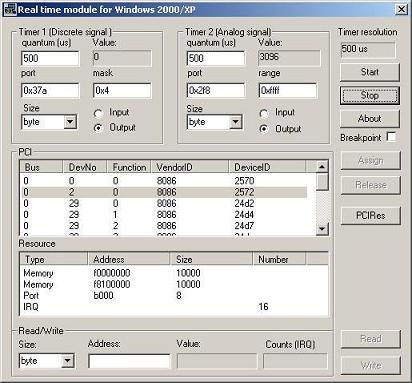
RTM timers are not synchronization objects; this means threads cannot wait for single objects with an RTM timer handle. This is in contrast to the Windows waitable timer, which is an object on which a thread can wait, or against which a thread can receive notification.
void timer1(unsigned dwmess)
{
   int i;
   unsigned nstate;
   unsigned nvalue;
   unsigned short ndigport;

      if(nstop ) return ;


      if(initLpt == 0)
      {
       _asm {
          mov dx,378h
          mov ax,0
          out dx,ax ;    //outp(BASE_LPT,0);
          add dx,2; CR
          mov ax,2eh
          out dx,ax ;    //outp(BASE_LPT+CR,0x2e);
      }
      initLpt =1;


      rtmsqrt(1.5);
/*
code
*/
..................


}
#pragma code_seg()


void func()
{
   int error;
   HANDLE tm;

      if(RtmInit(hRTMDLL,KERNEL_MODE) == -1) return 0;

         RtmDebug(hRTMDLL ,TRUE);
         tm = RtmCreateTimer(hRTMDLL,timer_anl,0x2000,stanl.quantum,
                             KERNEL_MODE);
         RtmStartTimer(hRTMDLL ,tm,0x3000);

         error = RtmTimerPostMessage(hRTMDLL ,tm,0x100);