


My PPC device runs for a fairly long time on a watch battery and a pair of AAAs. Call me a hayseed, but I think this is really incredible. I wasn’t too surprised, then, when I found part of the reason for this long battery life is that my palmtop has a limited register set and it doesn’t have chip support for much floating-point math. Try as I might, I simply couldn’t rearrange program logic in a way that would get rid of unresolved externals that had to do with floating point number comparisons. I finally wrote workarounds that transform floating point numbers to integers and then operate them.
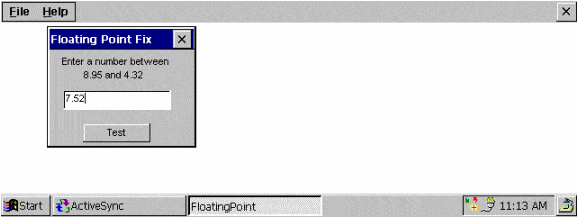
Figure 1: The FloatingPoint Example
Figure 1: FloatingPoint.cpp
// FloatingPoint.cpp : Defines the entry point for the application.
//

#include "stdafx.h"
#include "FloatingPoint.h"
#include <commctrl.h>
#include <windowsx.h>
#include <math.h>

#define MAX_LOADSTRING 100

#define BETWEEN        1
#define LESS_THAN      2
#define GREATER_THAN   3

// Global Variables:
HINSTANCE            hInst;            // The current instance
HWND                 hwndCB;           // The command bar handle

// Forward declarations of functions included in this code module:
ATOM MyRegisterClass (HINSTANCE hInstance, LPTSTR szWindowClass);
BOOL InitInstance (HINSTANCE, int);
LRESULT CALLBACK WndProc (HWND, UINT, WPARAM, LPARAM);
LRESULT CALLBACK About (HWND, UINT, WPARAM, LPARAM);
BOOL CALLBACK FloatingPtDlgProc (HWND, UINT, WPARAM, LPARAM);
BOOL CheckFloatingPointRange( TCHAR* );

int WINAPI WinMain(HINSTANCE hInstance,
                   HINSTANCE hPrevInstance,
                   LPTSTR    lpCmdLine,
                   int       nCmdShow)
{
    MSG msg;
    HACCEL hAccelTable;

    // Perform application initialization:
    if (!InitInstance (hInstance, nCmdShow))
    {
        return FALSE;
    }

    hAccelTable = LoadAccelerators(hInstance,
                  (LPCTSTR)IDC_FLOATINGPOINT);

    // Main message loop:
    while (GetMessage(&msg, NULL, 0, 0))
    {
        if (!TranslateAccelerator(msg.hwnd, hAccelTable, &msg))
        {
            TranslateMessage(&msg);
            DispatchMessage(&msg);
        }
    }

    return msg.wParam;
}

//
//  FUNCTION: MyRegisterClass()
//
//  PURPOSE: Registers the window class.
//
//  COMMENTS:
//
//    This function and its usage is only necessary if you want
//    this code to be compatible with Win32 systems prior to the
//    'RegisterClassEx' function that was added to Windows 95.
//    It is important to call this function so that the
//    application will get 'well formed' small icons associated
//    with it.
//
ATOM MyRegisterClass(HINSTANCE hInstance, LPTSTR szWindowClass)
{
    WNDCLASS    wc;

    wc.style            = CS_HREDRAW | CS_VREDRAW;
    wc.lpfnWndProc      = (WNDPROC) WndProc;
    wc.cbClsExtra       = 0;
    wc.cbWndExtra       = 0;
    wc.hInstance        = hInstance;
    wc.hIcon            = LoadIcon(hInstance,
                          MAKEINTRESOURCE(IDI_FLOATINGPOINT));
    wc.hCursor          = 0;
    wc.hbrBackground    = (HBRUSH) GetStockObject(WHITE_BRUSH);
    wc.lpszMenuName     = 0;
    wc.lpszClassName    = szWindowClass;

    return RegisterClass(&wc);
}

//
//  FUNCTION: InitInstance(HANDLE, int)
//
//  PURPOSE: Saves instance handle and creates main window
//
//  COMMENTS:
//
//    In this function, we save the instance handle in a global
//    variable and create and display the main program window.
//
BOOL InitInstance(HINSTANCE hInstance, int nCmdShow)
{
    HWND    hWnd;
    TCHAR    szTitle[MAX_LOADSTRING];        // The title bar text
    TCHAR    szWindowClass[MAX_LOADSTRING];  // The window class
                                             // name

    hInst = hInstance;        // Store instance handle in our
                              // global variable
    // Initialize global strings
    LoadString(hInstance, IDC_FLOATINGPOINT,
               szWindowClass, MAX_LOADSTRING);
    MyRegisterClass(hInstance, szWindowClass);

    LoadString(hInstance, IDS_APP_TITLE, szTitle, MAX_LOADSTRING);
    hWnd = CreateWindow(szWindowClass, szTitle,
                        WS_VISIBLE,
                        0, 0, CW_USEDEFAULT, CW_USEDEFAULT,
                        NULL, NULL, hInstance, NULL);

    if (!hWnd)
    {
        return FALSE;
    }

    ShowWindow(hWnd, nCmdShow);
    UpdateWindow(hWnd);
    if (hwndCB)
        CommandBar_Show(hwndCB, TRUE);

    DialogBox( hInst, TEXT( "FLOATING_POINT" ), hWnd,
               FloatingPtDlgProc);
    return TRUE;
}

//
//  FUNCTION: WndProc(HWND, unsigned, WORD, LONG)
//
//  PURPOSE:  Processes messages for the main window.
//
//  WM_COMMAND    - process the application menu
//  WM_PAINT      - Paint the main window
//  WM_DESTROY    - post a quit message and return
//
//
LRESULT CALLBACK WndProc(HWND hWnd, UINT message, WPARAM wParam,
                         LPARAM lParam)
{
    int wmId, wmEvent;

    switch (message)
    {
        case WM_COMMAND:
            wmId    = LOWORD(wParam);
            wmEvent = HIWORD(wParam);
            // Parse the menu selections:
            switch (wmId)
            {
                case IDM_HELP_ABOUT:
                   DialogBox(hInst, (LPCTSTR)IDD_ABOUTBOX,
                             hWnd, (DLGPROC)About);
                   break;
                case IDM_FILE_EXIT:
                   DestroyWindow(hWnd);
                   break;
                default:
                   return DefWindowProc(hWnd, message, wParam,
                                        lParam);
            }
            break;
        case WM_CREATE:
            hwndCB = CommandBar_Create(hInst, hWnd, 1);
            CommandBar_InsertMenubar(hwndCB, hInst, IDM_MENU, 0);
            CommandBar_AddAdornments(hwndCB, 0, 0);
            break;
        case WM_DESTROY:
            CommandBar_Destroy(hwndCB);
            PostQuitMessage(0);
            break;
        default:
            return DefWindowProc(hWnd, message, wParam, lParam);
   }
   return 0;
}

// Mesage handler for the About box.
LRESULT CALLBACK About(HWND hDlg, UINT message, WPARAM wParam,
                       LPARAM lParam)
{
    RECT rt, rt1;
    int DlgWidth, DlgHeight;    // dialog width and height in pixel
                                // units
    int NewPosX, NewPosY;

    switch (message)
    {
        case WM_INITDIALOG:
            // trying to center the About dialog
            if (GetWindowRect(hDlg, &rt1)) {
                GetClientRect(GetParent(hDlg), &rt);
                DlgWidth     = rt1.right - rt1.left;
                DlgHeight    = rt1.bottom - rt1.top ;
                NewPosX      = (rt.right - rt.left - DlgWidth)/2;
                NewPosY      = (rt.bottom - rt.top - DlgHeight)/2;

                // if the About box is larger than the physical
                // screen
                if (NewPosX < 0) NewPosX = 0;
                if (NewPosY < 0) NewPosY = 0;
                SetWindowPos(hDlg, 0, NewPosX, NewPosY,
                    0, 0, SWP_NOZORDER | SWP_NOSIZE);
            }
            return TRUE;

        case WM_COMMAND:
            if ((LOWORD(wParam) == IDOK) || (LOWORD(wParam)
                                == IDCANCEL))
            {
                EndDialog(hDlg, LOWORD(wParam));
                return TRUE;
            }
            break;
    }
    return FALSE;
}

BOOL CALLBACK FloatingPtDlgProc(HWND hDlg,
                                UINT message,
                                WPARAM wParam,
                                LPARAM lParam)
{
    HWND hWndEdit;
    TCHAR tszNumberBuff[8];

    switch (message)
    {

        case WM_INITDIALOG:
            hWndEdit = GetDlgItem( hDlg, IDC_FLOAT_NUMBER );
            //limit input to 6 characters
            Edit_LimitText(  hWndEdit, 6 );
            break;

        case WM_COMMAND:
            switch (LOWORD(wParam))
            {
                case IDC_TEST:
                    memset( tszNumberBuff, 0x0,
                            sizeof(tszNumberBuff));
                    GetDlgItemText( hDlg, IDC_FLOAT_NUMBER,
                                    &tszNumberBuff[0], 6 );
                     if( !CheckFloatingPointRange(
                         &tszNumberBuff[0]))
                     {
                         MessageBox(hDlg, TEXT(" Input not in
                                                 range "),
                                    TEXT( "Floating Point Test " ),
                                          MB_OK );
                     }
                     else
                     {
                         MessageBox(hDlg, TEXT(" Input within
                                                 range "),
                                    TEXT( "Floating Point Test " ),
                                          MB_OK );
                     }

                   break;

                case IDCANCEL:
                    EndDialog(hDlg, LOWORD(wParam));
                    return TRUE;
                default:
                    break;
            }
            break;
    }
    return FALSE;
}
////////////////////////////////////////////////////////
// Some PPCs don't do floating pt compares,
// so here is a work around
////////////////////////////////////////////////////////
BOOL CheckFloatingPointRange( TCHAR* pszFloatString  )
{
    int iValid, iInputDecimal, iInputSign, iCompareInput;
    int    iThreshDecimal, iThreshSign ;
    int    iThreshStrlen, iInputStrlen;
    int iInput, iThreshold, iExp, iDivisor;
    char *pszBuffer, *psz1stInputZero, *psz1stThreshZero;
    char szInputBuff[9];
    double     dInput;
    double     dThreshold = 0;
    double*  pThreshold;
    TCHAR *stopstring;

    //get validation type
    iValid = BETWEEN;
    //get user input
    dInput = wcstod(pszFloatString, &stopstring);

    //set the upper threshold value
    dThreshold = 8.95;


    //get input digits, magnitude & sign
    pszBuffer = _ecvt( dInput, 8, &iInputDecimal,
                       &iInputSign );
    //copy the string before the buffer contents are destroyed
    strcpy( szInputBuff, pszBuffer );
    //find the location of the first 0, calculate number digits
    psz1stInputZero = strchr( szInputBuff, '0');
    iInputStrlen = psz1stInputZero - szInputBuff;
    //convert to integer
    iInput = atoi( szInputBuff );
    //apply correct sign
    if( iInputSign )
    {
        iInput *= -1;
    }

    //get threshold digits, magnitude & sign
    pszBuffer = _ecvt( dThreshold, 8, &iThreshDecimal,
                       &iThreshSign );
    //find the location of the first 0, calculate number digits
    psz1stThreshZero = strchr( pszBuffer, '0');
    iThreshStrlen = psz1stThreshZero - pszBuffer;
    //convert to integer
    iThreshold = atoi( pszBuffer );
    //apply correct sign
    if( iThreshSign )
    {
        iThreshold *= -1;
    }


    switch( iValid )
    {
        case BETWEEN:
        case LESS_THAN:
            //if the input sign is greater, fail and bail

            //if the sign == 0, the number we converted is positive
            if( iInputSign == 0 && iThreshSign != 0 )
                {return FALSE; }

            //if the input magnitude is greater, fail & bail

            //The decimal parameter points to an integer value
            //giving the position of the decimal point with respect
            //to the beginning of the string.
            if( iInputDecimal > iThreshDecimal )
                {return FALSE; }

            if( iInputDecimal < iThreshDecimal )
                {return TRUE; }

            // if we get to here, we have to compare
            // the digits to find the larger number

            //divide away the padding to correct the magnitudes --
            //use all the decimal digits in the longest string
            iExp = ( iInputStrlen <= iThreshStrlen )? 8 -
                     iThreshStrlen: 8 - iInputStrlen;
            iDivisor = (int)pow( 10, (double)iExp);
            iCompareInput = iInput / iDivisor;
            iThreshold = iThreshold / iDivisor;

            if( iThreshold < iCompareInput )
                {return FALSE;}
            //return for Greater than
            if(iValid == LESS_THAN)
                {return TRUE;}

            //if this is a range, get 2nd bound
            if(iValid == BETWEEN)
            {    //set lower range bound
                dThreshold= 4.32;

                //get threshold digits, magnitude & sign
                pszBuffer = _ecvt( dThreshold, 8, &iThreshDecimal,
                                   &iThreshSign );
                //find the location of the first 0, calculate
                //number digits
                psz1stThreshZero = strchr( pszBuffer, '0');
                iThreshStrlen = psz1stThreshZero - pszBuffer;
                //convert to integer
                iThreshold = atoi( pszBuffer );
                //apply correct sign
                if( iThreshSign )
                {
                    iThreshold *= -1;
                }


            }
            //FALL THRU!!

        case GREATER_THAN:
            //test uses the first threshold val if GT, second if
            //BTWN
            //if the input sign is greater, fail and bail

            //if the sign 1= 0, the number we converted is negative
            if( iInputSign != 0 && iThreshSign == 0 )
                {return FALSE; }

            //if the input magnitude is greater, fail & bail

            //The decimal parameter points to an integer value
            //giving the position of the decimal point with respect
            //to the beginning of the string.
            if( iInputDecimal < iThreshDecimal )
                {return FALSE; }

            if( iInputDecimal > iThreshDecimal )
                {return TRUE; }

            // if we get to here, we have to compare
            // the digits to find the larger number

            //divide away the padding to correct the magnitudes--
            //use all the decimal digits in the longest string
            iExp = ( iInputStrlen <= iThreshStrlen )? 8 -
                     iThreshStrlen: 8 - iInputStrlen;
            iInput = iInput / (int)pow( 10, (double)iExp);
            iThreshold = iThreshold / (int)pow( 10, (double)iExp );

            if( iThreshold > iInput )
                {return FALSE;}
            else
                {return TRUE;}

        default:
            //all other cases are self validating
            return TRUE;
            break;
    }    //end switch
}
The math transforms are done in the CheckFloatingPointRange() function. The tricky thing about converting floating point numbers to integers is getting the place values translated correctly, so if you write a floating point routine, pay careful attention to the length of the strings that you end up with as you translate between characters and integers.
    //get input digits, magnitude & sign
    pszBuffer = _ecvt( dInput, 8, &iInputDecimal, &iInputSign );
    //copy the string before the buffer contents are destroyed
    strcpy( szInputBuff, pszBuffer );