


Introduction
Microsoft has added a file protection feature starting from Windows 2000, and is termed as WFP. WFP stands for Windows File Protection. Right now, the applicable operating systems that use/follow WFP are the Windows Server 2003 family, Windows XP, Windows 2000, and Windows ME.
WFP prevents accidental or malicious deletion/replacement of files that are part of the Windows OS. If it detects the modification/removal of files, it does the following:
- Copies the original version from the System32\dllcache folder. This contains all necessary files in compressed form; they are put here at the time of the OS installation.
- If that fails, it copies from the original installation folder. As with the previous method, it is also done silently; if the source is found on a local drive, Windows CD or Network—from wherever you installed Windows.
- If both fail, Windows prompts the user to provide the source from where it can copy the replaced/deleted file.
You also can manually check by running a SFC.EXE program with the /SCANNOW parameter. SFC stands for System File Checker.
Here, I am not dealing with the extensive details for WFP, setting the Cache-size of ‘dllcache’, disabling this feature, and all that. Please look at the links provided below.
Enumerating the Protected Files
The only functions that deal with WFP are:
- SfcIsFileProtected determines whether the given files are protected.
- The essential ingredient for you is the SfcGetNextProtectedFile function. By using this function, you can get the list for all files that are under WFP.
Sample code to get the list of WFP files
PROTECTED_FILE_DATA pfd;    // It has only two members, shown in
                            // this code snippet.
pfd.FileNumber = 0;         // Start enumerating;
                            // SfcGetNextProtectedFile will
                            // increment further
while(SfcGetNextProtectedFile(NULL, &pfd))
{
   // Sample usage; FileName holds the full path
   CString str=pfd.FileName;
   pCombo->AddString(str);
}
Dependencies
- Header: SFC.H
- Library: SFC.LIB
- You need to install the Platform SDK for SFC support.
Application Features
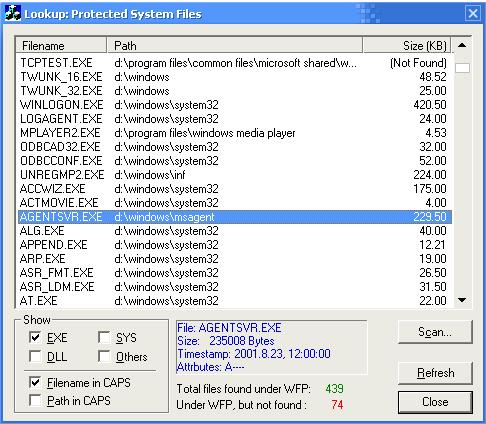
Grounded with the function and its easy usage, it is trivial to enumerate all the protected files. So, I extended my article to show addition details:
- Shows the files in the list control with three columns: Filename, Path (without filename), and its size (KB).
- Facilitates the user to get the list of only DLL, EXE, SYS, or Other files (excluding the former three types).
- Shows up the total files(n), as per filtering chosen by user, along with missing files(m). Note tha m+n is NOT the total number of files, but n-m is number of files that are found sucessfully.
- Shows the size, time-stamp, and attributes of the currently selected file.
- Allows user to run scanning of WFP files. To do this, I just started processing “SFC.EXE” with the “/SCANNOW” parameter.
The Wrapper Class
Here is the CEnumWFPWrapper class declaration that wraps SFC functionality:
// SfcGetNextProtectedFile wrapper class.
class CEnumWFPWrapper
{
protected:
   PROTECTED_FILE_DATA m_pfd;
   bool m_bDone;
   CString m_strFullPath;
public:
   CEnumWFPWrapper();

   void FindFirst();
   void FindNext();

   CString GetPathOnly(bool bCaps = false) const;
   CString GetFullPath(bool bCaps = false) const;
   CString GetFileName(bool bCaps = true) const;
   CString GetExtension(bool bCaps = true) const;

   bool GetSizeKB(float &fSize) const;

   bool IsComplete() const;

private:
   bool m_bFindFirstCalled;
};
The usage of this class is simple. Just declare an object of this type, call the FindFirst method, and then enumerate the list of all WFP files by using FindNext. You will be testing whether enumeration is complete by IsComplete.
There are methods such as GetFullPath and GetSizeKB that return the attributes of current scanned files. Note that SfcGetNextProtectedFile will return the filename irrespective of its presence on the system.