


Dependency Property Generator:
When it comes to MVVM, everybody – or almost everybody – agrees on its benefits. The clear separation of the different parts of the code is definitely a good practice. Only that it forces you to write a lot of tedious boilerplate code. Forget the happy days when a sheer double-click would generate an event handler and let you directly write what you have on your mind. MVVM comes with a heavy machinery made of Dependency properties, registration, commands and xaml style declaration.
This is why most developers, after some time, will use an MVVM “toolkit”, which I don’t like for many reasons. (The first one being that I want to remain fully in charge of my code)
One could definitely use a T4 template to generate the tedious code, but this approach is not very didactic. Once written, templates are quickly forgotten, and after a while you just don’t know what and how the template generates. Not to mention that the user of this template will lack a very important information: where should they insert this generated code?
A dedicated application, which can be installed as a tool in VS2010 is then to be preferred. This is how I came to write “Dependency Property Generator”, which is the core of this article. I posted a very simple example along, so you can quickly understand how the tool works. (In 2 words you select a control, you select an event, and this is the end of the story: the code is already written!)
How it looks:
The interface is very simple:
– Select a control in the above part of the GUI
– Using the combo box in the middle you select the event you want to use
– The tabs below show you the generated code. It also indicates where the code should be pasted in your project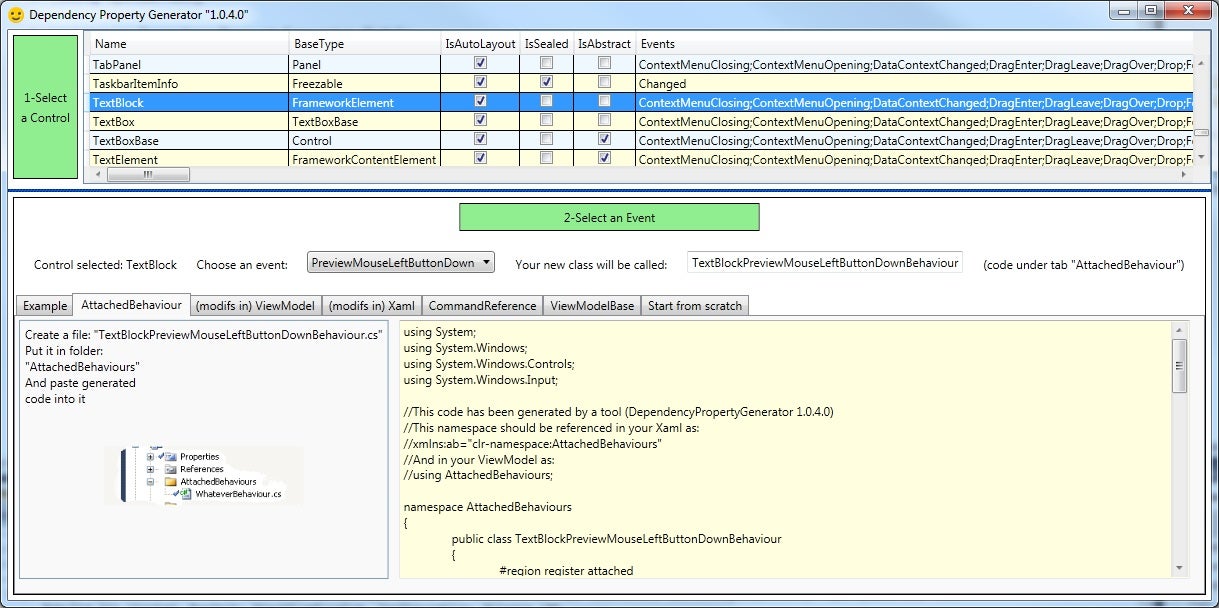
The Hello world example:
The simplest example is actually fully described in the application itself. So a good picture will give you an idea on how to proceed:
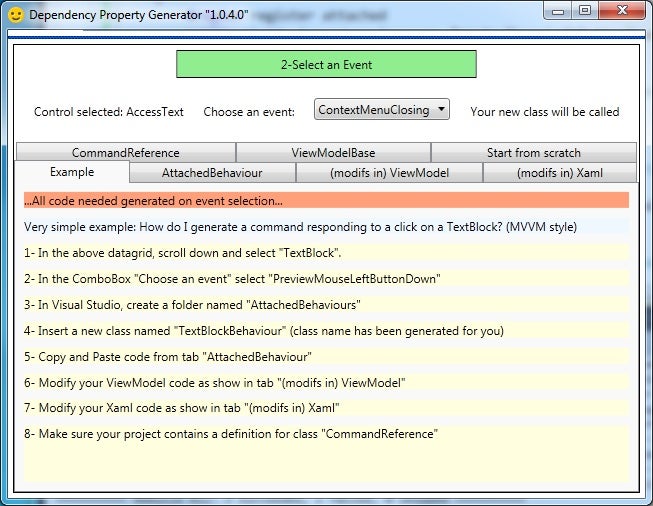
Every Dependency Property is defined and registered in the “Attached Behaviour” folder. Commands are declared, initialized and used in the ViewModel. In the xaml, the modifications occurs with the declaration of a new style with a dedicated setter for the newly created property.
Every line of code (both .cs and .xaml) is generated for you and the application tells you where to insert that code.
Last but not least:
A decent MVVM application must include at least a ViewModelBase class and also a command reference.
Both of these are also generated and should be included in your project at the beginning.
A tab named “start from scratch” reminds you what to do when you start an MVVM project.
Downloads:
I include a zipped VS2010 solution which comprises:
– The full source of the tool
– A simple example of a MVVM application created with the tool, where most of the code was generated by “Dependency Property Generator”
VS2010 solution