


Introduction
This is my first attempt to read a .msg file that is generated upon saving an email from a MS Outlook 2000 file. In this article, I tried to explain how to read the .msg file, which is an OLE2 compound document.
Before going to the discussion of how to extract message body from .msg file, I suggest that you go through this article, http://www.fileformat.info/format/outlookmsg/. It gives the detailed structure of a .msg file.
.MSG File Structure
I used VC++ 6.0 as my development platform to parse the .msg file. The VC++ 6.0 development environment ships with ‘DFVIEW.EXE’. If you open this tool to open any .msg file, you will get the following output.
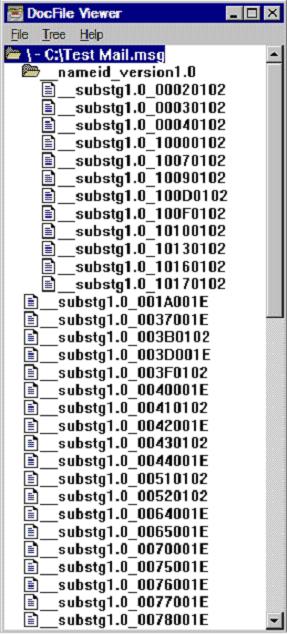
Now, it is clear that this compound file is made up of nodes and sub nodes. Your interest is in the __substg1.0_xxxxxxxx node. Each of these nodes holds a piece of information. Definitely, all information is not readable, but some nodes will have information in ASCII text format and can be readable. It is interesting to point that the __substg1.0_xxxxxxxx nodes ending with 001E contain data in ASCII text format. So, the main focus will be on these nodes.
How to Extract Mail Information from the .msg File
The main objective in this article to identify nodes that hold recipients’ information, subject, and mail body. Here are all those __substg1.0_xxxxxxxx nodes that are important to you:
- The __substg1.0_0E04001E node holds recipients’ address.
- The __substg1.0_0E1D001E node holds the subject of the mail.
- The __substg1.0_1000001E node holds the mail body if mail has been sent as plain/text format; otherwise, this node may not be there.
- The __substg1.0_1013001E node holds the mail body in HTML format. If mail node __substg1.0_1000001E is absent, you will look into this node to extract the mail body.
Double-click on these nodes in the DocFile viewer to see the corresponding information.
Implementation in MFC & ATL to Read a .msg File
I suggest that you go through the article “An Introduction to structured storage”, by Kenn Scribner, in which I found a simple generic approach in reading from and writing to a structure file. I have used Scribner’s approach to read a .msg file and added functionality to extract the mail body, subject, and recipient address. I hope this series will help others who wants to read .msg files from a VC++ application.
My program has two functions. The first part checks whether the file supplied is a OLE2 Document file or not. If it is a OLE2 Document file, it Open the storage file using Win32 API StgOpenStorage(). Then, the second function tries to read information from the above-mentioned four nodes. Here is the code. Before writing the code, please include the ‘atlbase.h’ file in your class header file.
// Opened the storage(.msg file) for reading.

void CMSGFileDlg::OnOK()
{
   // TODO: Add extra validation here
   HRESULT hr = S_OK;
   try
   {
      USES_CONVERSION;
      TCHAR strFilePath[MAX_PATH+1] = {0};
      _tcscpy(strFilePath, _T("C:\\Test Mail.msg"));

      // Check for valid storage file.
      hr = StgIsStorageFile(T2W(strFilePath));

      if(FAILED(hr))
      {
         // Error, This is not a valid storage file!
         AfxMessageBox(_T("Not a Storage file"),
                       MB_OK | MB_ICONINFORMATION);
         return;
      }
      else
      {
         // This is a storage file

         CComPtr<IStorage> pIStorage;
         hr = StgOpenStorage(T2W(strFilePath),
            NULL,
            STGM_DIRECT |
            STGM_READ |
            STGM_SHARE_EXCLUSIVE,
            NULL,
            0,
            &pIStorage);

         if(FAILED(hr))    // Error in Opening storage file
            throw hr;
         else              // Read Storage file
         {
            hr = ReadStorage(pIStorage);
            if(FAILED(hr))
            {
               throw hr;
            }
         }
      }
   }
   catch(HRESULT hrError)
   {
      LPVOID lpMsgBuf = NULL;
      ::FormatMessage(FORMAT_MESSAGE_ALLOCATE_BUFFER |
         FORMAT_MESSAGE_FROM_SYSTEM | FORMAT_MESSAGE_IGNORE_INSERTS,
            NULL, hrError,
         MAKELANGID(LANG_NEUTRAL, SUBLANG_DEFAULT),
         (LPTSTR)&lpMsgBuf,
         0,
         NULL);

      // Display Error message.
         if ( lpMsgBuf )
      {
         AfxMessageBox((LPTSTR)lpMsgBuf,MB_OK | MB_ICONINFORMATION);
         // Free the buffer.
         LocalFree(lpMsgBuf);
      }    // end of if
   }
   CDialog::OnOK();
}