


Introduction
Smartphones have evolved from being stylus driven to being
gesture driven. Ever since Apple launched the IPhone, gesture based input has
become the dominant form of interaction with these devices. When Microsoft
released Windows Phone 7 in November 2010, the latest offering from Redmond had
full support for gesture based input. Both the application development
platforms for Windows Phone – Silverlight
and XNA have
full support for gesture based input.
Gesture Support in Silverlight Based Windows Phone Applications
Silverlight based Windows Phone applications handle the
following events, which enable gesture support.
|
Event Name |
When does it trigger |
|
ManipulationStarted |
When user touches the screen |
|
ManipulationDelta |
When user moves the finger(s) on the screen |
|
ManipulationCompleted |
When user removes the finger(s) from the screen |
All Silverlight controls for Windows Phone platform handle
and support gestures.
Gesture Support in XNA Based Windows Phone Applications
XNA has a more action-driven support for gestures. Different
gestures are supported, such as Tap, DoubleTap, Hold, FreeDrag, VerticalDrag,
HorizontalDrag, DragComplete, Flick, Pinch and PinchComplete.
Hands-On
Let us get hands-on and create a simple Silverlight based
Windows Phone application that handles gestures.
Create a new Silverlight for Windows Phone project called
WindowsPhoneGesturesSilverlightDemo.
Add a TextBlock on the MainPage.xaml.
Now, go to the properties for the MainPage.xaml and double
check the event called ManipulationDelta to create the event.
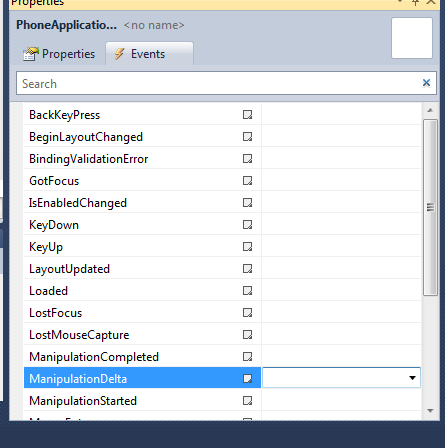
Figure 1: Double check ManipulationDelta
Add the following snippet in the code for the event.
private void PhoneApplicationPage_ManipulationDelta(object sender, ManipulationDeltaEventArgs e)
        {
            textBlock1.Text = "Last touched at " + e.DeltaManipulation.Translation.X.ToString() + "," + e.DeltaManipulation.Translation.Y.ToString();
        }
In the above snippet, we are printing the manipulation delta
from the last time the manipulation was executed. So, if we move our finger
across the screen in short burst, we should see the TextBlock being updated at
short intervals and at each update, it provides the delta in the movement of
the finger.
Executing the Test Application
Compile and run the application. In the emulator, scroll the
mouse with the left button clicked to fire the events that update the
TextBlock.
Summary
In this article, we saw how we can handle gestures in our
Silverlight based Windows Phone application. I hope you have found this
information useful.