


1. Introduction
This series illustrates how a Windows client app can communicate with a Windows Service application using a WCF service.
Frequently it can be a challenge to communicate between a Windows Service and a Windows application. Prior to Vista, Windows allowed a service to be registered with the “Interact with Desktop” property allowing the service to communicate with a client in the desktop of a logged in user. This was convenient because the service could display data in the user’s desktop. Since Vista, this practice is no longer recommended due to security concerns.
Since interacting with the desktop is no longer an option, one of the challenging problems to overcome is how a Windows Service can communicate with applications running on a logged on user desktop. The difficulty is that a Windows Service runs on a different desktop (session 0) than user desktops (session n). While there are ways to overcome this problem such as enumerating current users, obtaining a handle to their desktops and so on, solving the various issues that arise with this approach isn’t trivial.
Another approach is to use some form of interprocess communication and treat the Windows Service as a ‘server’ and require that the Windows client applications register with the ‘server’ on client start up. The service can then use the interprocess communication to notify clients of specific events or, in a less than ideal scenario, users could poll the service for changes.
The title of this article describes our approach – we will be using a WCF service to communicate between a Windows Service and a WPF Taskbar Tray application.
Our sample code will illustrate monitoring file change events from the Windows service and sending out file change notications to the task bar tray applications using the WCF service.
Figure 1.1 is a screen shot of the notification window that appears when a users makes changes to any file in the “My Documents” folder. 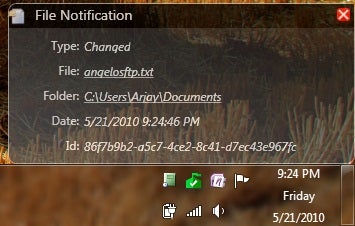
Figure 1.1
Since we need to cover a significant amount of ground and several different WxF technologies, we’ll break the discussion into four parts.
- Part I – Covers the basic architecture and the creation of the common class library.
- Part II – Covers the creation of the Windows Service and service installer.
- Part III – Covers the creation of the WCF service and how it’s hosted inside the Windows Service.
- Part IV- Covers the WPF tray application and its communication with the WCF service.
2. Architecture
2.1. Overview
As mentioned our architecture is a Windows Service which hosts a WCF service used to communicate with a client taskbar application. The WCF service code monitors the My Documents folder of each user running the client, and sends a notification to the clients via the WCF. On startup, each client app registers itself with the WCF service. Figure 2.1 is a simple diagram outlining the approach.
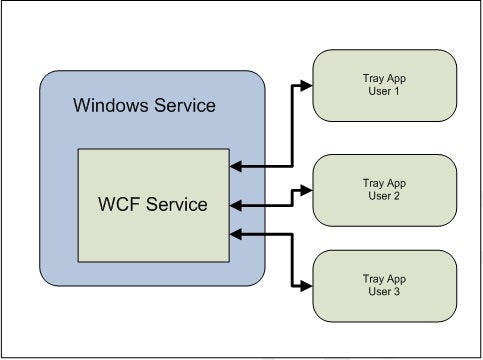
Figure 2.1
About the Author
Arjay Hawco is an application developer/architect and Microsoft MVP who works with the latest WxF .Net technologies. He is also cofounder of Iridyn, Inc, a software consulting firm.