


Recursion in XSL
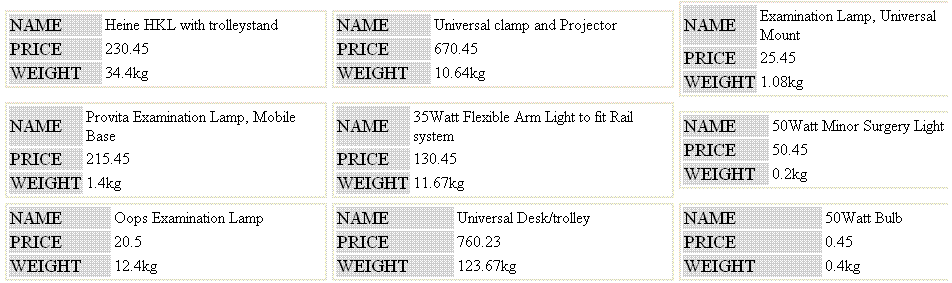
XSL is a declarative programming language. Variables, once declared, cannot be reassigned. It is often difficult for programmers coming from a procedural languages background to do advanced tasks. By using XSL, you can solve complex problems that at first glance often seem to be difficult or impossible. In this brief, I will demonstrate the recursive nature of templates. In a typical case of a product catalog display, the requirement is to display the product details in each cell, and number of columns should be selectable by the user. A sample XML file is listed below:
<data>
<product name="Heine HKL with trolleystand"
         price="230.45"
         weight="34.4kg" />
<product name="Universal clamp and Projector"
         price="670.45"
         weight="10.64kg" />
<product name="Examination Lamp, Universal Mount"
         price="25.45"
         weight="1.08kg" />
<product name="Provita Examination Lamp, Mobile Base"
         price="215.45"
         weight="1.4kg" />
<product name="35Watt Flexible Arm Light to fit Rail system"
         price="130.45"
         weight="11.67kg" />
.
.
.
</data>
Assume that you get the above from a business component. Each element row corresponds to a product whose attributes are comprised of product-specific data. Each product, along with its details, will be rendered in a single cell. The number of columns should be definable at runtime. The following is the brief XSL that does the rendering:
<?xml version="1.0" encoding="utf-8"?>
<xsl:stylesheet version="1.0"
   xmlns_xsl="http://www.w3.org/1999/XSL/Transform">
   <xsl:template match="/">
      <xsl:param name="numCols" select="3"/>
      <table cellpadding="0" cellspacing="5" border="0">
         <xsl:call-template name="renderColumns">
            <xsl:with-param name="listrows" select="//product"/>
            <xsl:with-param name="startindex" select="1"/>
            <xsl:with-param name="numofCols" select="$numCols"/>
         </xsl:call-template>
      </table>
   </xsl:template>

   <xsl:template name="renderColumns">
      <xsl:param name="listrows" />
      <xsl:param name="startindex"/>
      <xsl:param name="numofCols"/>
      <xsl:if test="count($listrows) > 0">
         <tr>
            <xsl:apply-templates select="$listrows[position()
               >= $startindex and position()
               < ($startindex+$numofCols)]" mode="rows">
            </xsl:apply-templates>
         </tr>
         <xsl:call-template name="renderColumns">
            <xsl:with-param name="listrows"
                 select="$listrows[position()
                 >= $startindex+$numofCols]"/>
            <xsl:with-param name="startindex"
                 select="$startindex"/>
               <xsl:with-param name="numofCols" select="$numofCols"/>
         </xsl:call-template>
      </xsl:if>
   </xsl:template>

   <xsl:template match="node()" mode="rows">
      <td nowrap="true">
         <table style="width:100%;border-right: thin solid;
                       border-top: thin solid; border-left: thin solid;
                       border-bottom: thin solid;">
            <xsl:apply-templates select="@*"/>
         </table>
      </td>
   </xsl:template>

   <xsl:template match="@*">
      <tr>
         <td style="font-size: larger; text-transform: uppercase;
                    background-color: gainsboro">
            <xsl:value-of select="name()"/>
         </td>
         <td>
            <xsl:value-of select="."/>
         </td>
      </tr>
   </xsl:template>
</xsl:stylesheet>
Explanation:
<xsl:template match="/">
   <xsl:param name="numCols" select="3"/>
As a C or C++ programmer organizes and reuses the code by using functions or object methods, in XSL you can organize code by using templates. The code above is the root template that will be invoked by the XSLT processor. You declare a parameter by using xsl:param, whose name is numCols. The user can pass this parameter; if the user does not supply any value in this parameter, by default it will have the value of 3. This variable will specify the number of columns to be rendered.
<xsl:call-template name="renderColumns">
   <xsl:with-param name="listrows" select="//product"/>
   <xsl:with-param name="startindex" select="1"/>
   <xsl:with-param name="numofCols" select="$numCols"/>
</xsl:call-template>
You call the renderColumns template, to which you pass three parameters. In listrows, you select all product elements. startindex signifies the starting index, and numofCols will control the number of rows to be rendered.
<xsl:template name="renderColumns">
   <xsl:param name="listrows" />
   <xsl:param name="startindex"/>
   <xsl:param name="numofCols"/>
   <xsl:if test="count($listrows) > 0">
      <tr>
         <xsl:apply-templates select="$listrows[position()
            >= $startindex and position()
            < ($startindex+$numofCols)]" mode="rows">
         </xsl:apply-templates>
      </tr>
      <xsl:call-template name="renderColumns">
         <xsl:with-param name="listrows"
                         select="$listrows[position()
                         >= $startindex+$numofCols]"/>
            <xsl:with-param name="startindex"
                            select="$startindex"/>
            <xsl:with-param name="numofCols" select="$numofCols"/>
      </xsl:call-template>
   </xsl:if>
</xsl:template>
In XSL template renderColumns, you select elements whose position will be greater than or equal to the starting index and whose position is less than or equal to the sum of startindex and numofcols. After rendering this subset of elements, you recursively call renderColumns by selecting a subset of elements whose position is greater than the sum of startindex and numofCols, which are already rendered. To exit this recursive loop, you have a test condition at the start; it checks for the count of elements in the listrows variable. Because you are selecting only those elements that are yet to be rendered while calling recursively, sa et of nodes by each call will be reduced by the number of elements rendered. To rendering rows, in this call template you using the following template:
<xsl:template match="node()" mode="rows">
   <td nowrap="true">
      <table style="width:100%; border-right: thin solid;
                    border-top: thin solid; border-left: thin solid;
                    border-bottom: thin solid;">
         <xsl:apply-templates select="@*"/>
      </table>
   </td>
</xsl:template>
In which you convert attribute nodes into elements and call another template:
<xsl:template match="@*">
   <tr>
      <td style="font-size: larger; text-transform: uppercase;
                 background-color: gainsboro">
         <xsl:value-of select="name()"/>
      </td>
      <td>
         <xsl:value-of select="."/>
      </td>
   </tr>
</xsl:template>
This does the job of rendering the product details in a cell.
Conclusion
Even though variables are constant throughout the lifetime of a variable in XSL, you can achieve things that are at first glance looks not possible due to the declarative nature of XSL. Upon a close look and thinking in a declarative manner, you can solve the problem.
</xsl:template>

<xsl:template name="renderColumns">
   <xsl:param name="listrows" />
   <xsl:param name="startindex"/>
   <xsl:param name="numofCols"/>
   <xsl:if test="count($listrows) > 0">
   <tr>
      <xsl:apply-templates select="$listrows[position()
           >= $startindex and position()
           < ($startindex+$numofCols)]" mode="rows">
      </xsl:apply-templates>
   </tr>
      <xsl:call-template name="renderColumns">
        <xsl:with-param name="listrows"
                        select="$listrows[position()
                        >= $startindex+$numofCols]"/>
          <xsl:with-param name="startindex" select="$startindex"/>
          <xsl:with-param name="numofCols" select="$numofCols"/>
      </xsl:call-template>
   </xsl:if>
</xsl:template>

<xsl:template match="node()" mode="rows">
   <td nowrap="true">
      <table style="width:100%;border-right: thin solid; border-top:
                    thin solid; border-left: thin solid;
                    border-bottom: thin solid;">
         <xsl:apply-templates select="@*"/>
      </table>
   </td>
</xsl:template>

<xsl:template match="@*">
   <tr>
      <td style="font-size: larger; text-transform: uppercase;
                 background-color: gainsboro">
         <xsl:value-of select="name()"/>
      </td>
      <td>
         <xsl:value-of select="."/>
      </td>
   </tr>
</xsl:template>
</xsl:stylesheet>
Explanation:
<xsl:template match="/">
   <xsl:param name="numCols" select="3"/>
As a C or C++ programmer organizes and reuses the code using by functions or object methods, in XSL you can organize code by using templates. The code above is the root template that will be invoked by the XSLT processor. You declare a parameter by using the xsl:param, whose name is numCols. The user can pass this parameter. If the user does not supply any value in this parameter, by default it will have the value of 3. This variable will specify the number of columns to be rendered.
<xsl:call-template name="renderColumns">
   <xsl:with-param name="listrows" select="//product"/>
   <xsl:with-param name="startindex" select="1"/>
   <xsl:with-param name="numofCols" select="$numCols"/>
</xsl:call-template>