


In the previous article, I presented the XmlTextWriter class as a noncached, forward-only means of writing XML data. In this article, you’ll look at the reciprocal class for reading XML data—the XmlTextReader class. The XmlTextReader class is also a sequential, forward-only class, meaning that you cannot dynamically search for any node—you must read every node from the beginning of the file until the end (or until you’ve reached the desired node). Therefore, this class is most useful in scenarios where you’re dealing with small files or the application requires the reading of the entire file. Also, note that the XmlTextReader class does not provide any sort of XML validation; this means that the class assumes that the XML being read is valid. In this week’s article, I’ll illustrate the following aspects of using the XmlTextReader class:
- Reading and parsing XML nodes
- Retrieving names and values
Reading and Parsing XML Nodes
As mentioned, the XmlTextReader does not provide a means of randomly reading a specific XML node. As a result, the application reads each node of an XML document, determining along the way whether the current node is what is needed. This is typically accomplishd by constructing an XmlTextReader object and then iteratively calling—within a loop—the XmlTextReader::Read method until that method returns false. The code will generally look like the following:
// skeleton code to enumerate an XML file's nodes
try
{
   XmlTextReader* xmlreader = new XmlTextReader(fileName);
   while (xmlreader->Read())
   {
      // parse based on NodeType
   }
}
catch (Exception* ex)
{
}
__finally
{
}
As each call to the Read method will read the next node in the XML file, your code must be able to distinguish between node types. This includes everything from the XML file’s opening declaration node to element and text nodes and even includes special nodes for comments and whitespace. The XmlTextReader::NodeType property is an enum of type XmlNodeType that indicates the exact type of the currently read node. Table 1 lists the different types defined by the XmlNodeType type.
Table 1 has been abbreviated to show only those XmlNodeType values that are currently used by the NodeType property.
Table 1: XmlNodeType Enum Values
| XmlNodeType Value | Description |
|---|---|
| Attribute | An attribute defined within an element |
| CDATA | Identifies a block of data that will not parsed by the XML reader |
| Comment | A plain-text comment |
| DocumentType | Document type declaration |
| Element | Represents the beginning of an element |
| EndElement | The end element tag—for example, </author> |
| EntityReference | An entity reference |
| None | The state the reader is in before Read has been called |
| ProcessingInstruction | An XML processing instruction |
| SignificantWhitespace | White space between markup tags in a mixed content model |
| Text | The text value of an element |
| Whitespace | White space between tags |
| XmlDeclaration | The XML declaration node that starts the file/document |
Now that you see how to discern node types, look at a sample XML file and a code snippet that will read and output to the console all found nodes within that file. This will illustrate what the XmlTextReader returns to you with each Read and what you should look for in your code as you enumerate through the file’s nodes. Here first is a simple XML file:
<?xml version="1.0" encoding="us-ascii"?>
<!-- Test comment -->
<emails>
   <email language="EN" encrypted="no">
      <from>Tom@ArcherConsultingGroup.com</from>
      <to>BillG@microsoft.com</to>
      <copies>
         <copy>Krista@ArcherConsultingGroup.com</copy>
      </copies>
      <subject>Buyout of Microsoft</subject>
      <message>Dear Bill...</message>
   </email>
</emails>
Now for the code. The following code snippet opens an XML file and—within a while loop—enumerates all nodes found by the XmlTextReader. As each node is read, its NodeType, Name, andValue properties are output to the console:
// Loop to enumerate and output all nodes of an XML file
String* format = S"XmlNodeType::{0,-12}{1,-10}{2}";

XmlTextReader* xmlreader = new XmlTextReader(fileName);
while (xmlreader->Read())
{
   String* out = String::Format(format,
                                __box(xmlreader->NodeType),
                                xmlreader->Name,
                                xmlreader->Value);
   Console::WriteLine(out);
}
Looking at the file and code listings, you should easily be able to see how each of the lines in Figure 1 were formed.
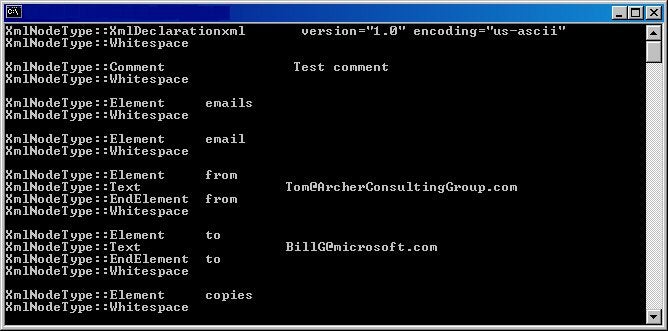
Figure 1: Enumerating all the nodes of an XML file