


Introduction
The ASP.NET AJAX Library greatly simplifies the process of adding AJAX functionality to a web page. The primary means for adding AJAX functionality is the UpdatePanel. At first glance, the UpdatePanel appears to eliminate the need to hand code JavaScript and in many scenerios, this is true. However, there are scenerios where it is either not possible or inefficient to provide the desired operation excusively with an UpdatePanel. Specifically, if you need custom validation, field calculations, etc for the client side it is better to write JavaScript. In order to accomplish these, we need to add event handlers onKeyUp or onBlur. Normally we would create event handlers for the controls involved when the page is loaded. However, event handlers attached to controls within an UpdatePanel have issues in that the event handler will lose connection after an UpdatePanel refresh. Conventiently, the AJAX library provides a simple method for performing operations client-side after an UpdatePanel refresh. In this ASP.NET tutorial we’ll demonstrate this, we will create a simple project which peforms simple calculations client side within an UpdatePanel. Starting with the client-side markup as listed below:
<asp:ScriptManager ID=”ScriptManager1″ runat=”server”>
</asp:ScriptManager>
Example: Perform Javascript functions after UpdatePanel Refresh<br />
<asp:UpdatePanel ID=”UpdatePanel1″ runat=”server”>
   <ContentTemplate>
      <asp:Label ID=”lblTime” runat=”server” Text=”Label”></asp:Label>
      <asp:Button ID=”cmdUpdateTime” runat=”server” onclick=”cmdUpdateTime_Click” Text=”Update” /> <br /> <br />
      <asp:TextBox ID=”txtValue1″ runat=”server”></asp:TextBox>
      <asp:TextBox ID=”txtValue2″ runat=”server”></asp:TextBox>
      =
      <asp:Label ID=”lblAnswer” runat=”server” Text=”0″></asp:Label>
   </ContentTemplate>
</asp:UpdatePanel>
This markup will create a simple page with a button to trigger a refresh of the UpdatePanel as well as text fields used in client side calculations as shown in Figure 1 below.
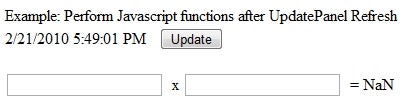
Figure 1 – Example Page
Skipping over the code behind, next we need to start to create the client side script. Next, we can jump into the JavaScript. Start off by calling the method to attach to the pageLoaded event and create the event handler:
Sys.WebForms.PageRequestManager.getInstance().add_pageLoaded(pageLoaded);
function pageLoaded(sender, args)
{
}
Next, we need to add the handlers to the onKeyUp events for the two input boxes. While you can use a JavaScript framework for this or a built in method, the ASP.NET AJAX Client Library provides several methods to simplify many common tasks. The $get function is used to retrieve the element by ID (i.e. var a = $get(“txtValue1”); ). Similarly, the $addHandler method is used to add an event handler to a DOM event. The $addHandler accepts 3 parameters, DOM element, event name and the handler. Putting this together, we can come up with the following JavaScript code block.
function pageLoaded(sender, args)
{
   $addHandler($get(“txtValue1”), “keyup”, calculate);
   $addHandler($get(“txtValue2”), “keyup”, calculate);
   calculate();
}
function calculate(sender, args)
{{
   var val1 = $get(“txtValue1”);
   var val2 = $get(“txtValue2”);
   var res = $get(“lblAnswer”);
   var a = parseFloat(val1.value) * parseFloat(val2.value);
   res.innerText = a;
}
The new pageLoaded method, created above, now contains the code to add an event handler to the onKeyup events for both the txtValue1 and txtValue2 text fields. Next, the calculate method is used to multiply the two text fields together and display the result in the lable, lblAnswer.
Conclusion
The ASP.NET AJAX Client Libraries included with ASP.NET AJAX framework provides a simple and effective means of attaching JavaScript to an UpdatePanel refresh. In addition, the library provides several utility methods such as $get and $addHandler. These utility methods greatly reduce the need to include other libraries such as jQuery, Prototype, etc, thus reducing the number and the amount of data transferred to the web browser.