


Many Visual Studio .Net developers are familiar with the setup projects that have been available in Visual Studio through many versions until recently. These setup project templates allow you to create a setup configuration to deploy the needed executable files for your current project.
You can also include any additional files needed such as readme.txt files, help files, or 3rd party libraries. COM DLL libraries can also be automatically registered by the setup project. It can place your files in existing system folders, or in special folders that you define.
All in all, it is a very flexible, handy capability to have right at your fingertips within your development environment.
However, if you have tried to create an install setup project in VS 2013, you have discovered that this version of Visual Studio does not include the handy setup package projects available in VS 2010 and earlier versions.
Happily, Visual Studio 2013 now supports setup project templates. Microsoft has shipped a Visual Studio extension to produce setup projects.
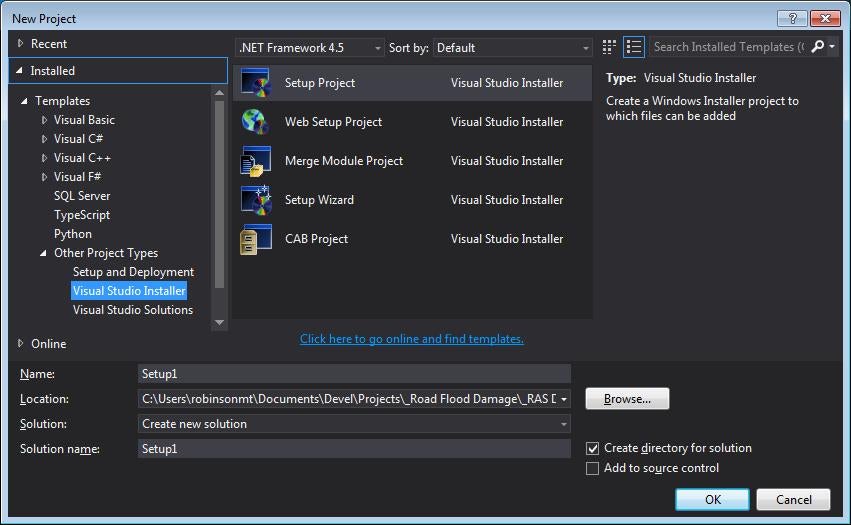
It replicates the set of project templates 2010 has. See Figure 1 for the list of project templates available. These include a local setup project, a web application setup project, and a merge module project template, along with a setup wizard and CAB project template.
To obtain the most recent version of the Setup Package functionality from within Visual Studio 2013 by going to â??Tools/Extensionsâ?? and â??Updates/Onlineâ??, then search on “Visual Studio Installer Projects”. Select this option to download and install the project, and then restart visual studio.
After installing the package, you will be able to select the various kinds of installation templates from the New Projects dialog and build your install!