


Welcome to this week’s installment of .NET Tips & Techniques! Each week, award-winning Architect and Lead Programmer Tom Archer demonstrates how to perform a practical .NET programming task using either C# or Managed C++ Extensions.
A recent client of mine wanted text to be displayed in a Label (static) control only if the text could fit. If the text could not fit into the Label, the user was to see a string indicating that the text was too long and they could double-click the item to drill down into the details of the value (which displayed another dialog). Using .NET, this turned out to be much easier than I first anticipated.
I’ve created a simple Managed Extensions demo to illustrate how to do this. Here’s a figure of that application being run a few times:
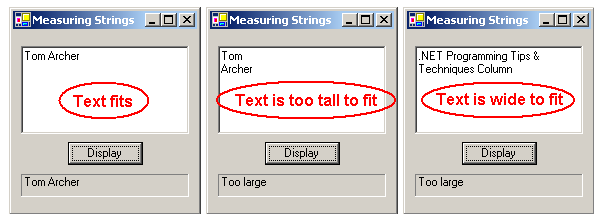
As you can see, the code is tested by entering text into a multi-line TextBox (edit) control and then clicking the Display button. If the text fits nicely into the Label control, it’s displayed. If not, the text “Too large” is displayed instead.
This is accomplished by performing the following steps:
- Call the Label object’s CreateGraphics method. This method returns a Graphics object for the current device context.
- Call the Graphics object’s MeasureString method, passing it the string to be measured and the font that will be used to display the string. The return value will be a System::Drawing::SizeF object that contains the height and width of the string as it will be rendered in the current device context.
- Compare the SizeF, Height, and Width property values to the Height and Width properties of the Label control to determine whether the text will fit.
Here’s how that code would look (copied from the article’s demo):
private: System::Void button1_Click(System::Object *  sender,
                                    System::EventArgs *  e)
{
   Graphics* g = label1->CreateGraphics();
   SizeF size = g->MeasureString(textBox1->Text,label1->Font);
   if (size.Width < label1->Width
   && size.Height < label1->Height)    // fits
   {
      label1->Text = textBox1->Text;
   }
   else    // doesn't fit
   {
     label1->Text = S"Too large";
   }
}
The last two things to point out are:
- I pass the TextBox object’s text and the Label object’s font.
- I compare on both height and width because a carriage-return/line-feed pair (the TextBox MultiLine property is set to True) would not be measured because they’re not displayable characters. Therefore, I want to make sure that the text also displayed vertically.