


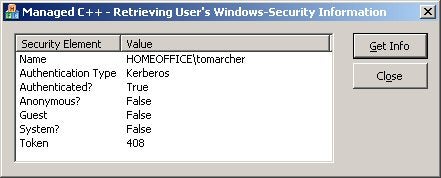
I recently finished up a spyware-detection application that needed to determine various Windows security information such as whether or not the user has administrator rights. Thankfully, I was able to write the application in .NET so I had access to a few extremely helpful classes that made this task very easy. One of those classes is WindowsIdentity (found in the System::Security::Principal namespace). By using this class, I was able to retrieve security information such as the name of the user (including the domain or workgroup), whether or not the user is authenticated, and the authentication type. The following commented code shows how easy this task is:
- Include the necessary namespace:
using namespace System::Security::Principal; - Obtain the WindowsIdentity object associated with the current user:
- You now can query the WindowsIdentity object’s property for the exact information you need:
listSecurity.SetItemText(0, 1, CString(identity->Name));
listSecurity.SetItemText(1, 1, CString(identity->AuthenticationType));
listSecurity.SetItemText(2, 1, CString(identity->IsAuthenticated.ToString()));
listSecurity.SetItemText(3, 1, CString(identity->IsAnonymous.ToString()));
listSecurity.SetItemText(4, 1, CString(identity->IsGuest.ToString()));
listSecurity.SetItemText(5, 1, CString(identity->IsSystem.ToString()));
listSecurity.SetItemText(6, 1, CString(identity->Token.ToString()));
WindowsIdentity* identity = WindowsIdentity::GetCurrent();
Looking Ahead
The next article will take this a step further and illustrate how you can verify whether the current user is in a specific group (such as the Administrator group), so that you can easily test whether a user has the necessary rights to invoke various functions in a given application.