


Getting started
Tabs Studio supports Visual Studio 2005/2008 and Visual Studio 2010 Beta 2 (excluding express editions). After Tabs Studio installation you will see multiple rows tab bar with relevant tabs grouped together. You will never need to search for an open document in the drop down list any more. The following figure demonstrates tabs after opening an MFC project in Visual Studio 2008:
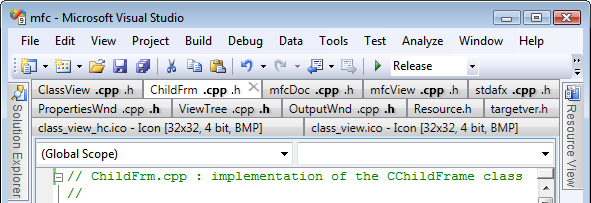
h and cpp tabs are automatically grouped together for this C++ project. For C#, VB, Web and other projects, documents with other relevant extensions are grouped. This technique saves lots of time when switching between open documents:

Customization
Powerful visual customization support offered by Tabs Studio allows you to theme tabs according to your personal coding preferences. Tabs Studio is a WPF add-in and use XAML for styling. Font, color, position, visibility and animation of each tab element can be customized. For example, the following figure demonstrates Visual Studio 2010 like theme:
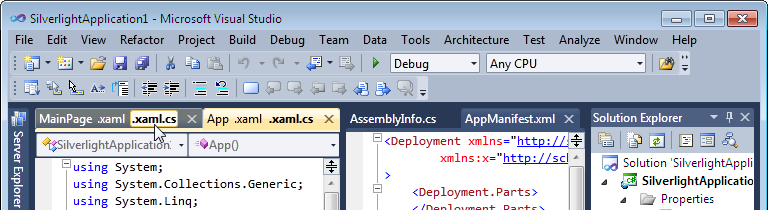
You control when and how to show a close tab button, whether to color document and non-document tabs differently, whether to remove path from tab name and can even replace file modification status from asterisk to red tab text color.
Extras
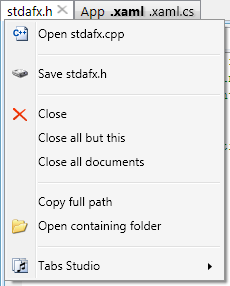
Tabs Studio offers several additional productivity improvements such as ability to quickly open corresponding file from tab context menu, switch between corresponding files using a keyboard shortcut and highlight the previously selected tab.
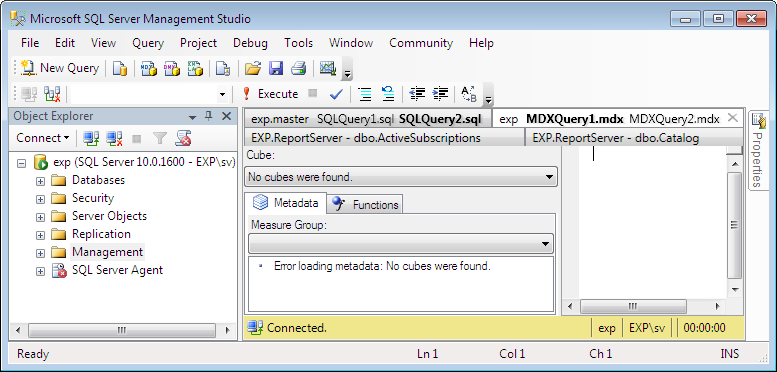
Experimental support for Microsoft SQL Server 2005/2008 Management Studio IDE is available. Offering the same multiple rows of tabs and tab grouping as in Visual Studio IDE:
Extensibility
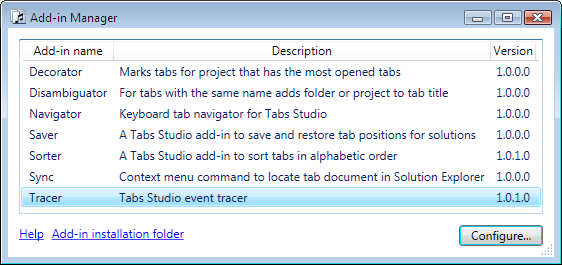
Tabs Studio supports custom .NET add-ins that can further extend Tabs Studio functionality and interact with the Visual Studio shell. Several sample add-ins with full source code are already available. For example, Sorter add-in sorts tabs in alphabetical order. You can see this additional functionality shortly described in the Description column in Tabs Studio Add-in Manager window for installed add-ins:
Try it for yourself
You can download fully functional 30 day trial from Tabs Studio add-in official site. Personal lifetime Tabs Studio license costs $34.