


Introduction
I will be the first to admit I don’t know everything.
It’s almost ludicrous to make such an obvious statement, but
there it is. I looked at WPF very early and saw just a
handful of controls, and I thought to myself “self this
puppy is not ready” and focused on LINQ instead.
Well, I just got back from PDC in LA signing books-
Professional DevExpress ASP.NET Controls- for the great
company that I work for Developer Express and kept hearing
that WinForms is dead. While I am suspicious about WinForms
being dead I have always contended that Web development and
Windows development begged homogenization. WPF and XAML (XML
for Applications) may be the solution, and so it’s high time
I stick my toes tepidly back into the world of XAML.
If you are past the introductory level of WPF then you
may want to skip this article. However, if you enjoy a
little schadenfreude then you can read along and watch me
struggle through WPF as I try to connect the dots and figure
out how what I already know applies to WPF.
Hello World (or as I put it Jello Mold)
It used to be that when you designed a form–and still is
in WinForms–that a forms state was serialized as object
statements and imperative lines of code. The first thing you
will notice about WPF in Visual Studio 2008 is that besides
there being many more WPF controls the form is described as
XAML. XAML is XML tuned for applications. The XAML for a
simple WPF form with a TextBox and Button is declaratively
expressed as shown in Listing 1.
  <Window x_Class=”Window1″
      xmlns_x=”http://schemas.microsoft.com/winfx/2006/xaml”
      Title=”Window1″ Height=”300″ Width=”300″>
      <Grid>
      <TextBox Height=”23″ Margin=”19,46,139,0″ Name=”TextBox1″ VerticalAlignment=”Top” />
      <Button Height=”23″ HorizontalAlignment=”Right” Margin=”0,46,36,0″
		Name=”Button1″ VerticalAlignment=”Top” Width=”75″>Push Me</Button>
    </Grid>
  </Window>
Listing 1: The XAML for a simple WPF form
You can design the form much as you would in WinForms or
modify the XAML directly. Instead of the three files,
.designer.vb, .vb, and
.resx files, you get in WinForms, WPF uses two
files: .xaml and .xaml.vb. The
.xaml file contains the XAML and the
.xaml.vb is the backing code for you WPF
projects.
Adding code to a .xaml file feels just like
coding a WinForms file. For example, given a TextBox and
Button you can implement the Click event for the button by
double-clicking the button and writing VB code. Listing 2
contains the code for the XML in listing 1.
  Class Window1
  Private Sub Button1_Click(ByVal sender As System.Object, _
          ByVal e As System.Windows.RoutedEventArgs) _
          Handles Button1.Click
      MsgBox(TextBox1.Text)
    End Sub
  End Class
Listing 2: The very simply implementation of the XAML form
The results–if you enter some text and click the button-
-are as you would expect. A message box is displayed
containing the contents of the TextBox control. The design
time form is shown in Figure 1.
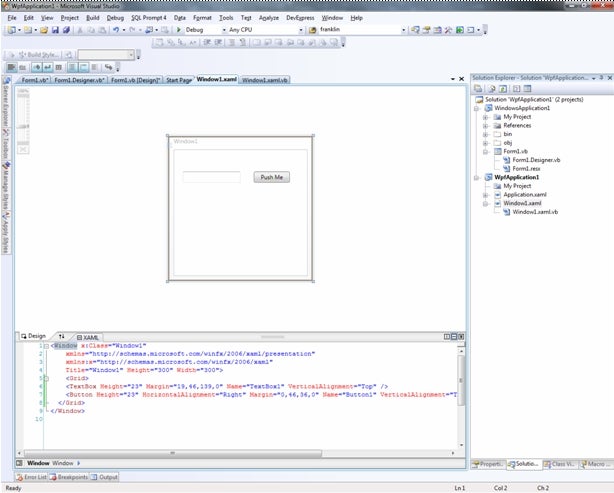
Figure 1: The XAML is shown on the bottom and the design time view of the form is shown above
Now I have to do some reading. I am sure just to make
everything a little more challenging there is a whole new
set of vernacular associated with WPF. Like everyone else I
will have to immerse myself in the world of WPF before I can
adequately share that information with you.
Summary
I have been writing the VB Today column for more than ten
years now. The one truism that remains as regards technology
is that “the only constant is change”. WPF appears to be the
change for developers for the foreseeable future with
significant investment having been made for VS2010. I will
still be doing some examples in WinForms, but it looks like
a clear signal is being sent that developers start investing
in WPF.
In my spare time I will be working on Sams Teach Yourself
the Entity Framework in 24 Hours, and I am interested in
seeing how the Entity Framework and LINQ in .NET 4.0 can be
used with WPF development. Check back every week or so to
begin your exploration of these technologies.
Biography
Paul Kimmel is the VB Today columnist for CodeGuru and has written
several books on object-oriented programming and .NET. Check
out his upcoming book Professional DevExpress ASP.NET
Controls (from Wiley) now available on Amazon.com and
fine bookstores everywhere. Look for his upcoming book
Teach Yourself the ADO.NET Entity Framework in 24
Hours (from Sams). You may contact him for technology
questions at pkimmel@softconcepts
.com. Paul Kimmel is a Technical Evangelist for
Developer Express, Inc, and you can ask him about Developer
Express at paulk@devexpress.com
and read his DX blog at http://
community.devexpress.com/blogs/paulk.