


Introduction
With the growing popularity of social networking websites
such as Facebook and Twitter, more and more websites are integrating them in
their pages. Facebook and Twitter Helpers for WebMatrix allow you to
easily integrate the respective applications into ASP.NET
MVC Razor based websites. Helpers are basically ready pieces of code that
allow you to reuse the code in your pages with only a few lines of code from
your side. These easy to use helpers make it possible for developers to achieve
Facebook and Twitter integration without the need to know the background
technical details. This article is intended to give you an overview of Facebook
and Twitter Helpers for WebMatrix and how to install and use them in ASP.NET MVC 3 websites.
Overview of Facebook and Twitter Helpers
<h2>Comments</h2>
@{Facebook.Initialize("your_app_id_here", "your_app_secret_here");}
@Facebook.GetInitializationScripts()
@Facebook.Comments()
The Initialize() method initializes the Facebook helper with
your application settings. Make sure to replace your Facebook application’s ID
and application’s secret key. The GetInitializationScripts() method initializes
the Facebook JavaScript SDK to be able to support the XFBML
tags of the social plugins. Finally, the Comments() method renders the comments
box in your web page. There is one more thing you need to do before running the
web page. Open the layout file of the web site and modify the <HTML> tag
as shown below:
<html lang="en" @Facebook.FbmlNamespaces()>
The FbmlNamespaces() method emits certain FBML related
namespaces. That’s it! Run the web page again and you should see Comments box
like this:
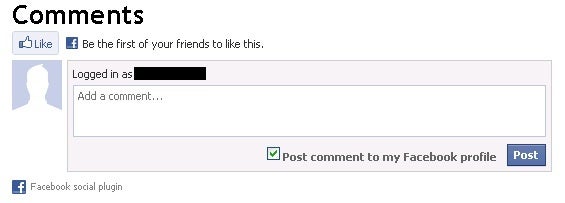
Figure 7: Facebook Comments box
Using the Features of Twitter Helper
Now let’s put Twitter Helper to use and render some Twitter
specific features. We will render the following features of Twitter on the
page.
- Display profile box for a Twitter user
- Search tweets and display the search results in a box
- Display a Follow button
- Display a Tweet button
Add another ASP.NET web page (.cshtml) to the website and
key in the following code:
<h2>My Twitter Profile</h2>
@Twitter.Profile("twitter_username_here")

<h2>Search results for #aspnet</h2>
@Twitter.Search("aspnet")

<h2>Follow Me</h2>
@TwitterGoodies.FollowButton("twitter_username_here")

<h2>Tweet Something</h2>
@TwitterGoodies.TweetButton(TwitterGoodies.DataCount.Horizontal,
"Social Networking WebMatrix Tips",
"https://www.codeguru.com",
TwitterGoodies.Languages.English,
"twitter_username_here")
The above code makes use of Twitter helper. The usage of
various helper methods is straight forward and self-explanatory. For example,
Profile() method displays a profile box for a specified Twitter user as shown
below:
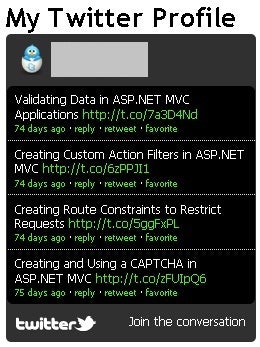
Figure 8: Twitter Profile Box
Similarly, TweetButton() method that accepts tweet text,
URL, language and user displays a Tweet button. Clicking on the Tweet button
opens a dialog for entering the tweet.
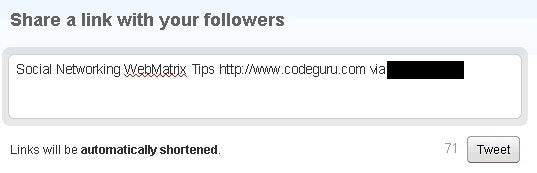
Figure 9: Tweet Dialog Box
Summary
Facebook and Twitter helpers for WebMatrix allow you to
integrate social plugins and features of the respective sites into your own
website. The Like button, Comments box, Twitter profile, Tweet button and more
can be added to your web page with just a few lines (often single!) of code. In
order to use these helpers you need to install them to your WebMatrix website
and then consume the respective helper methods.