


Introduction
.NET Framework 4.0 made code contracts first class citizens by introducing System.Diagnostics.Contracts as part of base class libraries. Code contracts offer a way to express state assumptions in applications and take forms of pre-conditions, post-conditions and object invariants. In this article we will see the underlying internals of how code contracts work.
Sample Application Using Code Contracts
Here is the sample code we will be using.
  using System;
  using System.Collections.Generic;
  using System.Linq;
  using System.Text;
  using System.Diagnostics.Contracts;

  namespace RewriteThrow
  {
      class Program
      {
          static void Main(string[] args)
          {
              Contract.Assert(false);
          }
      }
  }
Tools Required
- Microsoft Visual Studio 2010 Ultimate/Professional
- Code contracts tools download
Let us start by creating a solution titled SampleContracts with a Console C# project titled NoRewriting which has the code listed above. Do not change the project properties for this.
Create another C# console project titled RewriteAssert having the same code as above. However for this project, Go to the project properties and on the Code Contracts tab, check the “Perform Runtime Contract checking” and also check that the “Assert on Contract Failure”.

Figure 1
Now, create a third C# console project titled RewriteThrow, again with the same code as above. However, for this project, go to the project properties and on the Code Contracts tab, check the “Perform Runtime Contract checking” and also double-check that the “Assert on Contract Failure” is not checked.

Figure 1
Now that we have the project setup, build the solution and let us look under the covers.
Diving In
Fire up ildasm.exe from Microsoft Visual Studio Tools directory (Start -> Microsoft Visual Studio 2010 > Visual Studio Tools> Visual Studio Command prompt and typing ildasm.exe at the console)
Open the NoRewriting.exe and check out the contents of the binary. It should look like the sample below:
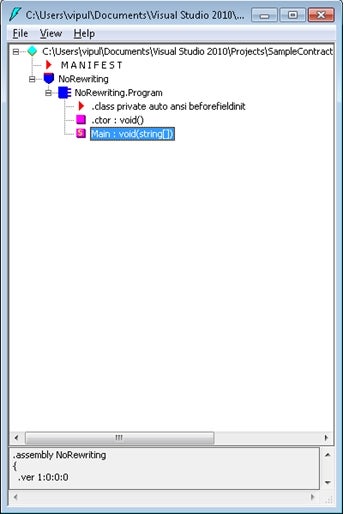
Figure 1
The RewriteAssert Assembly looks like the sample below:
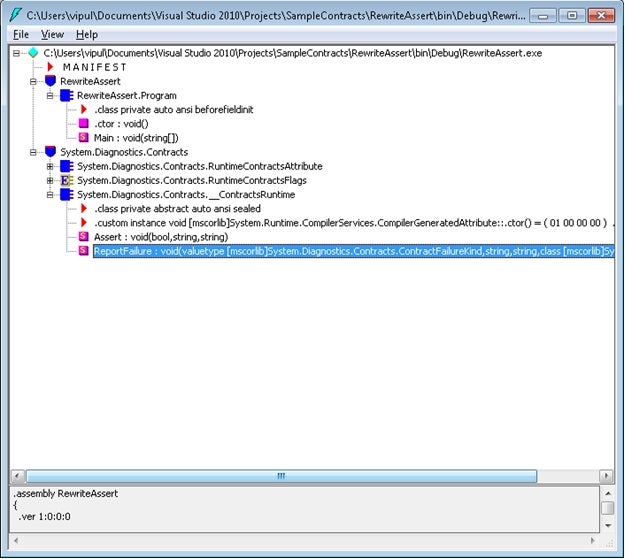
Figure 1
And the RewriteThrow assembly looks like the sample below:
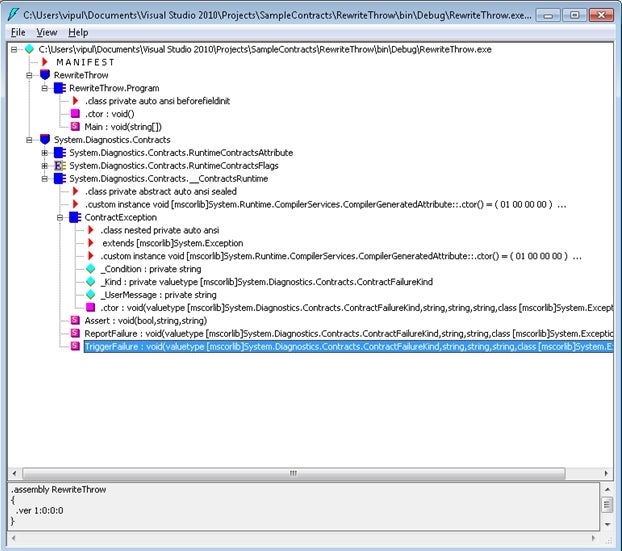
Figure 1
Even though the exact same code is compiled into these three binaries, however the ending composition of these binaries is very different from each other. Let us try to understand the reason for that.