


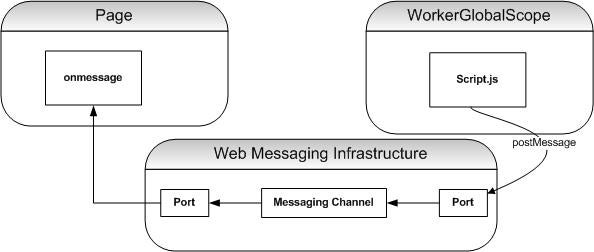
WorkerGlobalScope
The sample code demonstrates a Dedicated Web Worker. As the
name would indicate, a Dedicated Web Worker is targeted for applications
requiring point to point communication. The specification offers an alternative
called Shared Web Worker for communication with multiple producers and
consumers. A Shared Worker exposes more of the Messaging API components, but the
underlying infrastructure is the same as a Dedicated Web Worker.
As stated earlier WorkerGlobalScope provides a sort of
context for the Worker. Much of the infrastructure a developer leverages in a window/document
has been carried to a Web Worker. So, for example, a WorkerGlobalScope includes
Timer implementations. Each Web Worker implementation extends the
WorkerGlobalScope to suit its needs.
Web Workers leverage a lot of the existing Eventing
infrastructure. Web Workers also leverage a new Web Messaging Specification.
Web Messaging Infrastructure
Web Messaging more securely enables cross-document
communication. Enabling Cross-site scripting opens a security hole in a browser.
For security reasons cross-site scripting is disabled. Cross-document
communication is important to building Web Applications, so Web Messaging has
been architected for security as well as communication capability.
Web Messaging protocols pass around a MessageEvent object. In
the example, "data" is the attribute containing the message payload; "data"
is a string in the example, but can be any type.
Web Workers leverage the Web Messaging Channel Messaging
infrastructure. A MessageChannel connects two MessagePorts. The specification
refers to the setup as "entangling" the ports. A call to postMessage
on a MessagePort puts data across the channel. Each MessagePort maintains a
message queue. Messages posted on one port on the MessageChannel are set to the
other port on the MessageChannel and visa-versa. MessagePorts receive a message
via an "onmessage" function.
Web Workers extend the Web Messaging infrastructure
supporting posting to an Array of MessagePorts. MessagePort Arrays are handy
for multiple notifications.
Conclusion
Web Worker is a new specification outlining the behavior of JavaScript
background workers. Web Workers leverage the upcoming HTML5 Web Messaging API.