


The process of building professional desktop applications includes many hidden tasks, such as the persistence of window state and appearance. This will introduce additional accessibility for such applications. This article describes a simple approach to do so. Sample applications written in C# and VB.NET.
Let’s start with basic assumption about what are we intend to have. First of all, the main window size and position should be saved between sessions. Also, an application usually contains several panes, divided by splitters. The position of the splitters should be saved. If an application contains a list view, saving its columns width will be convenient too.
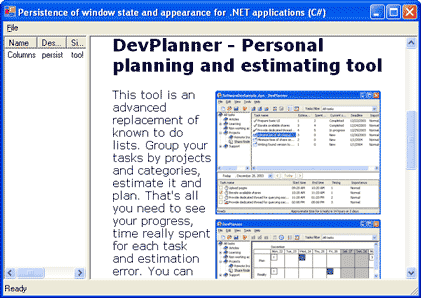
You can stop here if you don’t want to deal with the details of implementation. Simply include the UIPersistLib project from the source code for this article to your solution and add code from the following listing to your form. Also, please be sure to look at the end of this article.
using UIPersistLib;

public class MainFrame : System.Windows.Forms.Form
{
  ...
  private FormPersistence formPersistence;

  public MainFrame()
  {
    InitializeComponent();
    formPersistence =
    new FormPersistence(this, "SimpleAppCsharp\\Settings");
  }
}
Form Persistence Details
If you’re still here, I’ll try to explain the details. The FormPersistence class performed the subscription and handling of MainFrame events to save and restore the appropriate windows’ state and size. The main idea is saving the window size and position while it is restored (not minimized or maximized). The main window state must be saved as a separate value.
Handling the main window state
We can’t save the window’s state and position before closing it because we can lose information about the restored state if the window is maximized or minimized. Thus, let’s save it after changing:
private void MainFrame_Resize(object sender, System.EventArgs e)
{
  if(mainFrame.WindowState == FormWindowState.Normal)
  {
    Save();
  }
  else
  {
    SaveWindowState();
  }
}

private void MainFrame_Move(object sender, System.EventArgs e)
{
  if(mainFrame.WindowState == FormWindowState.Normal)
  {
    Save();
  }
  else
  {
    SaveWindowState();
  }
}
I encapsulated the writing and reading to the Registry into a ViewProfile class. This class can save Rectangles and single integer values.
Let’s examine the saving process. To prevent saving while initializating, provide the Boolean value restoreComplete. This value sets to false when restoring is started and to true when restoring is completed. If the window is maximized or minimized, we should not save bounds; we only need to save the window state.
public void Save()
{
  if(this.restoreComplete)
  {
    Profile.Write(Names.Bounds, mainFrame.DesktopBounds);
    SaveWindowState();
  }
}
private void SaveWindowState()
{
  Profile.Write(Names.WindowState, (int)mainFrame.WindowState);
}
Restoring performed while loading:
private void MainFrame_Load(object sender, System.EventArgs e)
{
  Restore();
}

public void Restore()
{
  this.restoreComplete = false;
  mainFrame.DesktopBounds = Profile.Read(Names.Bounds);
  mainFrame.WindowState =
    (FormWindowState)Profile.ReadInt(Names.WindowState);
  this.restoreComplete = true;
}
Persistence of splitters
To provide the persistence of splitting the pane’s size, we simply add code to the Save and Restore methods.
foreach(Control control in mainFrame.Controls)
{
  RestoreControl(control);
}
and
foreach(Control control in mainFrame.Controls)
{
  SaveControl(control);
}
Why the Controls collection? Because it contains all child controls regarding splitter levels. Saving the sizes of controls itself indirectly causes the saving of splitters. Also, we need to exclude saving of the toolbar and status bar.
private void RestoreControl(Control control)
{
  Type controlType = control.GetType();
  bool isToolBar   = (controlType == typeof(ToolBar));
  bool isStatusBar = (controlType == typeof(StatusBar));
  if(!isToolBar && !isStatusBar)
  {
    control.Bounds = Profile.Read(Names.Bounds + control.Name);
  }
}

private void SaveControl(Control control)
{
  Type controlType = control.GetType();
  bool isToolBar   = (controlType == typeof(ToolBar));
  bool isStatusBar = (controlType == typeof(StatusBar));
  if(!isToolBar && !isStatusBar)
  {
    Profile.Write(Names.Bounds + control.Name, control.Bounds);
  }
}
Persistence of columns in a list view
Finally, we can save list view columns. To do so, we need to provide additional code in the SaveControl and RestoreControl methods. We can examine the control type using Object.GetType() to match typeof(ListView) and when processing the ListView.Columns collection.
private void RestoreColumns(ListView listView)
{
  foreach(ColumnHeader column in listView.Columns)
  {
    column.Width = Profile.ReadInt(Names.Column + column.Index);
  }
}

private void SaveColumns(ListView listView)
{
  foreach(ColumnHeader column in listView.Columns)
  {
    Profile.Write(Names.Column + column.Index, column.Width);
  }
}
Where Is a Trick?
Thanks, DevPlanner, a tool for personal planning and estimating. It helps me preserve time for writing, while completing my primary work.