


.Notifier: Outlook-Like Notification Window
When using Microsoft Outlook, you come across a mail notification window that appears slowly and fades off. But, when you drop your mouse back on the window, it becomes opaque, and then again on mouse away it fades off, and this process continues so on. So, eventually it either fades away or you ignore the window, or you close it or you click it to read the mail. This article describes how to build that kind of window using C#.
Let me know if you encounter problems or have a suggestion for improvement.
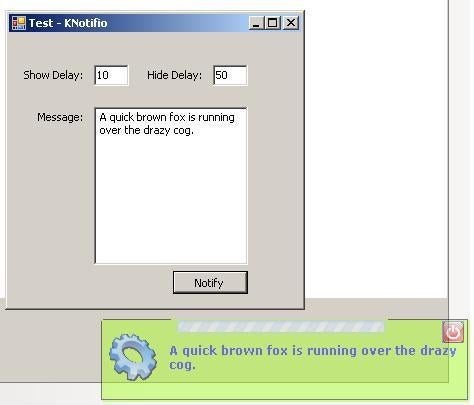
The Logic
Following is the program flow:
- Make opacity level 0 initially.
- Display window.
- Start show timer T1.
- Gradually increase the opacity in T1 until it reaches max 1.0 level.
- Stop timer T1.
- Start the hiding timer T2.
- Decrease the opacity level in T2 until it reaches min level 0.01.
- Stop the timer T2.
- Clean message.
- Close the window.
Using the Code
Following is how you use the code. If you would like to change the notification window display rates, use the following:
KNotifier.KNotifio.Show(txtMessage.Text,    //the message itself
                        nShow,              //Time to show the window
                        nHide);             //Time to hide the window
Otherwise, to just send the message, use the following:
KNotifier.KNotifio.Show("This is a test message."); //Simple call
Hide Notification Window Timer
The hide timer event goes as follows:
private void tmrHide_Tick(object sender, EventArgs e)
{
   //Decrease the opacity level until its greater than zero
   if (this.Opacity > 0.00)
   {
      this.Opacity -= 0.01;
   }
   else
   {
      //Window has gone completely transparent
      tmrHide.Stop();    //Stop the timer
      CloseWnd();        //Close window
   }
}
Show Notification Window Timer
The show timer event goes as follows:
private void tmrShow_Tick(object sender, EventArgs e)
{
   //Increase opacity until it reaches maximum
   if (this.Opacity < 0.99)
   {
      this.Opacity += 0.01;
   }
   else
   {
      //Window already opaque
      tmrShow.Stop();     //Let's stop the timer

      tmrHide.Start();    //Start hiding the window
   }
}
Closing the Notification Window
Following is how the window is closed.
private void CloseWnd()
{
   try
   {
      //Stop timers
      g_Fio.tmrHide.Stop();
      g_Fio.tmrShow.Stop();

      g_Fio.Close();                          //Close the form
      m_strPreviousMessage = string.Empty;    //Clean message
   }
   catch (Exception exec) { }
}
How the Window Is Shown
public static void Show(string strMessage, i nShowTime, int nHideTime)
{
   //Set the time it should take to show the window
   m_nShowTime = nShowTime - 5;
   //Set the time it would take to hide the window
   m_nHideTime = nHideTime;
   Show(strMessage);
}
The Show() Method
public static void Show(string strMessage)
{
   try
   {
      if (m_strPreviousMessage == strMessage)
         return;
      else
         m_strPreviousMessage = strMessage;
         KNotifio theNotifio = new KNotifio();
         g_Fio = theNotifio;
         theNotifio.txtMessage.Text = strMessage;
         theNotifio.Show();
         theNotifio.panel1.Focus();
   }
   catch (Exception exc)
   {
      ;
   }
}
Initialization/Constructor
public KNotifio()
{
   InitializeComponent();
   tmrHide.Interval = m_nHideTime;    //Set timers
   tmrShow.Interval = m_nShowTime;

   try
   {
      //Set round rects
   } catch (Exception exc) { }

   //Move window close to system tray (above the clock)
   Location = new Point(Screen.PrimaryScreen.Bounds.Width -
      this.Width, Screen.PrimaryScreen.Bounds.Height -
      this.Height - 50);
}
Rounded Corners
We call an API to make the corners round.
/// <summary>
/// Provides MS Outlook styled dynamic notification window
/// </summary>
public partial class KNotifio : Form
{
   //Need to make our window a bit rounded.
   [DllImport("Gdi32.dll", EntryPoint = "CreateRoundRectRgn")]
   private static extern IntPtr CreateRoundRectRgn
   (
      int nLeftRect,        // x-coordinate of upper-left corner
      int nTopRect,         // y-coordinate of upper-left corner
      int nRightRect,       // x-coordinate of lower-right corner
      int nBottomRect,      // y-coordinate of lower-right corner
      int nWidthEllipse,    // height of ellipse
      int nHeightEllipse    // width of ellipse
   );
....
Feedback
Let me about the reason in case you don’t like it and the ways I can be of help. I would love that.