


Introduction
Coupled to the new C# Async Community Technology Preview released during PDC 2010; is a library called Task Parallel Library Dataflow (TDF). TDF is part of a growing list of technologies built on top of the Task Parallel Library (TPL) that are part of Microsoft’s Technical Computing Initiative. Like many of the other Technical Computing products TDF aims to make Parallel Computing products and patterns more accessible to the Microsoft Development Community.
Like other Technical Computing products TDF builds on proven industry patterns and practices. TDF couples the Task Parallel Library to a set of classes/interfaces that leverage Message Passing to coordinate the behavior of a solution. Using a short sample application I’ll demonstrate how to apply TDF.
Overview
You can download TDF from the Dataflow site http://msdn.microsoft.com/en-us/devlabs/gg585582.
Note: While I think it’s important to study new products and patterns coming down the pipeline I would never use a CTP in a production application. Please remember that TDF is not a “production” grade release.
According to the TDF documentation, TDF’s architecture gains it’s inspiration from a number of different sources. Among the sources is the Concurrency and Coordination Runtime (CCR). TDF is a new product in CTP so there are no clear guidelines on where and when to use TDF. Good TDF candidates would likely be applications that benefit from the composition and decoupling you get with messaging and the execution benefits of TPL. So, for example, intensive workload applications like the ones you find inside of a Windows Service.
TDF is composed of a set of “Blocks“. Blocks receive, send, or both receive and send messages to other Blocks. In general, the pattern for a block looks a lot like the graphic below.
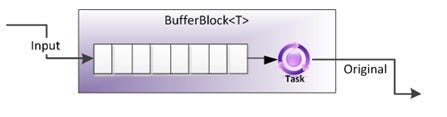
Figure 1: Block Architecture, Source: “An Introduction to TPL Dataflow
TDF Messages are instances of the class the particular block is configured to interact with. Messages are stored in TPL data structures.
Blocks leverage Tasks. I think of task classes as chunks of work. Blocks run tasks on a given TaskScheduler. Each Block exhibits different behavior in how it dispatches to the TaskScheduler and/or how it handles messages.
Some concrete examples will demonstrate how a few of these blocks work.
Sample Overview
The full sample code appears below.
  using System.Threading.Tasks.Dataflow;
  using System.Threading.Tasks;
  using System.Threading;

  namespace TPL.Test.DataFlows
  {
      class Program
      {
          static void Main(string[] args)
          {
              var writeOut = new ActionBlock<string>(s =>
              {
                  Console.WriteLine(s);
              }

              );


              var broadcast = new BroadcastBlock<string>(s => s.ToString());

              var transform = new TransformBlock<string, string>(s => s.ToUpper());

              var buffer = new BufferBlock<DateTime>();

              var join = new JoinBlock<string, DateTime>();

              var joinWrite = new ActionBlock<Tuple<string, DateTime>>(t => writeOut.Post(t.Item1 + " at " + t.Item2.ToString()));


              broadcast.LinkTo(transform);

              broadcast.LinkTo(writeOut);

              transform.LinkTo(join.Target1);

              buffer.LinkTo(join.Target2);

              join.LinkTo(joinWrite);


              //Begin activating everything

              Task.Factory.StartNew(() =>
              {
                  while (true)
                  {
                      Thread.Sleep(2000);
                      buffer.Post(

                      DateTime.Now);
                  }
              },

              TaskCreationOptions.LongRunning);

              var itr = 0;

              while (itr < 15)
              {
                  broadcast.Post(

                  "New string " + Guid.NewGuid().ToString());

                  Thread.Sleep(1000);
                  ++itr;
              }

              Console.WriteLine("Execution complete, any key to continue...");
              Console.ReadKey();
          }
      }
  }