


Introduction
There are many programs on the market like Spy++ or screen capture programs which allow you to find and select a specific window or window-control like Button, Edit, or others.
The goal for this project was to write an easy interface for finding window handles.
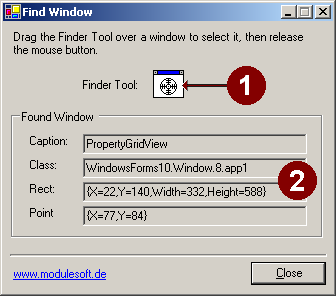
1. After starting the application, drag the bullseye symbol "Finder Tool" (1)
2. Move the "Finder Tool" Symbol to the desired window
3. Stop moving and drop the mouse cursor if you want informations about the underlaying window
4. The information about the selected window is shown in the dialog properties (2)
Background
I have programmed such a finder tool for many years in C++. Now I used this in C#, so I have converted my old C++ code into C# code.
Using the Code
There are two important methods which find and select the window.
1. Function "MainForm::ChildWindowFromPoint"
Param: point is the global point on the screen (normally the mouse cursor)
Return: handle from the found window
static IntPtr ChildWindowFromPoint(Point point)
{
	IntPtr WindowPoint = ApiWrapper.Window.WindowFromPoint(point);
	if (WindowPoint == IntPtr.Zero)
		return IntPtr.Zero;

	if (ApiWrapper.Window.ScreenToClient(WindowPoint, ref point) == false)
		throw new Exception("ScreenToClient failed");

	IntPtr Window = ApiWrapper.Window.ChildWindowFromPointEx(WindowPoint, point, 0);
	if (Window == IntPtr.Zero)
		return WindowPoint;

	if(ApiWrapper.Window.ClientToScreen(WindowPoint, ref point) == false)
		throw new Exception("ClientToScreen failed");

	if(ApiWrapper.Window.IsChild(ApiWrapper.Window.GetParent(Window),Window) == false)
		return Window;

	// create a list to hold all childs under the point
	ArrayList WindowList = new ArrayList();
	while (Window != IntPtr.Zero)
	{
		Rectangle rect = ApiWrapper.Window.GetWindowRect(Window);
		if(rect.Contains(point))
			WindowList.Add(Window);
		Window = ApiWrapper.Window.GetWindow(Window, (uint)ApiWrapper.Window.GetWindow_Cmd.GW_HWNDNEXT);
	}

	// search for the smallest window in the list
int MinPixel = GetSystemMetrics((int)GetSystem_Metrics.SM_CXFULLSCREEN) * GetSystemMetrics((int)GetSystem_Metrics.SM_CYFULLSCREEN);
	for (int i = 0; i < WindowList.Count; ++i)
	{
		Rectangle rect = ApiWrapper.Window.GetWindowRect( (IntPtr)WindowList[i] );
		int ChildPixel = rect.Width * rect.Height;
		if (ChildPixel < MinPixel)
		{
			MinPixel = ChildPixel;
			Window = (IntPtr)WindowList[i];
		}
	}
	return Window;
}
2. Function "MainForm::ShowInvertRectTracker"
Param: window to show/hide the select rectangle
static void ShowInvertRectTracker(IntPtr window)
{
	if(window != IntPtr.Zero)
	{
		// get the coordinates from the window on the screen
		Rectangle WindowRect = ApiWrapper.Window.GetWindowRect(window);
		// get the window's device context
		IntPtr dc = ApiWrapper.Window.GetWindowDC(window);

		// Create an inverse pen that is the size of the window border
		ApiWrapper.Gdi.SetROP2(dc, (int)ApiWrapper.Gdi.RopMode.R2_NOT);

		Color color = Color.FromArgb(0, 255, 0);
		IntPtr Pen = ApiWrapper.Gdi.CreatePen((int)ApiWrapper.Gdi.PenStyles.PS_INSIDEFRAME, 3 * GetSystemMetrics((int)GetSystem_Metrics.SM_CXBORDER), (uint)color.ToArgb());

		// Draw the rectangle around the window
		IntPtr OldPen = ApiWrapper.Gdi.SelectObject(dc, Pen);
		IntPtr OldBrush = ApiWrapper.Gdi.SelectObject(dc, ApiWrapper.Gdi.GetStockObject((int)ApiWrapper.Gdi.StockObjects.NULL_BRUSH));
		ApiWrapper.Gdi.Rectangle(dc, 0, 0, WindowRect.Width, WindowRect.Height);

		ApiWrapper.Gdi.SelectObject(dc, OldBrush);
		ApiWrapper.Gdi.SelectObject(dc, OldPen);

		//release the device context, and destroy the pen
		ApiWrapper.Window.ReleaseDC(window, dc);
		ApiWrapper.Gdi.DeleteObject(Pen);
	}
}
Files:
- MainForm.cs
Show the FindWindow dialog.
Handles the mouse events (down - move - up) and display the result informations. - GdiApiWrapper.cs, WinApiWrapper.cs
The base functions "MainForm::ChildWindowFromPoint" and "MainForm::ShowInvertRectTracker" use extensive the base Win Api.
The signature's of the Win API are listed in this files. The list of functions are not complete. I only implemented the functions that I
needed for this tool.