


What Is This?
Salute another player in the Microsoft’s .NET jungle: the .NET Micro Framework, formerly known as SPOT (Smart Personal Objects Technology). So, spot it on your development map. Initially announced about a couple of years ago and now already in version 2.5 (with v3.0 “kimono” on its way), it is Microsoft’s recipe for embedded device firmware development. It covers the # market niche where Microsoft Windows CE and the .NET Compact Framework have unacceptable overhead; that is, there are strict constraints for power, processor capabilities, and memory—Sensor Nodes, Aux displays, Health Monitoring, Remote Controls, and Robotics. Microsoft’s answer to such environment is the .NET Micro Framework, where you can develop your applications in C#.
The architecture of the .NET Micro Framework provides you with the tools necessary to develop your firmware as managed C# applications. It does this by making use of specialized versions of the .NET common language runtime (CLR) and the .NET Framework class library. That’s not ideal an solution for everyone as it often happens, but it does allow you to reuse your C# skills and work in the familiar environment, because the SDK is integrated seamlessly into MS Visual Studio. Funny enough, you can’t create native applications; the access to the native code is provided via the interop only!
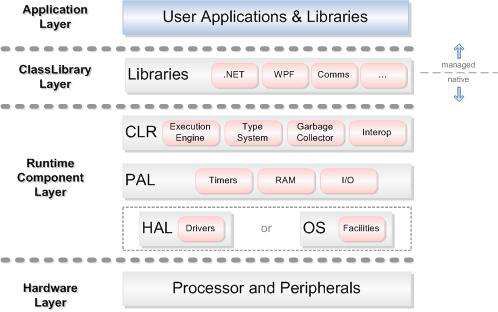
Figure 1: .NET Micro Framework Architecture
To make the .NET Micro Framework available with the smallest possible memory footprint, it is designed to contain only those pieces of the .NET Framework that are most relevant to small devices (look at the architecture chart in Figure 1). These include the major portions of the System.Collections, System.Diagnostics, System.Globalization, System.IO, System.Reflection, System.Resources, System.Runtime, and System.Threading namespaces, among others. You can enjoy globalized language support, thread support, garbage collection, managed drivers for LCDs, Universal Asynchronous Receiver/Transmitter (USART), I2CTM, General Purpose Input/Output (GPIO), pulse-width modulation (PWM), graphics primitives, BMP and JPG image support, and text manipulation.
The integration with Visual Studio happens throughout the entire development process, from the creation of projects using .NET Micro Framework templates, through application development on the computer using the .NET Micro Framework extensible emulator, to downloading the applications to the device running .NET Micro Framework, and finally to debugging (in Visual Studio) the code that’s executing directly on the device. You may find more about .NET Micro Framework at the .NET Micro Framework page.
Build Your First Micro Framework Project
So, it’s time to create your first MF project:
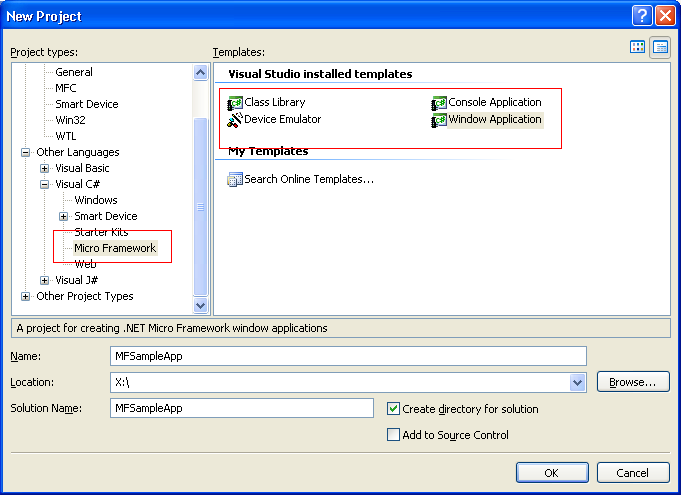
Figure 2: Create New Project
As you see, you have four different templates to start with:
- Class Library
- Device Emulator
- Console Application
- Windows Application
Each type may be useful for your project, and you can even create your own device emulator! The Framework is shipped with the default one, so you begin with “Hello World” Window Application and run your code on that emulator. You can always select another device and transport it (for example, USB or Serial cable) via the “Micro Framework” page in project properties:
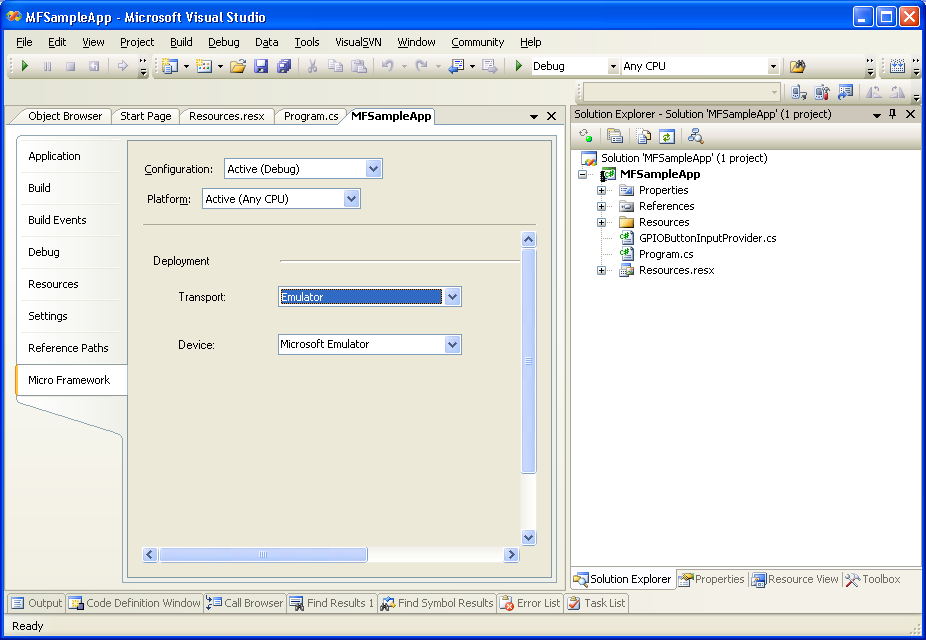
Figure 3: Micro Framework Page